
Bubble Cobble (Legacy)
Bubble Pub-Brand Modpack!
Screenshots
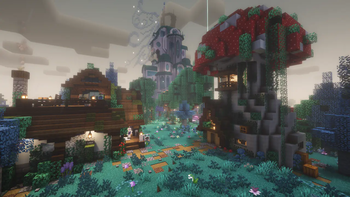
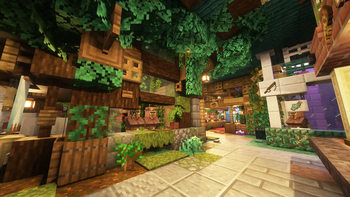
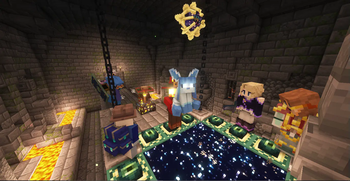

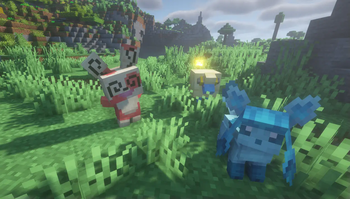
About this Modpack
⠀

(The modpack has nothing to do with bubbles. that's just the name of our group, and the icon is our mascot!)
Bubble Cobble is a "Curated Kitchen Sink" Forge modpack intended for use by ourselves and our friends friends. It's designed to be a community server kind of experience for a world with friends that drop in and out all the time.
Tons of improvements to low-tech, villages, farming, food, exploration and more, all carefully configured and tweaked to bring out the best of every single mod. There's a little something-something for everyone, so we've decided to make the modpack public for people to enjoy!
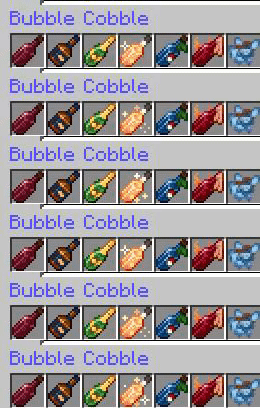
The stars of the show are Create and Cobblemon, which are made to work nicely through Create: Cobblemon Industrialized and Cobblemon: Klinks and Klangs; or immerse yourself in farming and cooking with Farmer's Delight with plenty of addons, including custom-made brewable wines and liquors!
Oculus is included in the modpack, but it comes with no included shaders. Feel free to install your favorite shaders in the video settings!
Link to a spreadsheet with all the mods, organized neatly!
List of features exclusive to this modpack
- The Sopping Wet Thing!
- [To be expanded]
Technical Details:
- This modpack is based on Forge; with this being a hefty modpack, we recommend to allocate at least 4GB of memory to Minecraft. 6GB is recommended.
Note that, being an organized thing between a private group of friends, the modpack is subject to changing at (almost) all times, adding or removing mods on a whim. Check the changelogs whenever the modpack updates! And make sure to support the original authors!
Available Versions
How to Set Up a Bubble Cobble (Legacy) Server
Order Server
Choose at least 6 GB RAM (8 GB recommended for Bubble Cobble (Legacy)). Based on player count: per 5 players.
Install Modpack in Dashboard
Open the modpack browser in the dashboard, search for "Bubble Cobble (Legacy)" and click "Install". The forge loader and Minecraft 1.20.1 are configured automatically.
Start Server & Play
Start the server – all mods are loaded automatically. Share the server IP with friends and play together!
Frequently Asked Questions
Bubble Cobble (Legacy) server crashes or won't start – what to do?
Most common causes: insufficient RAM or wrong forge loader. Check latest.log for "OutOfMemoryError" → increase RAM to at least 8 GB. For "Mixin" or "ClassNotFoundException" errors: modpack version and loader don't match. With Mado Hosting, loader and Minecraft version are auto-configured on modpack install – preventing most startup issues.
How much RAM does a Bubble Cobble (Legacy) server really need?
Minimum 6 GB, recommended 8 GB for stable performance. per 5 players. Important: Minecraft modpacks need more RAM than vanilla – plan extra per additional player. With Mado Hosting, you can scale RAM up live at any time without data loss (from €12/month).
Can I add custom mods to Bubble Cobble (Legacy) without conflicts?
Yes, but check compatibility: only use mods for the same loader (forge) and same Minecraft version (1.20.1). Common issues: ID conflicts with recipe mods and incompatible coremod versions. The Mado dashboard mod browser only shows compatible mods and warns about known conflicts.
Bubble Cobble (Legacy) server lagging – performance tips
1) Increase RAM to 8 GB+. 2) Reduce server view-distance to 8 (server.properties). 3) Pre-generate chunks with the "Chunky" plugin. 4) Use /spark profiler to check which mods consume the most tick time. With Mado Hosting, all servers run on NVMe SSDs with dedicated CPU cores – eliminating hardware as a bottleneck.
Similar Modpacks
![Cobblemon Official Modpack [Fabric]](https://cdn.modrinth.com/data/5FFgwNNP/e7f9ee2e9d361623847853fe2ddce42f519ee64f.png)
![COBBLEVERSE - Pokemon Adventure [Cobblemon]](https://cdn.modrinth.com/data/Jkb29YJU/581ecf54530972afb18a04660afd820f2f24f6c7.png)
![Better MC [FABRIC] - BMC2](https://cdn.modrinth.com/data/shFhR8Vx/a19c2bcb51d38f32f138d3607e91cb2b7b8e387f_96.webp)


![Better MC [FORGE] - BMC4](https://cdn.modrinth.com/data/4BV47HRn/7f5ef7cc61b2593609aabef3ed07a866a4f11b73_96.webp)
Rent Bubble Cobble (Legacy) Server
Start your own server with automatic modpack installation.
Supported Versions
Start your Bubble Cobble (Legacy) Server now
From €12.00/month with 8 GB RAM for the best performance.
Configure Server →