
Builtechraft Client Mods
Suggested mods to play on Builtechraft SMP
Screenshots
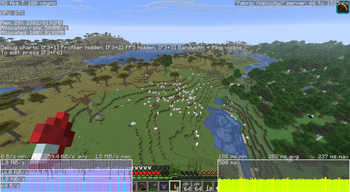

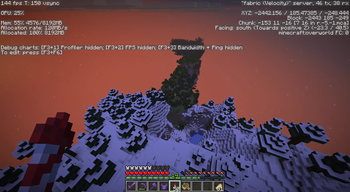
About this Modpack
| Builtechraft SMP
Builtechraft is a high-performance utility and technical modpack tailored for the Builtechraft community.
This is not a content-bloated pack; it is a precision-engineered toolkit for technical players and builders. It prioritizes extreme performance (FPS), client-side stability, and advanced building tools, ensuring a seamless experience in complex multiplayer environments.
🚀 Performance & Optimization
The core of the pack is built to make the game fly. We’ve eliminated stutters and rendering lag using the industry standards:
- Sodium & Lithium: The essential foundation for modern rendering and game logic optimization.
- FerriteCore & ModernFix: Drastic reduction in RAM usage and critical engine bug fixes.
- ImmediatelyFast & Entity Culling: Optimized entity rendering and HUDs to maintain stable FPS in crowded areas.
- Bobby: Maintain high render distances even when the server imposes limits.
🏗️ Technical Building Tools
Equipped with the definitive suite for large-scale projects and farm planning:
- Axiom: The ultimate real-time terrain editing and building tool.
- Litematica & Syncmatica: Manage your schematics and share them in real-time with other players on the server. I personaly recommend to watch this video to understand my keybind configuration for Litematica here.
- Tweakeroo & MiniHUD: Full control over client-side mechanics (freecam, clicking, etc.) and detailed technical data overlays (TPS, coordinates, biomes).
- WorldEdit: The standard for large-scale block manipulation.
🎨 Visuals & Quality of Life
- Iris Shaders: Native shader support with the best possible performance overhead.
- [EMF] & [ETF]: Enhanced entity models and texture features (Optifine parity but more efficient).
- JourneyMap/VoxelMap: High-detail world mapping for navigation and project planning (we're exploring the best & not huge-size map option).
- Network Tuning: Includes Krypton and Packet Fixer to optimize data transfer and prevent unnecessary timeouts.
🌐 Community & Links
This modpack serves as the official base for our infrastructure. Join us to collaborate on technical projects:
- 💻 Official Web: builtechraft Site
- 💬 Official Discord: Builtechraft SMP
⚠️ Recommended Setup
- Minecraft Version: 1.20.5 - Latest possible
- Allocated RAM: 2GB to 4GB is recommended. Thanks to FerriteCore, you don't need excessive memory.
- Installation: Primarily a Client-Side pack, fully compatible with any Vanilla or Fabric-based server.
🗺️ About the Bobby Mod & Our World Cache
This modpack includes Bobby, a mod that saves visited chunks to your client's memory, allowing for massive render distances without causing server lag.
Due to years of building and exploration in Builtechraft, the full Bobby cache weighs several Gigabytes (less than 2GB actually).
So you don't have to load the world from scratch by flying around for hours, we offer periodic downloads of the updated map cache.
- How to get it? Join our Discord and find the direct Google Drive link in the corresponding channel.
- How to install it? Download the
.zipfile, extract it directly into your.minecraft/.bobbyfolder, and enjoy this method to load the chunks more fast!
🌐 Server-Side Excellence & Future Plans
You can check our mod list at builtechraft site to see which mods runs on our heavily optimized server-side Fabric server.
Note: We currently utilize a massive array of server-side optimization mods to ensure 20 TPS even under heavy load. This architecture allows us to plan a future release of a dedicated Server Modpack!
Available Versions
How to Set Up a Builtechraft Client Mods Server
Order Server
Choose at least 4 GB RAM (6 GB recommended for Builtechraft Client Mods). Based on player count: per 8 players.
Install Modpack in Dashboard
Open the modpack browser in the dashboard, search for "Builtechraft Client Mods" and click "Install". The fabric loader and Minecraft 26.1.2 are configured automatically.
Start Server & Play
Start the server – all mods are loaded automatically. Share the server IP with friends and play together!
Frequently Asked Questions
Builtechraft Client Mods server crashes or won't start – what to do?
Most common causes: insufficient RAM or wrong fabric loader. Check latest.log for "OutOfMemoryError" → increase RAM to at least 6 GB. For "Mixin" or "ClassNotFoundException" errors: modpack version and loader don't match. With Mado Hosting, loader and Minecraft version are auto-configured on modpack install – preventing most startup issues.
How much RAM does a Builtechraft Client Mods server really need?
Minimum 4 GB, recommended 6 GB for stable performance. per 8 players. Important: Minecraft modpacks need more RAM than vanilla – plan extra per additional player. With Mado Hosting, you can scale RAM up live at any time without data loss (from €8/month).
Can I add custom mods to Builtechraft Client Mods without conflicts?
Yes, but check compatibility: only use mods for the same loader (fabric) and same Minecraft version (26.1.2). Common issues: ID conflicts with recipe mods and incompatible coremod versions. The Mado dashboard mod browser only shows compatible mods and warns about known conflicts.
Builtechraft Client Mods server lagging – performance tips
1) Increase RAM to 6 GB+. 2) Reduce server view-distance to 8 (server.properties). 3) Pre-generate chunks with the "Chunky" plugin. 4) Use /spark profiler to check which mods consume the most tick time. With Mado Hosting, all servers run on NVMe SSDs with dedicated CPU cores – eliminating hardware as a bottleneck.
Similar Modpacks

![Cobblemon Official Modpack [Fabric]](https://cdn.modrinth.com/data/5FFgwNNP/e7f9ee2e9d361623847853fe2ddce42f519ee64f.png)
![COBBLEVERSE - Pokemon Adventure [Cobblemon]](https://cdn.modrinth.com/data/Jkb29YJU/581ecf54530972afb18a04660afd820f2f24f6c7.png)
![Better MC [FABRIC] - BMC2](https://cdn.modrinth.com/data/shFhR8Vx/a19c2bcb51d38f32f138d3607e91cb2b7b8e387f_96.webp)


Rent Builtechraft Client Mods Server
Start your own server with automatic modpack installation.
Supported Versions
Start your Builtechraft Client Mods Server now
From €8.00/month with 6 GB RAM for the best performance.
Configure Server →