
Butterfly Effect
A lightweight yet plentiful modpack combining the feel of beta Minecraft with modern features and mods. Create included!
Screenshots

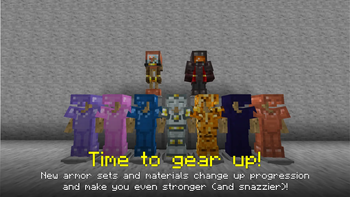
About this Modpack


The Butterfly Effect is the sensitive dependence on initial conditions in which a small change in one state of a deterministic nonlinear system can result in large differences in a later state, according to Wikipedia anyways. To put it in nerd talk, one tiny change in the past can make a huge change for the future. Which is the premise of this pack: what if the past held changes that took the development of Minecraft down a different road? By combining the aesthetic and simplicity of older Minecraft with modern-day features and even some big mods, they make up the ultimate successor to packs like Better Than Adventure and Mangopack. Whether you just want the old world generation and textures, or want some crazy terrain to build your next Create contraption with, there's something here for anyone, regardless of how long you've played.

You can find a more fleshed-out list of features in the Gallery tab of this pack. If you'd rather read it:
- Beta-inspired world generation, textures, and gameplay changes with Cascades, Nostalgic Tweaks, and Golden Days.
- Modern-day features up to 1.21.9 with Copper Age Backport and Vanilla Backport.
- A new heavenly dimension integrated to the game called the Aether.
- New ways to innovate your world and engineer amazing contraptions with Create.
- Bring your builds to life with Bits and Chisels, ReFramed, Additional Banners, Sawmill and Head Index.
- New tools to aid in exploration with Spyglass Zoom, Map Atlases, Nature's Compass, Waystones, and Port-A-Chest.
- New potions and enchants with Spirit Walker, Vein Mining, Aether Affinity and Miner's Enchant.
- 4 new seasons that change every 30 days; spring, summer, fall, and winter.
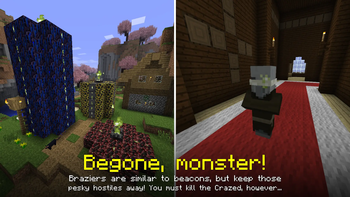
- Protect your base with Brazier multiblock structures.
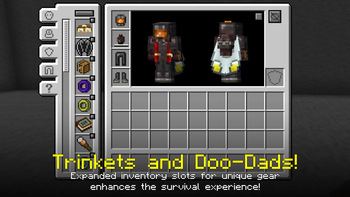
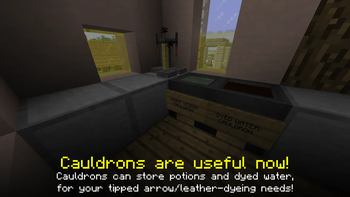
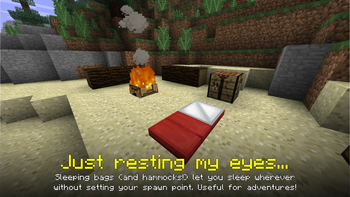
- Lots of QoL additions to add on to the 1.20.1 version platform.

This modpack is my current passion project, so I plan to work on it a lot in the future and keep updating it. Some ideas on the table so far:
- PRIORITY: Item name parity, custom textures for items without programmer art textures.
- New dimensions: Twilight Forest, 20w14~ Infinite Dimension mechanic.
- More decoration mods: stained blocks, furniture.
- New hostile and passive mobs.
- New surface, cave, Nether and End biomes.
Available Versions
How to Set Up a Butterfly Effect Server
Order Server
Choose at least 6 GB RAM (8 GB recommended for Butterfly Effect). Based on player count: per 5 players.
Install Modpack in Dashboard
Open the modpack browser in the dashboard, search for "Butterfly Effect" and click "Install". The fabric loader and Minecraft 1.20.1 are configured automatically.
Start Server & Play
Start the server – all mods are loaded automatically. Share the server IP with friends and play together!
Frequently Asked Questions
Butterfly Effect server crashes or won't start – what to do?
Most common causes: insufficient RAM or wrong fabric loader. Check latest.log for "OutOfMemoryError" → increase RAM to at least 8 GB. For "Mixin" or "ClassNotFoundException" errors: modpack version and loader don't match. With Mado Hosting, loader and Minecraft version are auto-configured on modpack install – preventing most startup issues.
How much RAM does a Butterfly Effect server really need?
Minimum 6 GB, recommended 8 GB for stable performance. per 5 players. Important: Minecraft modpacks need more RAM than vanilla – plan extra per additional player. With Mado Hosting, you can scale RAM up live at any time without data loss (from €12/month).
Can I add custom mods to Butterfly Effect without conflicts?
Yes, but check compatibility: only use mods for the same loader (fabric) and same Minecraft version (1.20.1). Common issues: ID conflicts with recipe mods and incompatible coremod versions. The Mado dashboard mod browser only shows compatible mods and warns about known conflicts.
Butterfly Effect server lagging – performance tips
1) Increase RAM to 8 GB+. 2) Reduce server view-distance to 8 (server.properties). 3) Pre-generate chunks with the "Chunky" plugin. 4) Use /spark profiler to check which mods consume the most tick time. With Mado Hosting, all servers run on NVMe SSDs with dedicated CPU cores – eliminating hardware as a bottleneck.
Similar Modpacks
![Cobblemon Official Modpack [Fabric]](https://cdn.modrinth.com/data/5FFgwNNP/e7f9ee2e9d361623847853fe2ddce42f519ee64f.png)
![COBBLEVERSE - Pokemon Adventure [Cobblemon]](https://cdn.modrinth.com/data/Jkb29YJU/581ecf54530972afb18a04660afd820f2f24f6c7.png)
![Better MC [FABRIC] - BMC2](https://cdn.modrinth.com/data/shFhR8Vx/a19c2bcb51d38f32f138d3607e91cb2b7b8e387f_96.webp)


![Better MC [FORGE] - BMC4](https://cdn.modrinth.com/data/4BV47HRn/7f5ef7cc61b2593609aabef3ed07a866a4f11b73_96.webp)
Rent Butterfly Effect Server
Start your own server with automatic modpack installation.
Supported Versions
Start your Butterfly Effect Server now
From €12.00/month with 8 GB RAM for the best performance.
Configure Server →