
Cam's Cartoonied
Cartoon-styled Minecraft modpack with smooth performance, vibrant shaders, clean UI, and animations.
Screenshots
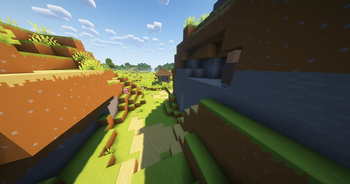
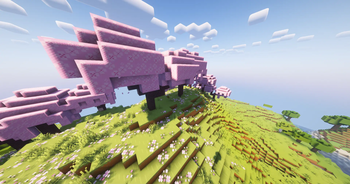
About this Modpack
🎨 Introducing Cam's Cartoonied

Cam's Cartoonied is a performance-enhanced, visually vibrant modpack that mixes clean cartoon-style graphics with high FPS and rich quality-of-life tweaks. Built to keep Minecraft feeling familiar while looking fresh, it’s the perfect blend of aesthetic and efficiency — no compromises needed.
🧩 Mods
🔧 Visual & Performance Tweaks
- Dynamic Lights – Light your surroundings by holding torches or glow items.
- Entity Model & Texture Features – Randomized mob variants and smoother animations.
- Low Fire & Low Shield – Better visibility during combat.
- Iris + Sodium + Lithium – Best-in-class rendering, FPS boosts, and world optimization.
- Inventory Sorter + Mouse Tweaks – Effortless inventory management with middle-click sorting.
- Simple Menu + Mod Menu – Streamlined UI with full mod visibility and customization.
🛠️ Utility & Backend
- Bad Packets, Fabric API, Kotlin, Placeholder API – Core frameworks that make other mods work.
- Collective, Balm, LibJF, TCD Commons – Shared libraries for mod support.
- Essential-container & ViaFabricPlus – Compatibility support for servers and networking.
🗺️ World & Navigation
- JourneyMap + JourneyMap WebMap – Optional minimap with fullscreen map and browser view.
- Simple Voice Chat – Proximity-based multiplayer voice chat support.
🧵 Resource Packs
🎨 Visual Enhancements
- 🟩 Bare Bones 1.21.5 – Minimalist textures with a clean, blocky aesthetic.
- 🎭 Fresh Animations v1.9.4 – Adds expressive, smooth animations to mobs.
- 🍇 Fancy Crops v1.1 – Makes farms and crops prettier and more vibrant.
- 💡 Icons v1.11.4 + AR’s OreUI Dark – Clean dark-mode GUI elements.
- 🧊 ToolTips Stylized + UniqueDark UI – Slick interface tweaks for tooltips and menus.
🌅 Shader Packs
💡 Choose from three handpicked shader sets
- ✨ BSL v10.0 – Balanced cartoony glow with smooth ambient lighting.
- 🌄 Complementary Reimagined r5.5.1 – Vibrant, soft, expressive – best for Bare Bones.
- 🕶 Complementary Unbound r5.5.1 – Bold colors and stylized shadows for a toon look.
⚙️ Configs & Optimization
🧪 How it runs and why it matters
- Everything is pre-tuned for performance and beauty.
- No client-side bloat — lightweight, modular design.
- Plug and play — no setup needed.
❓ FAQ – Quick Answers
1. How do I install this?
Use Prism, MultiMC, or manual install. Import the zip or drop into `.minecraft`. Need help? Ask!2. Will it run well on my PC?
Yes — Sodium, Lithium, and Iris give huge FPS boosts. Runs great even on low-end machines.3. Can I join servers with this pack?
Yes! Most mods are client-only. ViaFabricPlus lets you connect to older-version servers too.4. What if I don’t want shaders?
Just turn them off in the shader menu. You still get all performance + UI benefits.5. Can I use other texture packs or shaders?
Yes, feel free to swap any resource pack or Iris-compatible shader you prefer.6. Does voice chat work on servers?
Only on servers that also have Simple Voice Chat installed. Otherwise, it stays off.7. Can I customize the pack further?
Definitely — it’s modular. Add/remove anything you want and it’ll still run smooth.Available Versions
How to Set Up a Cam's Cartoonied Server
Order Server
Choose at least 4 GB RAM (6 GB recommended for Cam's Cartoonied). Based on player count: per 8 players.
Install Modpack in Dashboard
Open the modpack browser in the dashboard, search for "Cam's Cartoonied" and click "Install". The fabric loader and Minecraft 26.1.2 are configured automatically.
Start Server & Play
Start the server – all mods are loaded automatically. Share the server IP with friends and play together!
Frequently Asked Questions
Cam's Cartoonied server crashes or won't start – what to do?
Most common causes: insufficient RAM or wrong fabric loader. Check latest.log for "OutOfMemoryError" → increase RAM to at least 6 GB. For "Mixin" or "ClassNotFoundException" errors: modpack version and loader don't match. With Mado Hosting, loader and Minecraft version are auto-configured on modpack install – preventing most startup issues.
How much RAM does a Cam's Cartoonied server really need?
Minimum 4 GB, recommended 6 GB for stable performance. per 8 players. Important: Minecraft modpacks need more RAM than vanilla – plan extra per additional player. With Mado Hosting, you can scale RAM up live at any time without data loss (from €8/month).
Can I add custom mods to Cam's Cartoonied without conflicts?
Yes, but check compatibility: only use mods for the same loader (fabric) and same Minecraft version (26.1.2). Common issues: ID conflicts with recipe mods and incompatible coremod versions. The Mado dashboard mod browser only shows compatible mods and warns about known conflicts.
Cam's Cartoonied server lagging – performance tips
1) Increase RAM to 6 GB+. 2) Reduce server view-distance to 8 (server.properties). 3) Pre-generate chunks with the "Chunky" plugin. 4) Use /spark profiler to check which mods consume the most tick time. With Mado Hosting, all servers run on NVMe SSDs with dedicated CPU cores – eliminating hardware as a bottleneck.
Similar Modpacks

![Cobblemon Official Modpack [Fabric]](https://cdn.modrinth.com/data/5FFgwNNP/e7f9ee2e9d361623847853fe2ddce42f519ee64f.png)
![COBBLEVERSE - Pokemon Adventure [Cobblemon]](https://cdn.modrinth.com/data/Jkb29YJU/581ecf54530972afb18a04660afd820f2f24f6c7.png)
![Better MC [FABRIC] - BMC2](https://cdn.modrinth.com/data/shFhR8Vx/a19c2bcb51d38f32f138d3607e91cb2b7b8e387f_96.webp)


Rent Cam's Cartoonied Server
Start your own server with automatic modpack installation.
Details
- License
- Creative Commons Attribution Share Alike 4.0 International
- Server-side
- Unsupported
- Client-side
- Required
Supported Versions
Start your Cam's Cartoonied Server now
From €8.00/month with 6 GB RAM for the best performance.
Configure Server →