
Capinfer's Survival Enhanced
It's like your survival, but enhanced.
Screenshots
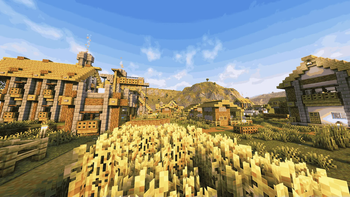
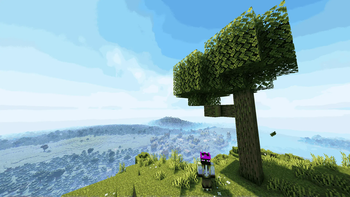

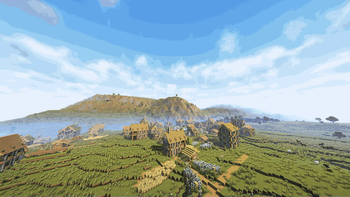
About this Modpack

Preview
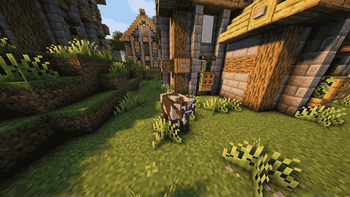
A "Vanilla-Friendly" survival modpack, with some of the best optimization mods, and a great atmosphere with the pre-configured shaders. All of this, whitout losing the original feel of the game, while at the same time adding new challenges and features to the main game
THIS MODPACK IS MADE THANKS TO AND BASED ON: Vanilla Perfected
A shout out to all the creators of the mods/resource packs/shaders of this modpack!.
Mods/textures/shaders used
. (VERY IMPORTANT DOT)- Tectonic
- Clumps
- Enhanced Block Entities
- Inventory Management
- Mace but 3D
- Particle Rain
- No Chat Reports
- Another Furniture
- Remove Reloading Screen
- FerriteCore
- TCDCommons API
- [EMF] Entity Model Features
- Detailed Animations
- Better Third Person
- CreativeCore
- e4mc
- Mouse Tweaks
- Detail Armor Bar
- Continuity
- Music Delay Remover (Infinite Music)
- Macaw's Doors
- Noisium
- ukulib
- BetterF3
- Mob Crates
- Model Gap Fix
- Smarter Farmers (farmers replant)
- Cloth Config API
- Customizable Elytra
- Fresh Skeleton Physics
- Cardinal Components API
- Better Villages
- Tiny Item Animations
- Indium
- Nvidium
- Controlling
- ImmediatelyFast
- MaLiLib
- Better Advancements
- Not Enough Animations
- Skin Shuffle
- Simple Voice Chat
- Horse Buff
- YUNG's Better Dungeons
- Just Enough Items
- Iris Shaders
- Cherished Worlds
- RightClickHarvest
- ThreadTweak
- You're in Grave Danger
- Library Ferret
- Text Placeholder API
- YUNG's Better Mineshafts
- oωo (owo-lib)
- Zoomify
- M.R.U
- Armor Stand Arms
- Litematica
- OctoLib
- Eating Animation
- Pick Up Notifier
- Particular ✨
- Puzzles Lib
- MonoLib
- Chat Heads
- Prism
- Architectury API
- Iceberg
- YetAnotherConfigLib (YACL)
- Collective
- Crops Love Rain
- Very Many Players (Fabric)
- Concurrent Chunk Management Engine (Fabric)
- AL's Creepers Revamped
- YUNG's Better Nether Fortresses
- Lithium
- Falling Leaves
- Mod Menu
- Forge Config API Port
- Farmer's Delight Refabricated
- qrafty's Capitalized Font
- More Culling
- YUNG's API
- Lighty
- YUNG's Better Strongholds
- OptiGUI
- Easy Shulker Boxes
- Stony Cliffs Are Cool
- [ETF] Entity Texture Features
- ModernFix
- Enchant Icons
- Fabric Language Kotlin
- Even Better Enchants
- Recolourful Containers GUI + HUD
- Toggle Item Frames
- Fabric API
- Better Statistics Screen
- Animatica
- JamLib
- Searchables
- Status Effect Bars
- Fancy Crops
- Lithostitched
- Visuality
- playerAnimator
- Small Ships
- Text Formatting Everywhere
- Sodium Extra
- Fresh Animations
- World Play Time
- Moonlight Lib
- Visual: Armor Trims
- Entity Culling
- CICADA
- BadOptimizations
- No Resource Pack Warnings
- Fresh Animations - Extensions
- Simple Grass Flowers
- Sodium
- ReplayMod
- 3D Skin Layers
- Reese's Sodium Options
- CIT Resewn
- Better Beds
- Scribble
- Complementary Shaders - Reimagined
- Glowing Torchflower
- Presence Footsteps
- AmbientSounds
- CSE title pack
- ComplementaryReimagined
- freecam
Available Versions
How to Set Up a Capinfer's Survival Enhanced Server
Order Server
Choose at least 6 GB RAM (8 GB recommended for Capinfer's Survival Enhanced). Based on player count: per 5 players.
Install Modpack in Dashboard
Open the modpack browser in the dashboard, search for "Capinfer's Survival Enhanced" and click "Install". The fabric loader and Minecraft 1.21.1 are configured automatically.
Start Server & Play
Start the server – all mods are loaded automatically. Share the server IP with friends and play together!
Frequently Asked Questions
Capinfer's Survival Enhanced server crashes or won't start – what to do?
Most common causes: insufficient RAM or wrong fabric loader. Check latest.log for "OutOfMemoryError" → increase RAM to at least 8 GB. For "Mixin" or "ClassNotFoundException" errors: modpack version and loader don't match. With Mado Hosting, loader and Minecraft version are auto-configured on modpack install – preventing most startup issues.
How much RAM does a Capinfer's Survival Enhanced server really need?
Minimum 6 GB, recommended 8 GB for stable performance. per 5 players. Important: Minecraft modpacks need more RAM than vanilla – plan extra per additional player. With Mado Hosting, you can scale RAM up live at any time without data loss (from €12/month).
Can I add custom mods to Capinfer's Survival Enhanced without conflicts?
Yes, but check compatibility: only use mods for the same loader (fabric) and same Minecraft version (1.21.1). Common issues: ID conflicts with recipe mods and incompatible coremod versions. The Mado dashboard mod browser only shows compatible mods and warns about known conflicts.
Capinfer's Survival Enhanced server lagging – performance tips
1) Increase RAM to 8 GB+. 2) Reduce server view-distance to 8 (server.properties). 3) Pre-generate chunks with the "Chunky" plugin. 4) Use /spark profiler to check which mods consume the most tick time. With Mado Hosting, all servers run on NVMe SSDs with dedicated CPU cores – eliminating hardware as a bottleneck.
Similar Modpacks
![Cobblemon Official Modpack [Fabric]](https://cdn.modrinth.com/data/5FFgwNNP/e7f9ee2e9d361623847853fe2ddce42f519ee64f.png)
![COBBLEVERSE - Pokemon Adventure [Cobblemon]](https://cdn.modrinth.com/data/Jkb29YJU/581ecf54530972afb18a04660afd820f2f24f6c7.png)
![Better MC [FABRIC] - BMC2](https://cdn.modrinth.com/data/shFhR8Vx/a19c2bcb51d38f32f138d3607e91cb2b7b8e387f_96.webp)


![Better MC [FORGE] - BMC4](https://cdn.modrinth.com/data/4BV47HRn/7f5ef7cc61b2593609aabef3ed07a866a4f11b73_96.webp)
Rent Capinfer's Survival Enhanced Server
Start your own server with automatic modpack installation.
Supported Versions
Start your Capinfer's Survival Enhanced Server now
From €12.00/month with 8 GB RAM for the best performance.
Configure Server →