
Cataclysm Z
the end has already come — you’re just late
Screenshots
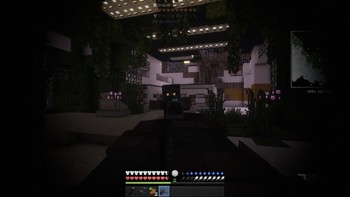
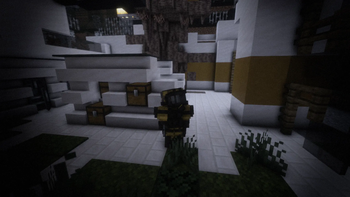
About this Modpack
CATACLYSM
When the sirens stopped, the world was already gone.
Cities fell silent. Streets filled with the sound of footsteps that weren’t human.
Now, there’s no rescue, no hope — only survival.
This is THE CATACLYSM, a hardcore survival modpack inspired by Project Zomboid, where every minute alive is earned. Forget everything you know about peaceful Minecraft — hunger, infection, fear, and exhaustion will be your new reality.
A World That Fights Back
- Zombies are faster, smarter, and more ruthless than ever. They hunt in packs, surround your shelter, and never stop. Every sound you make can bring death to your door.
Survival Is More Than Just Health
- You’ll have to manage hunger, thirst, body temperature, wounds, and infection — all while scavenging for food, tools, and medicine in a world that’s collapsing around you.
Immersive Realism
- Dynamic lighting, ambient sounds, and brutal combat combine to make every night terrifying. The rain chills your bones, the dark hides what’s coming, and the silence means they’ve found another victim.
Build or Die Trying
- You can’t just survive — you have to prepare.
Fortify safehouses, craft barricades, and reinforce every wall, because when the horde comes, nothing lasts forever.
Every Death Tells a Story
- Maybe you starved. Maybe you froze. Maybe you fought until the end.
Each life is unique — and each death, inevitable.
Build. Survive. Die. Repeat.
- There are no second chances here. Only stories of those who tried… and the echoes they left behind.
Credits:
Available Versions
How to Set Up a Cataclysm Z Server
Order Server
Choose at least 4 GB RAM (6 GB recommended for Cataclysm Z). Based on player count: per 5 players.
Install Modpack in Dashboard
Open the modpack browser in the dashboard, search for "Cataclysm Z" and click "Install". The forge loader and Minecraft 1.20.1 are configured automatically.
Start Server & Play
Start the server – all mods are loaded automatically. Share the server IP with friends and play together!
Frequently Asked Questions
Cataclysm Z server crashes or won't start – what to do?
Most common causes: insufficient RAM or wrong forge loader. Check latest.log for "OutOfMemoryError" → increase RAM to at least 6 GB. For "Mixin" or "ClassNotFoundException" errors: modpack version and loader don't match. With Mado Hosting, loader and Minecraft version are auto-configured on modpack install – preventing most startup issues.
How much RAM does a Cataclysm Z server really need?
Minimum 4 GB, recommended 6 GB for stable performance. per 5 players. Important: Minecraft modpacks need more RAM than vanilla – plan extra per additional player. With Mado Hosting, you can scale RAM up live at any time without data loss (from €8/month).
Can I add custom mods to Cataclysm Z without conflicts?
Yes, but check compatibility: only use mods for the same loader (forge) and same Minecraft version (1.20.1). Common issues: ID conflicts with recipe mods and incompatible coremod versions. The Mado dashboard mod browser only shows compatible mods and warns about known conflicts.
Cataclysm Z server lagging – performance tips
1) Increase RAM to 6 GB+. 2) Reduce server view-distance to 8 (server.properties). 3) Pre-generate chunks with the "Chunky" plugin. 4) Use /spark profiler to check which mods consume the most tick time. With Mado Hosting, all servers run on NVMe SSDs with dedicated CPU cores – eliminating hardware as a bottleneck.
Rent Cataclysm Z Server
Start your own server with automatic modpack installation.
Supported Versions
Start your Cataclysm Z Server now
From €8.00/month with 6 GB RAM for the best performance.
Configure Server →