
CCNet Fabric
The unofficial modpack for CCNet. CCNet Nations is a unique geopolitical roleplay sandbox server set on a 1:1000 map of the Earth.
Screenshots
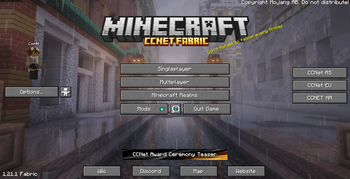
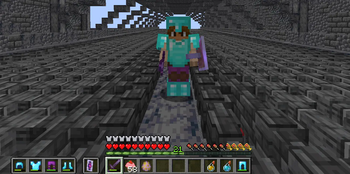
About this Modpack
CCNet Fabric Modpack
CCNet Minecraft has strict rules for the allowed modification on their server.
This modpack contains all the allowed modifications on the Nations server of CCNet, and the ones listed on the official modpack here. Read more about the modification at the CCNet Rules Website (Global Rule 1 - Client Modifications).
⚡ Performance & Optimization
- Alternate Current (Optimises lag created by redstone dust)
- BadOptimizations (A collection of mostly micro optimizations)
- Cull Leaves (better leave culling)
- Dynamic FPS (Reduces resource consumption when the game is unfocused, more free resources)
- Enhanced Block Entities (ever enter konigsberg chest room and feel the lag? say no more!)
- Entity Culling (Uses async path-tracing to skip rendering Block/Entities that are not visible)
- FerriteCore (major memory optimisations so your pc doesnt crash out :>)
- ScalableLux (Optifine's starlight alternative, since they discontinued it)
- GPU Memory Leak Fix (A mod that fixes some bugs which leak resources within GPU memory)
- ThreadTweak (reliable fort of SmoothBoot)
- ImmediatelyFast (rendering optimisations)
- Krypton (optimises minecraft network stacking)
- Lithium (mutli-purpose optimisation mod)
- ModernFix (an all-in-one optimisation mod_
- MoreCulling (A mod that changes how multiple types of culling are handled in order to improve performance)
- Sodium (powerful rendering engine and optimisations)
- Sodium Extra (additional options however also allows particle management-disabled uneccessary particles to improve performance in sieges)
- VMP (very many players, probably tries to save your pc in pvp regions)
🎨 Graphics & Visual Enhancements
- AnimaTica (adds support for resource packs that use custom animated textures)
- CITResewn (supports custom armor and item texture on nations)
- Clumps (optimises your average spawner experience)
- BetterMountHUD (improves the ingame HUD while riding a horse, donkey or other mount)
- BetterShields (adds shield disable sounds which sorta are inaccurate for high pinged players as this is client based, however colors shield for self if they are disabled or held)
- Capes (supports for capes :3)
- Continuity (connects block textures)
- FancyMenu (shwos stereoIm and Fqrtex in menu and some useless splash texts and a random lofi mc song)
- Reeses Sodium Options (more options for sodium)
🛠 User Interface & QoL
Mods that improve the game's UI and general quality of life features.
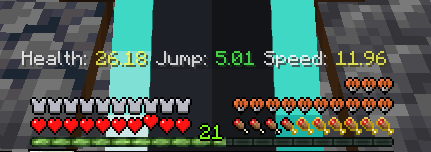
- AppleSkin (shows player saturation, good for pvp)
- Mr. Dynamic Torches (dynamic lights, carry a torch in your main hand for client side light area)
- ResourcePackCached (Tired of reloading pack everytime you join CCNet? Say no more we cache it for you!!)
- BetterPingDisplay (shows ping on TAB)
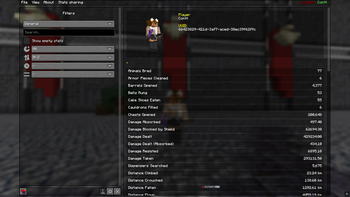
- BetterStats (better-compiled statistics cough cough Mojang)
- GammaUtils (Click N to toggle Night Vision)
- HorseStatsMod (Ride your horse to see their statistics)
- Mod Loading Screen (cool loading screen idk)
- Mod Menu (list of all modifications active, allows tweaks and changes)
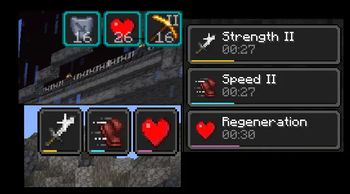
- Status Effect Bars (Shows a line thick bar on the bottom of effects icon)
- Status Effect Timer (Adds time to the effects icon so you can re-buff on time!!)
- UKUs Armor HUD (track your armor dura so you don't have to quickdrop)
- Zoomify (zoom in using C)
🌐 Multiplayer & Chat Enhancements
Mods designed to improve multiplayer interactions and chat functionality.
- AuthMe (dont relaunch your game when you can relog, thanks to authme)
- MoreChatHistory (unlimited chat history)
- NoChatReports [:)]
- RRLS (removes the reloading screen for ADHD users like me)
🔩 Fabric & Core Dependencies (remove these and your modpack dies)
- Fabric API
- Fabric Language Kotlin
- Fabric Loader
- Konkrete
- MixinTrace
- TCDCommons
- Yet Another Config Library
- ukulib
🎮 Gameplay Tweaks & Miscellaneous
These mods add general gameplay improvements and useful tweaks.
- Fabrishot (take high-res screenshots using F9
- KTNilcks
- ModelFix (fixes model gaps)
🗺️ Map & World Editing
- WorldEdit 7.3.8+6939-7d32b45
- Xaero’s Minimap 25.1.0
- Xaero’s World Map 1.39.4
🌅 Shaders
- Iris 1.8.1+mc1.21.1
- BSL Shaders (Click K to toggle)
Facing Issues/Bugs? Have Suggestions?
Contact @contt on Discord, or join the CCNet Discord
Some configs adapted from Fabulously Optimized, Copyright 2020-2026 Fabulously Optimized Authors (BSD 3-Clause License)
Available Versions
How to Set Up a CCNet Fabric Server
Order Server
Choose at least 4 GB RAM (6 GB recommended for CCNet Fabric). Based on player count: per 8 players.
Install Modpack in Dashboard
Open the modpack browser in the dashboard, search for "CCNet Fabric" and click "Install". The fabric loader and Minecraft 1.21.11 are configured automatically.
Start Server & Play
Start the server – all mods are loaded automatically. Share the server IP with friends and play together!
Frequently Asked Questions
CCNet Fabric server crashes or won't start – what to do?
Most common causes: insufficient RAM or wrong fabric loader. Check latest.log for "OutOfMemoryError" → increase RAM to at least 6 GB. For "Mixin" or "ClassNotFoundException" errors: modpack version and loader don't match. With Mado Hosting, loader and Minecraft version are auto-configured on modpack install – preventing most startup issues.
How much RAM does a CCNet Fabric server really need?
Minimum 4 GB, recommended 6 GB for stable performance. per 8 players. Important: Minecraft modpacks need more RAM than vanilla – plan extra per additional player. With Mado Hosting, you can scale RAM up live at any time without data loss (from €8/month).
Can I add custom mods to CCNet Fabric without conflicts?
Yes, but check compatibility: only use mods for the same loader (fabric) and same Minecraft version (1.21.11). Common issues: ID conflicts with recipe mods and incompatible coremod versions. The Mado dashboard mod browser only shows compatible mods and warns about known conflicts.
CCNet Fabric server lagging – performance tips
1) Increase RAM to 6 GB+. 2) Reduce server view-distance to 8 (server.properties). 3) Pre-generate chunks with the "Chunky" plugin. 4) Use /spark profiler to check which mods consume the most tick time. With Mado Hosting, all servers run on NVMe SSDs with dedicated CPU cores – eliminating hardware as a bottleneck.
Similar Modpacks

![Cobblemon Official Modpack [Fabric]](https://cdn.modrinth.com/data/5FFgwNNP/e7f9ee2e9d361623847853fe2ddce42f519ee64f.png)
![COBBLEVERSE - Pokemon Adventure [Cobblemon]](https://cdn.modrinth.com/data/Jkb29YJU/581ecf54530972afb18a04660afd820f2f24f6c7.png)
![Better MC [FABRIC] - BMC2](https://cdn.modrinth.com/data/shFhR8Vx/a19c2bcb51d38f32f138d3607e91cb2b7b8e387f_96.webp)


Rent CCNet Fabric Server
Start your own server with automatic modpack installation.
Supported Versions
Start your CCNet Fabric Server now
From €8.00/month with 6 GB RAM for the best performance.
Configure Server →