
Cheesecraft
A minecraft modpack that aims to make it as beautiful and optimized* as possible. *you will still need a pretty good pc for it to run well
Screenshots
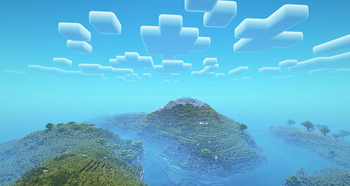
About this Modpack

Cheesecraft strives to be a minecraft modpack that adds many new content, such as the Aether, cheese (of course), new animations, and a completely overhauled worldgen system.
It also adds multiple optimization mods to make the game run as smooth as butter, considering you have a good enough computer, of course.
VR SUPPORT!!!
Mods: 238
<li>Almanac</li>
<li>Alternate Current</li>
<li>Animatica</li>
<li>Anti-Enderman</li>
<li>Architectury</li>
<li>Armor Stand Arms</li>
<li>AttributeFix</li>
<li>AxeStrip</li>
<li>AzureLib Armor</li>
<li>BadOptimizations</li>
<li>Balm</li>
<li>Bartering Station</li>
<li>Better Beds</li>
<li>Better FPS distance Mod</li>
<li>Better Mount HUD</li>
<li>Better Trees</li>
<li>Better chunk loading mod</li>
<li>Blood N' Particles Mod</li>
<li>Blur+</li>
<li>Boat Item View</li>
<li>Bookshelf</li>
<li>BookshelfInspector</li>
<li>Bundle API</li>
<li>CICADA</li>
<li>CIT Resewn</li>
<li>CameraOverhaul</li>
<li>Canary</li>
<li>Cave Dust</li>
<li>Chat Heads</li>
<li>ChatAnimation</li>
<li>Cherished Worlds</li>
<li>Chunk Activity Tracker</li>
<li>Chunksending Mod</li>
<li>Chunky</li>
<li>Cloth Config v15</li>
<li>Clumps</li>
<li>Cobweb</li>
<li>Collective</li>
<li>Combat Roll</li>
<li>Comforts</li>
<li>Concurrent Chunk Management Engine</li>
<li>Connectivity Mod</li>
<li>Continuity</li>
<li>Controlling</li>
<li>CoolRain</li>
<li>Copper Golem</li>
<li>CorgiLib</li>
<li>CoroUtil</li>
<li>Crash Assistant</li>
<li>CreativeCore</li>
<li>Cristel Lib</li>
<li>Cubes Without Borders</li>
<li>Darceno's Minecarts</li>
<li>DashLoader</li>
<li>Debugify</li>
<li>Deeper and Darker</li>
<li>Detail Armor Bar</li>
<li>DisplayCase</li>
<li>Distant Horizons</li>
<li>Do a Barrel Roll</li>
<li>Does It Tick?</li>
<li>Drip Sounds</li>
<li>Drippy Loading Screen</li>
<li>Dungeons and Taverns</li>
<li>Dynamic View Mod</li>
<li>Early Elytra</li>
<li>Easy Shulker Boxes</li>
<li>Eating Animation</li>
<li>Elytra Optimizations</li>
<li>Enchanted Vertical Slabs</li>
<li>EnchantmentDescriptions</li>
<li>Enhanced Block Entities</li>
<li>EnhancedVisuals</li>
<li>Entity Model Features</li>
<li>Entity Pin Cushions</li>
<li>Entity Texture Features</li>
<li>EntityCulling</li>
<li>Explosive Enhancement</li>
<li>FPShud</li>
<li>Fabric API</li>
<li>Fabric Language Kotlin</li>
<li>Falling Leaves</li>
<li>FancyMenu</li>
<li>Fast Item Frames</li>
<li>Fast Paintings</li>
<li>FastBoot</li>
<li>Faster Random</li>
<li>FerriteCore</li>
<li>FeyTweaks</li>
<li>Forge Config API Port</li>
<li>Fzzy Config</li>
<li>GPU Tape</li>
<li>GeckoLib 4</li>
<li>Get It Together, Drops!</li>
<li>GlitchCore</li>
<li>Glowing Torchflower</li>
<li>Graves</li>
<li>HT's TreeChop</li>
<li>Handcrafted</li>
<li>Hardcore Revival</li>
<li>Hold My Items</li>
<li>Horseman</li>
<li>Iceberg</li>
<li>ImmediatelyFast</li>
<li>Immersive Hotbar</li>
<li>Immersive Optimization</li>
<li>ImmersiveMC</li>
<li>ImmersiveUI</li>
<li>Inventory Particles</li>
<li>Iris</li>
<li>JamLib</li>
<li>Jupiter</li>
<li>Konkrete</li>
<li>Krypton</li>
<li>Ksyxis</li>
<li>Language Reload</li>
<li>Leawind's Third Person</li>
<li>Let Me Despawn</li>
<li>LibZ</li>
<li>Library ferret</li>
<li>Lighty</li>
<li>Limited Chunkloading Mod</li>
<li>Linear Progression</li>
<li>Litematica</li>
<li>Lithium</li>
<li>Lithostitched</li>
<li>Log Begone</li>
<li>Longer Days</li>
<li>M.R.U</li>
<li>MaLiLib</li>
<li>MaxHealthFix</li>
<li>Melody</li>
<li>Merchant Markers</li>
<li>MidnightLib</li>
<li>MmmMmmMmmMmm</li>
<li>Mod Menu</li>
<li>Model Gap Fix</li>
<li>ModernFix</li>
<li>Moonlight Lib</li>
<li>More Culling</li>
<li>MoreMcmeta</li>
<li>MoreMcmeta Emissive Textures Plugin</li>
<li>No Chat Reports</li>
<li>No More Phantoms</li>
<li>No Resource Pack Warnings</li>
<li>Noisium</li>
<li>NotEnoughAnimations</li>
<li>Nyf's Spiders</li>
<li>OctoLib</li>
<li>OptiGUI</li>
<li>Panorama Screenshot</li>
<li>Particle Core</li>
<li>Particle Interactions</li>
<li>Particle Rain</li>
<li>Particular</li>
<li>Pick Up Notifier</li>
<li>Placeholder API</li>
<li>Platform</li>
<li>Player Animator</li>
<li>Polytone</li>
<li>Pommel - Held Item Models</li>
<li>PrickleMC</li>
<li>Pufferfish's Skills</li>
<li>Puzzles Lib</li>
<li>Raknetify (Fabric)</li>
<li>RangedWeaponAPI</li>
<li>Realistic Bees</li>
<li>Redirected</li>
<li>Reimagined Menus</li>
<li>Resourceful Lib</li>
<li>Resourcify</li>
<li>Return Copper Horns</li>
<li>Right Click Harvest</li>
<li>RoadArchitect</li>
<li>Satin</li>
<li>Scalable Cat's Force Fabric</li>
<li>ScalableLux</li>
<li>Searchables</li>
<li>Serious Player Animations</li>
<li>ServerCore</li>
<li>Shield API</li>
<li>Silk (All modules)</li>
<li>Smoke Suppression</li>
<li>Smooth Scroll</li>
<li>Smooth chunk save Mod</li>
<li>SmoothGui</li>
<li>Sodium</li>
<li>Sodium Dynamic Lights</li>
<li>Sodium Extra</li>
<li>Sodium Shadowy Path Blocks</li>
<li>Sound Physics Perfected</li>
<li>Spawn Animations</li>
<li>Spawn Animations Compats</li>
<li>Status Effect Bars</li>
<li>StewDrinkSound</li>
<li>Structure Essentials Mod</li>
<li>Structure Pool API</li>
<li>Subtle Effects</li>
<li>TCD Commons API</li>
<li>Tectonic</li>
<li>TerraBlender</li>
<li>Terralith</li>
<li>ThreatenGL</li>
<li>Torch hit!</li>
<li>ToughAsNails</li>
<li>True Ending: Ender Dragon Overhaul</li>
<li>Tumbleweeds</li>
<li>TxniLib</li>
<li>Uranus</li>
<li>Vectorientation</li>
<li>Veinminer</li>
<li>Vertigo</li>
<li>Very Many Players</li>
<li>Villager Names</li>
<li>VisualOverhaul</li>
<li>Visuality</li>
<li>Vivecraft</li>
<li>WATER BUCKET. RELEASE!</li>
<li>Wakes</li>
<li>WaveyCapes</li>
<li>Welcome Message</li>
<li>Wither's Wrath</li>
<li>World Play Time</li>
<li>WorldEdit</li>
<li>Xaero's Minimap</li>
<li>Xaero's World Map</li>
<li>Xander's Sodium Options</li>
<li>YUNG's API</li>
<li>YUNG's Menu Tweaks</li>
<li>Yeetus Experimentus</li>
<li>YetAnotherConfigLib</li>
<li>cupboard</li>
<li>e4mc</li>
<li>lazy-language-loader</li>
<li>libIPN</li>
<li>mc-vr-api</li>
<li>oωo</li>
<li>spark</li>
Available Versions
How to Set Up a Cheesecraft Server
Order Server
Choose at least 6 GB RAM (8 GB recommended for Cheesecraft). Based on player count: per 5 players.
Install Modpack in Dashboard
Open the modpack browser in the dashboard, search for "Cheesecraft" and click "Install". The fabric loader and Minecraft 1.21.1 are configured automatically.
Start Server & Play
Start the server – all mods are loaded automatically. Share the server IP with friends and play together!
Frequently Asked Questions
Cheesecraft server crashes or won't start – what to do?
Most common causes: insufficient RAM or wrong fabric loader. Check latest.log for "OutOfMemoryError" → increase RAM to at least 8 GB. For "Mixin" or "ClassNotFoundException" errors: modpack version and loader don't match. With Mado Hosting, loader and Minecraft version are auto-configured on modpack install – preventing most startup issues.
How much RAM does a Cheesecraft server really need?
Minimum 6 GB, recommended 8 GB for stable performance. per 5 players. Important: Minecraft modpacks need more RAM than vanilla – plan extra per additional player. With Mado Hosting, you can scale RAM up live at any time without data loss (from €12/month).
Can I add custom mods to Cheesecraft without conflicts?
Yes, but check compatibility: only use mods for the same loader (fabric) and same Minecraft version (1.21.1). Common issues: ID conflicts with recipe mods and incompatible coremod versions. The Mado dashboard mod browser only shows compatible mods and warns about known conflicts.
Cheesecraft server lagging – performance tips
1) Increase RAM to 8 GB+. 2) Reduce server view-distance to 8 (server.properties). 3) Pre-generate chunks with the "Chunky" plugin. 4) Use /spark profiler to check which mods consume the most tick time. With Mado Hosting, all servers run on NVMe SSDs with dedicated CPU cores – eliminating hardware as a bottleneck.
Similar Modpacks
![Cobblemon Official Modpack [Fabric]](https://cdn.modrinth.com/data/5FFgwNNP/e7f9ee2e9d361623847853fe2ddce42f519ee64f.png)
![COBBLEVERSE - Pokemon Adventure [Cobblemon]](https://cdn.modrinth.com/data/Jkb29YJU/581ecf54530972afb18a04660afd820f2f24f6c7.png)
![Better MC [FABRIC] - BMC2](https://cdn.modrinth.com/data/shFhR8Vx/a19c2bcb51d38f32f138d3607e91cb2b7b8e387f_96.webp)


![Better MC [FORGE] - BMC4](https://cdn.modrinth.com/data/4BV47HRn/7f5ef7cc61b2593609aabef3ed07a866a4f11b73_96.webp)
Rent Cheesecraft Server
Start your own server with automatic modpack installation.
Details
- License
- GNU Lesser General Public License v3.0 or later
- Server-side
- Required
- Client-side
- Required
Supported Versions
Start your Cheesecraft Server now
From €12.00/month with 8 GB RAM for the best performance.
Configure Server →