
ChristmasTech
This is a Winter/Christmas themed techmod kitchensink pack
Screenshots
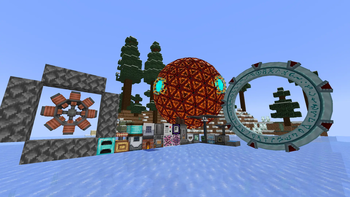
About this Modpack
ChristmasTech
ChristmasTech is a festive Minecraft kitchen-sink modpack that blends holiday charm with powerful tech mods. Explore snowy landscapes, automate huge factories, decorate your world for the season, and enjoy a cozy yet high-tech adventure. With a wide mix of mods for building, crafting, automation, exploration, and decoration, this pack offers something for every type of player. Whether you're engineering massive redstone-inspired machines or creating the perfect Christmas village, ChristmasTech delivers a fun, feature-rich experience for the holidays.
For more Information also check out the Github-Repository
https://github.com/7stain/ChristmasTech
Mods
Content Mods
- AE2 Import Export Card
- AE2: Better Villagers
- Another Furniture
- Applied Energistics 2
- Applied Energistics 2 Wireless Terminals
- Artifacts
- Better Archeology
- Better Villages
- Biomes O' Plenty
- Building Wands
- Chipped
- Christmas Land
- Comforts
- Create
- Create: Bells & Whistles
- Create: Better Villagers
- Create: Blazing Hot
- Create: Copycats+
- Create: Crafts & Additions
- Create: Diesel Generators
- Create: Dreams and Desires
- Create: Easy Stone Generators
- Create: Enchantment Industries
- Create: Jetpack
- Create: Man of Many Planes
- Create: New Age
- Create: New Beginnings
- Create: Power Loader
- Create: Railways Navigator
- Create: Rustic Structures
- Create: Slice & Dice
- Create: Stuff and Additions
- Create: The Factory Must Grow
- Create: Ultimate Factory
- Create: Wrencheable Planes
- Cultural Delights
- Delightful Creators
- Draconic Evolution
- Dungeons and Taverns
- Ender IO
- Extreme Reactors
- Farmer's Delight
- Guard Villagers
- Immersive Aircraft
- Immersive Engineering
- Industrial Foregoing
- Iron Furnaces
- Just Hammers
- Macaw's Holidays
- Man of Many Planes
- ME Requester
- MEGA Cells
- Mekanism
- Mekanism Generators
- MES - Moog's End Structures
- MmmMmmMmmMmm
- MNS - Moog's Nether Structures
- More Delight
- Morph-o-Tool
- MSS - Moog's Soaring Structures
- MVS - Moog's Voyager Structures
- PneumaticCraft: Repressurized
- Rechiseled
- Rechiseled: Create
- RFTools Base
- RFTools Builder
- RFTools Utility
- SecurityCraft
- Simple Hats
- Snowy Spirit
- Solar Flux Reborn
- Stargate Journey
- Tom's Simple Storage Mod
- Trash Cans
- Traveler's Backpack
- Ultimate Car Mod
- Underground Village, Stoneholm
- Villager Names
- Woot Revived
- WorldEdit
- YUNG's Better Desert Temples
- YUNG's Better Dungeons
- YUNG's Better Jungle Temples
- YUNG's Better Mineshafts
- YUNG's Better Strongholds
- YUNG's Cave Biomes
Quality of Life Mods
- AppleSkin
- Auth Me
- Crafting Tweaks
- Cubes Without Borders
- Durability Tooltip
- Extreme sound muffler
- Fast IP Ping
- Freecam
- Full Brightness Toggle
- GraveStone Mod
- Ice Age
- Inventory Profiles Next
- Jade
- Jade Addons (Neo/Forge)
- Just Enough Advancements (JEA)
- Just Enough Breeding (JEBr)
- Just Enough Effect Descriptions (JEED)
- Just Enough Immersive Multiblocks
- Just Enough Items (JEI)
- Just Enough Mekanism Multiblocks
- Just Enough Professions (JEP)
- Just Enough Resources (JER)
- Leaves Be Gone
- Model Gap Fix
- Mouse Tweaks
- Neat
- Not Enough Crashes
- Remove Reloading Screen
- RightClickHarvest
- Shulker Box Tooltip
- Snow Under Trees
- Snow! Real Magic!
- SnowFlakes
- Sound Physics Remastered
- WI Zoom
- Xaero Zoomout
- Xaero's Minimap
- Xaero's World Map
Optimization Mods
- BadOptimizations
- Cull Leaves
- Dynamic FPs
- Entity Culling
- ImmediatelyFast
- ModernFix
- Sodium
- spark
Library Mods
- Accessories
- Architectury API
- Athena
- Balm
- Brandons Core
- Cloth Config API
- CodeChicken Lib
- Collective
- Cucumber Library
- Curios API
- FerriteCore
- Fusion (Connected Textures)
- Geckolib
- GlitchCore
- GuideME
- HammerLib
- JamLib
- Kiwi
- Konkrete
- Kotlin for Forge
- LDLib
- libIPN
- Library Ferret
- LibX
- McJtyLib
- MidnightLib
- Moog's Structure Lib
- Moonlight Lib
- oωo (owo-lib)
- Patchouli
- Puzzles Lib
- Resourceful Config
- Resourceful Lib
- SuperMartijn642's Config Lib
- SuperMartijn642's Core Lib
- TerraBlender
- Titanium
- YUNG's API
- ZeroCore
Available Versions
How to Set Up a ChristmasTech Server
Order Server
Choose at least 6 GB RAM (8 GB recommended for ChristmasTech). Based on player count: per 5 players.
Install Modpack in Dashboard
Open the modpack browser in the dashboard, search for "ChristmasTech" and click "Install". The neoforge loader and Minecraft 1.21.1 are configured automatically.
Start Server & Play
Start the server – all mods are loaded automatically. Share the server IP with friends and play together!
Frequently Asked Questions
ChristmasTech server crashes or won't start – what to do?
Most common causes: insufficient RAM or wrong neoforge loader. Check latest.log for "OutOfMemoryError" → increase RAM to at least 8 GB. For "Mixin" or "ClassNotFoundException" errors: modpack version and loader don't match. With Mado Hosting, loader and Minecraft version are auto-configured on modpack install – preventing most startup issues.
How much RAM does a ChristmasTech server really need?
Minimum 6 GB, recommended 8 GB for stable performance. per 5 players. Important: Minecraft modpacks need more RAM than vanilla – plan extra per additional player. With Mado Hosting, you can scale RAM up live at any time without data loss (from €12/month).
Can I add custom mods to ChristmasTech without conflicts?
Yes, but check compatibility: only use mods for the same loader (neoforge) and same Minecraft version (1.21.1). Common issues: ID conflicts with recipe mods and incompatible coremod versions. The Mado dashboard mod browser only shows compatible mods and warns about known conflicts.
ChristmasTech server lagging – performance tips
1) Increase RAM to 8 GB+. 2) Reduce server view-distance to 8 (server.properties). 3) Pre-generate chunks with the "Chunky" plugin. 4) Use /spark profiler to check which mods consume the most tick time. With Mado Hosting, all servers run on NVMe SSDs with dedicated CPU cores – eliminating hardware as a bottleneck.
Similar Modpacks
![Better MC [FABRIC] - BMC2](https://cdn.modrinth.com/data/shFhR8Vx/a19c2bcb51d38f32f138d3607e91cb2b7b8e387f_96.webp)
![Better MC [FORGE] - BMC4](https://cdn.modrinth.com/data/4BV47HRn/7f5ef7cc61b2593609aabef3ed07a866a4f11b73_96.webp)


![Better MC [FABRIC] - BMC3](https://cdn.modrinth.com/data/NHUidpfR/327e0749bb6d160c41799fd77bf6d3d631569dc8_96.webp)

Rent ChristmasTech Server
Start your own server with automatic modpack installation.
Supported Versions
Start your ChristmasTech Server now
From €12.00/month with 8 GB RAM for the best performance.
Configure Server →