
ChunkPilot
Client-side Fabric performance pack with conservative defaults, optional vanilla-style visuals, and technical survival tools.
Screenshots
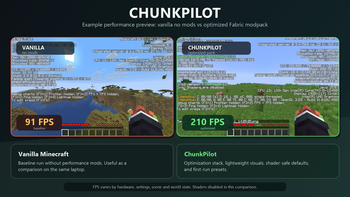
About this Modpack
ChunkPilot
ChunkPilot is a Fabric client modpack for Minecraft 26.1.2. It bundles performance, rendering, memory, and culling mods with conservative default settings, optional vanilla-style visuals, and technical-survival client tools.
The goal is to provide a ready-to-import client setup for players who want a smoother baseline than vanilla on common hardware, especially laptops and integrated graphics. Performance results vary by device, graphics drivers, world, settings, server, render distance, enabled resource packs, and shaders.
What Is Included
- Fabric Loader 0.19.2 and Minecraft 26.1.2.
- Performance and rendering mods such as Sodium, Lithium, FerriteCore, Entity Culling, More Culling, ImmediatelyFast, ScalableLux, BadOptimizations, Better Block Entities, Ksyxis, FastQuit, Dynamic FPS, Krypton, and related dependencies.
- Iris for optional shader support. Shaders are disabled by default.
- MakeUp Ultra Fast as an optional lightweight shader pack.
- Vanilla-style resource packs. The default enabled packs are Vanilla Experience Plus, Visible Ores, and Visual Armor Trims. Other included packs are optional and can be enabled or disabled by the player.
- Technical-survival tools: Litematica, MiniHUD, Tweakeroo, Item Scroller, Shulker Box Tooltip, Xaero Minimap, and Xaero World Map.
ChunkPilot AutoTune
ChunkPilot includes a small client-side helper called ChunkPilot AutoTune. On first launch, it writes a conservative Minecraft settings preset using available information such as CPU thread count, memory values, operating system, and GPU name hints when available.
AutoTune is meant to choose safer starting settings. It does not modify graphics drivers, overclock hardware, change Windows settings, or guarantee a specific FPS number. By default, it does not overwrite player changes every launch.
Default first-run settings include:
- Render distance: 8 chunks.
- Simulation distance: 6 chunks.
- FPS cap: 120.
- Shaders disabled.
- Lightweight resource packs enabled.
Environment And Compatibility
ChunkPilot is a client-side modpack. Install it on your Minecraft client through Modrinth App, Prism Launcher, or another launcher that supports .mrpack files.
It is not intended to be installed on a dedicated server. It should be able to join vanilla or Fabric servers when those servers allow client-side performance, minimap, and technical utility mods. Always follow the rules of the server you play on.
What ChunkPilot Does Not Do
- It does not add new blocks, items, mobs, dimensions, quests, or progression systems.
- It does not include ReShaded because of compatibility warnings and FPS impact in this setup.
- It does not include Technical Tree Chopper in the public default pack because that changes survival gameplay.
- It does not promise the same FPS result on all hardware.
Recommended Use
Start with the default settings. If your computer has a dedicated GPU, you can try enabling MakeUp Ultra Fast manually through Iris. If your FPS drops too much, turn shaders off again and reduce render distance.
Available Versions
How to Set Up a ChunkPilot Server
Order Server
Choose at least 6 GB RAM (8 GB recommended for ChunkPilot). Based on player count: per 5 players.
Install Modpack in Dashboard
Open the modpack browser in the dashboard, search for "ChunkPilot" and click "Install". The fabric loader and Minecraft 26.1.2 are configured automatically.
Start Server & Play
Start the server – all mods are loaded automatically. Share the server IP with friends and play together!
Frequently Asked Questions
ChunkPilot server crashes or won't start – what to do?
Most common causes: insufficient RAM or wrong fabric loader. Check latest.log for "OutOfMemoryError" → increase RAM to at least 8 GB. For "Mixin" or "ClassNotFoundException" errors: modpack version and loader don't match. With Mado Hosting, loader and Minecraft version are auto-configured on modpack install – preventing most startup issues.
How much RAM does a ChunkPilot server really need?
Minimum 6 GB, recommended 8 GB for stable performance. per 5 players. Important: Minecraft modpacks need more RAM than vanilla – plan extra per additional player. With Mado Hosting, you can scale RAM up live at any time without data loss (from €12/month).
Can I add custom mods to ChunkPilot without conflicts?
Yes, but check compatibility: only use mods for the same loader (fabric) and same Minecraft version (26.1.2). Common issues: ID conflicts with recipe mods and incompatible coremod versions. The Mado dashboard mod browser only shows compatible mods and warns about known conflicts.
ChunkPilot server lagging – performance tips
1) Increase RAM to 8 GB+. 2) Reduce server view-distance to 8 (server.properties). 3) Pre-generate chunks with the "Chunky" plugin. 4) Use /spark profiler to check which mods consume the most tick time. With Mado Hosting, all servers run on NVMe SSDs with dedicated CPU cores – eliminating hardware as a bottleneck.
Similar Modpacks

![Cobblemon Official Modpack [Fabric]](https://cdn.modrinth.com/data/5FFgwNNP/e7f9ee2e9d361623847853fe2ddce42f519ee64f.png)
![COBBLEVERSE - Pokemon Adventure [Cobblemon]](https://cdn.modrinth.com/data/Jkb29YJU/581ecf54530972afb18a04660afd820f2f24f6c7.png)
![Better MC [FABRIC] - BMC2](https://cdn.modrinth.com/data/shFhR8Vx/a19c2bcb51d38f32f138d3607e91cb2b7b8e387f_96.webp)


Rent ChunkPilot Server
Start your own server with automatic modpack installation.
Supported Versions
Start your ChunkPilot Server now
From €12.00/month with 8 GB RAM for the best performance.
Configure Server →