Cinema Shots
Turn your Minecraft experience into a cinematic adventure with the right mods!
Screenshots
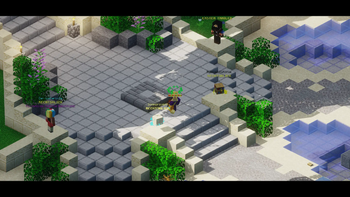
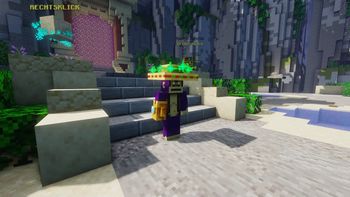
About this Modpack
Cinematic Modpack for Minecraft
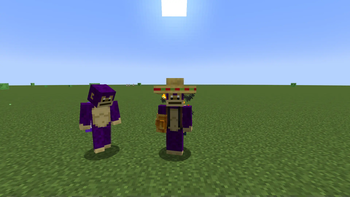
This modpack is specifically designed to help players create stunning cinematic shots in Minecraft. Whether you're a content creator, filmmaker, or just someone who enjoys crafting beautiful scenes, this collection of mods provides all the tools you need to capture professional-quality videos and screenshots.
Performance and Graphics Enhancements
- Sodium and Iris Shaders are crucial for improving both performance and visuals. Sodium ensures smooth gameplay with higher FPS, while Iris Shaders allows you to apply realistic lighting and shadow effects using shader packs like AstraLex Shaders. This combination ensures that your recordings not only run smoothly but also look visually stunning.
Camera Control and Perspectives
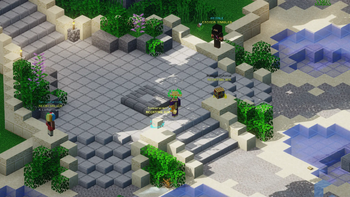
OrthoCamera provides an orthographic view, perfect for taking detailed, distortion-free shots of buildings or landscapes. This is especially useful for map builders who want to showcase their creations in a professional and clean perspective.
Freecam allows you to detach the camera from your character, enabling you to explore your world freely from any angle. This is ideal for finding creative camera angles without moving your character, which is essential for capturing cinematic shots.
Motion Capture is a powerful tool for recording and replaying character movements in Minecraft. This allows you to choreograph complex scenes where characters or NPCs perform precise actions, making it easier to create scripted cinematic sequences.
Recording and Editing
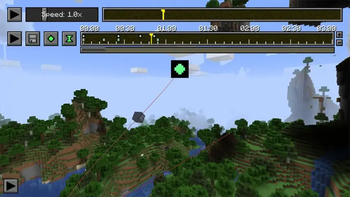
- ReplayMod is the centerpiece of this modpack for anyone looking to create professional Minecraft videos. It allows you to record entire gameplay sessions and then edit them in a built-in editor. ReplayMod offers a wide range of camera controls, enabling you to create smooth camera movements and breathtaking shots that are perfect for Minecraft films or time-lapse videos.
Fine-Tuning and Customization
- Zoomify and Not Enough Animations provide additional customization to make the gameplay experience more realistic and dynamic. Zoomify allows you to zoom in on distant objects for detailed shots, while Not Enough Animations ensures that movements and interactions appear more lifelike, enhancing the quality of your videos.
Additional Tools for Content Creators
- Creator Overlays provides useful on-screen overlays that display information like FPS, recording status, and more while recording. This is especially handy for streamers and YouTubers who need to monitor these details during their content creation process.
By combining these mods, you have a powerful toolkit that makes creating cinematic content in Minecraft easier and more effective. Whether you're capturing breathtaking landscapes, choreographing epic scenes, or simply recording high-quality gameplay, this modpack has everything you need.
Available Versions
How to Set Up a Cinema Shots Server
Order Server
Choose at least 6 GB RAM (8 GB recommended for Cinema Shots). Based on player count: per 5 players.
Install Modpack in Dashboard
Open the modpack browser in the dashboard, search for "Cinema Shots" and click "Install". The fabric loader and Minecraft 1.21 are configured automatically.
Start Server & Play
Start the server – all mods are loaded automatically. Share the server IP with friends and play together!
Frequently Asked Questions
Cinema Shots server crashes or won't start – what to do?
Most common causes: insufficient RAM or wrong fabric loader. Check latest.log for "OutOfMemoryError" → increase RAM to at least 8 GB. For "Mixin" or "ClassNotFoundException" errors: modpack version and loader don't match. With Mado Hosting, loader and Minecraft version are auto-configured on modpack install – preventing most startup issues.
How much RAM does a Cinema Shots server really need?
Minimum 6 GB, recommended 8 GB for stable performance. per 5 players. Important: Minecraft modpacks need more RAM than vanilla – plan extra per additional player. With Mado Hosting, you can scale RAM up live at any time without data loss (from €12/month).
Can I add custom mods to Cinema Shots without conflicts?
Yes, but check compatibility: only use mods for the same loader (fabric) and same Minecraft version (1.21). Common issues: ID conflicts with recipe mods and incompatible coremod versions. The Mado dashboard mod browser only shows compatible mods and warns about known conflicts.
Cinema Shots server lagging – performance tips
1) Increase RAM to 8 GB+. 2) Reduce server view-distance to 8 (server.properties). 3) Pre-generate chunks with the "Chunky" plugin. 4) Use /spark profiler to check which mods consume the most tick time. With Mado Hosting, all servers run on NVMe SSDs with dedicated CPU cores – eliminating hardware as a bottleneck.
Rent Cinema Shots Server
Start your own server with automatic modpack installation.
Details
- License
- LicenseRef-All-Rights-Reserved
- Server-side
- Unsupported
- Client-side
- Required
Supported Versions
Start your Cinema Shots Server now
From €12.00/month with 8 GB RAM for the best performance.
Configure Server →