
Cinemanilla+
Shader-free cinematic visuals with high FPS, perfect for low-end and mid-range PCs.
Screenshots
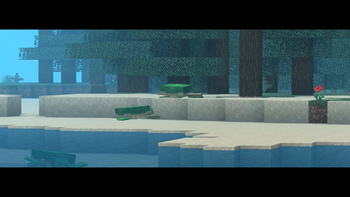
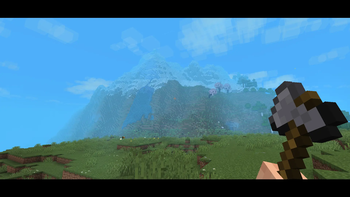
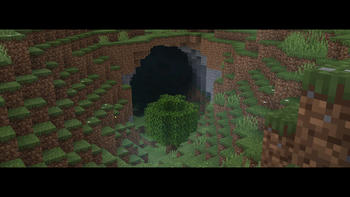
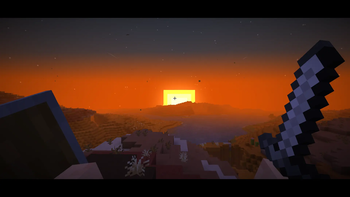
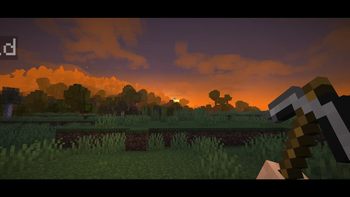
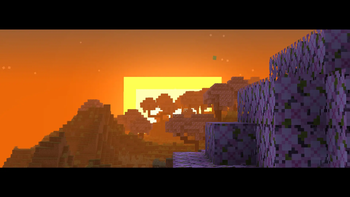
About this Modpack
‼️This Modpack is Optimized For Visual Effects+ ‼️
Please download Here: https://modrinth.com/resourcepack/visual-effects-plus/version/1.0.0
🎬 Cinemanilla+
Cinemanilla+ is a carefully crafted Vanilla+ cinematic Minecraft modpack focused on immersion, atmosphere, smooth performance, and film-like presentation — without shaders and without changing core gameplay.
Showcase:
🌄 Cinematic Visuals (No Shaders)
This pack uses lightweight visual mods instead of shaders to create a clean, film-like look that still feels vanilla.
✨ What you actually get
Better lighting and connected textures using Sodium, Continuity, and Entity Texture Features
Smoother, more expressive animations with Fresh Animations and Not Enough Animations
Ambient particles and environmental effects from Biome Particle Weather and Visual Effects+
Improved skies, clouds, and depth without overprocessing the image
The world looks natural, readable, and cinematic — not glossy or fake.
🎥 Camera & Film Feel
This is the core of the pack.
🎞️ Cinematic features
Optional letterboxing for movie-style framing (black bars)
Cinematic Zoom for smooth exploration and dramatic shots
Camera Overhaul for natural movement and inertia
Cleaner UI tweaks to keep the screen distraction-free
This is built for recording, screenshots, roleplay, and immersion — but still feels good for normal survival gameplay.
🎒 Immersion & World Feel
Small details that noticeably improve how the game feels.
Hold My Items shows items physically held in your hands
Presence Footsteps adds realistic, directional footstep audio
Ambient Sounds and Sound Physics Remastered add reverb, echoes, and depth
Subtle entity and particle interactions make the world feel responsive
Minecraft doesn’t just look better — it reacts to you.
🚀 Performance First
Cinemanilla+ is designed to run smoothly, even on mid-range systems.
⚙️ Performance mods included
Lithium, FerriteCore, ImmediatelyFast
Entity Culling and More Culling
Dynamic FPS and C2ME
High FPS, fast loading, minimal stutter.
🎯 Who this pack is for
Players who want cinematic visuals without shaders
Content creators and screenshot enjoyers
Vanilla players who want polish, not overhaul
Anyone who wants Minecraft to feel like a playable film
Available Versions
How to Set Up a Cinemanilla+ Server
Order Server
Choose at least 6 GB RAM (8 GB recommended for Cinemanilla+). Based on player count: per 5 players.
Install Modpack in Dashboard
Open the modpack browser in the dashboard, search for "Cinemanilla+" and click "Install". The fabric loader and Minecraft 1.21.5 are configured automatically.
Start Server & Play
Start the server – all mods are loaded automatically. Share the server IP with friends and play together!
Frequently Asked Questions
Cinemanilla+ server crashes or won't start – what to do?
Most common causes: insufficient RAM or wrong fabric loader. Check latest.log for "OutOfMemoryError" → increase RAM to at least 8 GB. For "Mixin" or "ClassNotFoundException" errors: modpack version and loader don't match. With Mado Hosting, loader and Minecraft version are auto-configured on modpack install – preventing most startup issues.
How much RAM does a Cinemanilla+ server really need?
Minimum 6 GB, recommended 8 GB for stable performance. per 5 players. Important: Minecraft modpacks need more RAM than vanilla – plan extra per additional player. With Mado Hosting, you can scale RAM up live at any time without data loss (from €12/month).
Can I add custom mods to Cinemanilla+ without conflicts?
Yes, but check compatibility: only use mods for the same loader (fabric) and same Minecraft version (1.21.5). Common issues: ID conflicts with recipe mods and incompatible coremod versions. The Mado dashboard mod browser only shows compatible mods and warns about known conflicts.
Cinemanilla+ server lagging – performance tips
1) Increase RAM to 8 GB+. 2) Reduce server view-distance to 8 (server.properties). 3) Pre-generate chunks with the "Chunky" plugin. 4) Use /spark profiler to check which mods consume the most tick time. With Mado Hosting, all servers run on NVMe SSDs with dedicated CPU cores – eliminating hardware as a bottleneck.
Similar Modpacks
![Cobblemon Official Modpack [Fabric]](https://cdn.modrinth.com/data/5FFgwNNP/e7f9ee2e9d361623847853fe2ddce42f519ee64f.png)
![COBBLEVERSE - Pokemon Adventure [Cobblemon]](https://cdn.modrinth.com/data/Jkb29YJU/581ecf54530972afb18a04660afd820f2f24f6c7.png)
![Better MC [FABRIC] - BMC2](https://cdn.modrinth.com/data/shFhR8Vx/a19c2bcb51d38f32f138d3607e91cb2b7b8e387f_96.webp)


![Better MC [FORGE] - BMC4](https://cdn.modrinth.com/data/4BV47HRn/7f5ef7cc61b2593609aabef3ed07a866a4f11b73_96.webp)
Rent Cinemanilla+ Server
Start your own server with automatic modpack installation.
Supported Versions
Start your Cinemanilla+ Server now
From €12.00/month with 8 GB RAM for the best performance.
Configure Server →