
Cinematic Pack
The perfect modpack for YouTubers or those who enjoy filmmaking in Minecraft, this modpack is based on the ReplayMod.
Screenshots
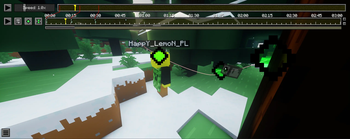
About this Modpack
Cinematic Pack
A mod pack that includes shaders, resource packs, and mods that add support for various animated textures, optimization, etc. This pack is perfect for starting out; you just need to install FFmpeg according to the official ReplayMod guide.
REQUIRED TO USE THIS PACK, READ THIS!!
To render videos with ReplayMod, you need to add FFmpeg to your Minecraft folder. The full guide is available here:
https://www.replaymod.com/docs/#installing-ffmpeg
The pack includes initial textures that are similar to those in the official Minecraft trailers.
The mod pack will definitely be optimized as I find cool mods for animations or decorations that can enhance your cinematics.
REMEMBER! The mod pack does not need to be installed on the server [V1]; all mods are client-side, and you can record with friends who don’t have these mods. It’s important that the person responsible for rendering, etc., is using this pack on the server.
However, for better immersion, it’s best if your friends use the same textures and shaders so they can better get into character. ;)
[V2] The pack got new furniture, etc. This version of the pack needs to be uploaded to the server so we can 'use' friends for role-playing. ;)
Available Versions
How to Set Up a Cinematic Pack Server
Order Server
Choose at least 6 GB RAM (8 GB recommended for Cinematic Pack). Based on player count: per 5 players.
Install Modpack in Dashboard
Open the modpack browser in the dashboard, search for "Cinematic Pack" and click "Install". The fabric loader and Minecraft 1.20.4 are configured automatically.
Start Server & Play
Start the server – all mods are loaded automatically. Share the server IP with friends and play together!
Frequently Asked Questions
Cinematic Pack server crashes or won't start – what to do?
Most common causes: insufficient RAM or wrong fabric loader. Check latest.log for "OutOfMemoryError" → increase RAM to at least 8 GB. For "Mixin" or "ClassNotFoundException" errors: modpack version and loader don't match. With Mado Hosting, loader and Minecraft version are auto-configured on modpack install – preventing most startup issues.
How much RAM does a Cinematic Pack server really need?
Minimum 6 GB, recommended 8 GB for stable performance. per 5 players. Important: Minecraft modpacks need more RAM than vanilla – plan extra per additional player. With Mado Hosting, you can scale RAM up live at any time without data loss (from €12/month).
Can I add custom mods to Cinematic Pack without conflicts?
Yes, but check compatibility: only use mods for the same loader (fabric) and same Minecraft version (1.20.4). Common issues: ID conflicts with recipe mods and incompatible coremod versions. The Mado dashboard mod browser only shows compatible mods and warns about known conflicts.
Cinematic Pack server lagging – performance tips
1) Increase RAM to 8 GB+. 2) Reduce server view-distance to 8 (server.properties). 3) Pre-generate chunks with the "Chunky" plugin. 4) Use /spark profiler to check which mods consume the most tick time. With Mado Hosting, all servers run on NVMe SSDs with dedicated CPU cores – eliminating hardware as a bottleneck.
Similar Modpacks

![Cobblemon Official Modpack [Fabric]](https://cdn.modrinth.com/data/5FFgwNNP/e7f9ee2e9d361623847853fe2ddce42f519ee64f.png)
![COBBLEVERSE - Pokemon Adventure [Cobblemon]](https://cdn.modrinth.com/data/Jkb29YJU/581ecf54530972afb18a04660afd820f2f24f6c7.png)
![Better MC [FABRIC] - BMC2](https://cdn.modrinth.com/data/shFhR8Vx/a19c2bcb51d38f32f138d3607e91cb2b7b8e387f_96.webp)


Rent Cinematic Pack Server
Start your own server with automatic modpack installation.
Supported Versions
Start your Cinematic Pack Server now
From €12.00/month with 8 GB RAM for the best performance.
Configure Server →