
Cinematorgraphy
This Modpack allows you to make the best of the best shots in Minecraft!
Screenshots
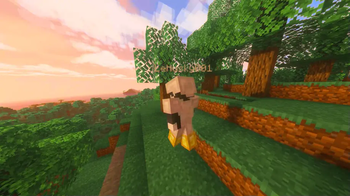
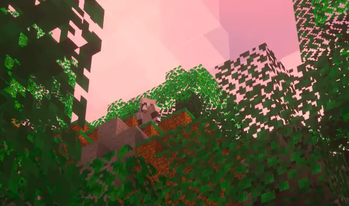
About this Modpack
🎬 Cinematography
A Fabric modpack tailored for Minecraft filmmakers, machinima creators, and aesthetic storytellers.
🧰 Features
Cinematography focuses on providing a visually rich and immersive experience while enhancing creative control for content creators. Whether you're filming epic battles, serene nature shots, or complex roleplays—this pack gives you the tools to direct like a pro.
✨ Visual Enhancements
Iris & Sodium – Optimal performance with full shader support.
Insanity, Solas, and Pastel Shaders – Aesthetic choices for every mood.
Better Clouds, Falling Leaves, Particle Rain – Enhances atmosphere and realism.
Visuality – Adds ambient particle effects to deepen immersion.
🎥 Cinematic Tools
Camera Utils – Provides smooth and programmable camera paths.
Motion Capture (Mocap) – Record and replay player actions.
Flashback – In-game replay system for capturing scenes and shots.
🧩 Utility APIs
- Fabric API, Cloth Config, TCDCommons API – Ensures compatibility and mod stability.
🧪 Experimental & Fun Additions
Spooklementary – Adds creepy seasonal effects.
Explosive Enhancement – Bigger and better explosions for dramatic flair.
Not Enough Animations – Makes characters feel more alive in cutscenes.
🔧 UI & Quality of Life
Better Statistics Screen – Track performance and progress.
Blur+ – Smooth UI blur effect for more polished visuals.
Larion World Generation – Adds unique terrain variety for natural-looking sets.
🎞️ Ideal Use Cases
Minecraft cinematics and trailers
Aesthetic world tours and creative showcases
Available Versions
How to Set Up a Cinematorgraphy Server
Order Server
Choose at least 6 GB RAM (8 GB recommended for Cinematorgraphy). Based on player count: per 5 players.
Install Modpack in Dashboard
Open the modpack browser in the dashboard, search for "Cinematorgraphy" and click "Install". The fabric loader and Minecraft 1.21 are configured automatically.
Start Server & Play
Start the server – all mods are loaded automatically. Share the server IP with friends and play together!
Frequently Asked Questions
Cinematorgraphy server crashes or won't start – what to do?
Most common causes: insufficient RAM or wrong fabric loader. Check latest.log for "OutOfMemoryError" → increase RAM to at least 8 GB. For "Mixin" or "ClassNotFoundException" errors: modpack version and loader don't match. With Mado Hosting, loader and Minecraft version are auto-configured on modpack install – preventing most startup issues.
How much RAM does a Cinematorgraphy server really need?
Minimum 6 GB, recommended 8 GB for stable performance. per 5 players. Important: Minecraft modpacks need more RAM than vanilla – plan extra per additional player. With Mado Hosting, you can scale RAM up live at any time without data loss (from €12/month).
Can I add custom mods to Cinematorgraphy without conflicts?
Yes, but check compatibility: only use mods for the same loader (fabric) and same Minecraft version (1.21). Common issues: ID conflicts with recipe mods and incompatible coremod versions. The Mado dashboard mod browser only shows compatible mods and warns about known conflicts.
Cinematorgraphy server lagging – performance tips
1) Increase RAM to 8 GB+. 2) Reduce server view-distance to 8 (server.properties). 3) Pre-generate chunks with the "Chunky" plugin. 4) Use /spark profiler to check which mods consume the most tick time. With Mado Hosting, all servers run on NVMe SSDs with dedicated CPU cores – eliminating hardware as a bottleneck.
Similar Modpacks

![Cobblemon Official Modpack [Fabric]](https://cdn.modrinth.com/data/5FFgwNNP/e7f9ee2e9d361623847853fe2ddce42f519ee64f.png)
![COBBLEVERSE - Pokemon Adventure [Cobblemon]](https://cdn.modrinth.com/data/Jkb29YJU/581ecf54530972afb18a04660afd820f2f24f6c7.png)
![Better MC [FABRIC] - BMC2](https://cdn.modrinth.com/data/shFhR8Vx/a19c2bcb51d38f32f138d3607e91cb2b7b8e387f_96.webp)


Rent Cinematorgraphy Server
Start your own server with automatic modpack installation.
Details
- License
- LicenseRef-All-Rights-Reserved
- Server-side
- Unsupported
- Client-side
- Required
Supported Versions
Start your Cinematorgraphy Server now
From €12.00/month with 8 GB RAM for the best performance.
Configure Server →