
Clean & Fast
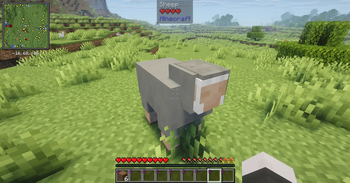
A lean, no-bloat Fabric optimization modpack with smooth animations, ambient sounds, dynamic lighting, minimap, and shader support. Maximum performance, minimum clutter.
Screenshots


About this Modpack
Clean & Fast
Maximum performance. Minimum bloat. Everything you actually need.
A carefully curated Fabric optimization modpack that makes Minecraft run as fast as possible while adding only the essential quality of life features every player wants. No filler mods, no unnecessary extras — just a clean, fast, polished experience.
Performance
| Mod | Description |
|---|---|
| Sodium + Sodium Extra | Complete rendering engine rewrite |
| Lithium | Game logic, AI, and tick optimization |
| ScalableLux | Modern lighting engine rewrite |
| C2ME | Multithreaded chunk loading |
| FerriteCore | Massive RAM reduction |
| ModernFix | All-in-one bug and performance fixes |
| ImmediatelyFast | HUD, GUI, and text rendering optimization |
| Krypton | Network stack optimization |
| Entity Culling + More Culling | Skip rendering what you can't see |
| Dynamic FPS | Saves resources when minimized |
| Clumps | Groups XP orbs to reduce lag |
| Let Me Despawn | Smarter mob despawning |
Visuals & Audio
| Mod | Description |
|---|---|
| Iris Shaders + Complementary Reimagined | Beautiful shaders out of the box |
| Fresh Animations + EMF/ETF | Smooth, natural mob animations |
| Not Enough Animations + Better Animations Collection | Improved player and mob animations |
| LambDynamicLights | Dynamic lighting from held items |
| Continuity | Connected textures |
| Dynamic Crosshair | Context-aware crosshair |
| Sound Physics Remastered | Realistic sound echoes and reverb |
| AmbientSounds | Immersive environmental audio |
Navigation
| Mod | Description |
|---|---|
| Xaero's Minimap + World Map | Lightweight minimap with waypoints and full world map |
Quality of Life
| Mod | Description |
|---|---|
| Jade | Block/entity info tooltip |
| AppleSkin | Food and saturation display |
| Shulker Box Tooltip | See shulker contents on hover |
| Inventory Profiles Next | One-click inventory sorting |
| Mouse Tweaks | Better inventory interaction |
| Controlling | Searchable keybinds |
| Zoomify | Zoom key |
| Mod Menu | In-game mod configuration |
| Reese's Sodium Options | Better video settings layout |
Built for 1.21.2 on Fabric. More versions coming soon.
Available Versions
How to Set Up a Clean & Fast Server
Order Server
Choose at least 4 GB RAM (6 GB recommended for Clean & Fast). Based on player count: per 8 players.
Install Modpack in Dashboard
Open the modpack browser in the dashboard, search for "Clean & Fast" and click "Install". The fabric loader and Minecraft 26.1.2 are configured automatically.
Start Server & Play
Start the server – all mods are loaded automatically. Share the server IP with friends and play together!
Frequently Asked Questions
Clean & Fast server crashes or won't start – what to do?
Most common causes: insufficient RAM or wrong fabric loader. Check latest.log for "OutOfMemoryError" → increase RAM to at least 6 GB. For "Mixin" or "ClassNotFoundException" errors: modpack version and loader don't match. With Mado Hosting, loader and Minecraft version are auto-configured on modpack install – preventing most startup issues.
How much RAM does a Clean & Fast server really need?
Minimum 4 GB, recommended 6 GB for stable performance. per 8 players. Important: Minecraft modpacks need more RAM than vanilla – plan extra per additional player. With Mado Hosting, you can scale RAM up live at any time without data loss (from €8/month).
Can I add custom mods to Clean & Fast without conflicts?
Yes, but check compatibility: only use mods for the same loader (fabric) and same Minecraft version (26.1.2). Common issues: ID conflicts with recipe mods and incompatible coremod versions. The Mado dashboard mod browser only shows compatible mods and warns about known conflicts.
Clean & Fast server lagging – performance tips
1) Increase RAM to 6 GB+. 2) Reduce server view-distance to 8 (server.properties). 3) Pre-generate chunks with the "Chunky" plugin. 4) Use /spark profiler to check which mods consume the most tick time. With Mado Hosting, all servers run on NVMe SSDs with dedicated CPU cores – eliminating hardware as a bottleneck.
Similar Modpacks

![Cobblemon Official Modpack [Fabric]](https://cdn.modrinth.com/data/5FFgwNNP/e7f9ee2e9d361623847853fe2ddce42f519ee64f.png)
![COBBLEVERSE - Pokemon Adventure [Cobblemon]](https://cdn.modrinth.com/data/Jkb29YJU/581ecf54530972afb18a04660afd820f2f24f6c7.png)
![Better MC [FABRIC] - BMC2](https://cdn.modrinth.com/data/shFhR8Vx/a19c2bcb51d38f32f138d3607e91cb2b7b8e387f_96.webp)


Rent Clean & Fast Server
Start your own server with automatic modpack installation.
Supported Versions
Start your Clean & Fast Server now
From €8.00/month with 6 GB RAM for the best performance.
Configure Server →