
Clean FPS - Zoom
Zoom Version of Clean FPS
Screenshots
About this Modpack
Clean FPS
A lightweight Minecraft optimization modpack built for high FPS and a smooth vanilla experience.
No unnecessary features—just smoother gameplay, faster chunk loading, and better frame stability.
This modpack is especially useful for low-end PCs and laptops, but it also helps higher-end systems run smoothly and consistently.
Clean FPS - Zoom
Adds the Zoomify Mod to Clean FPS Base Modpack
Performance
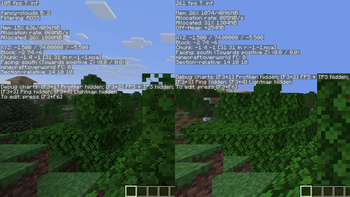
All tests were performed using the same world seed, same position, settings, and render distance. Tests were done on the Clean FPS Base Modpack.
FPS comparisons are available here
System - 26.1.2
- CPU: Ryzen 5 5500U
- GPU: Integrated Radeon Vega
- RAM: 16GB (dual channel)
- OS: Windows 11
- Resolution: 1080p (Fullscreen)
- Settings: Render Distance - 12, Simulation Distance - 5
Results:
| Metric | Vanilla | Clean FPS |
|---|---|---|
| Average | 135.4 | 252.46 |
| Minimum | 105 | 222 |
| Maximum | 145 | 261 |
- Higher minimum FPS reduces stuttering during gameplay
- Higher average FPS improves overall smoothness
Benefits
- Less stuttering while moving
- Faster world loading
- More stable FPS (fewer drops)
Performance improvements may vary depending on hardware and settings.
Versions Available
This modpack comes in three variants:
Clean FPS (Base) —
1.0.0
Only optimization mods. No extra features. Focused on pure performance.Clean FPS + Zoom —
1.0.0-zoom
Adds a simple zoom feature while preserving performance.Clean FPS + Zoom + Shaders —
1.0.0-shader
Includes shader support for improved visuals alongside optimization.
Installation Guide
- Install the Modrinth App or any launcher that supports Modrinth modpacks
- Search for Clean FPS in the modpack browser
- Select the version you want (Base / Zoom / Shader)
- Click Install
- Launch the game and start playing
Support / Donate
If you like the modpack and want to support future updates:
YouTube
More updates, comparisons, and gameplay: YouTube
Mods Included (Latest Version [26.1.2])
Click to expand
Base Modpack:
- Sodium
- Sodium Extra
- Reese's Sodium Options
- Lithium
- FerriteCore
- Entity Culling
- More Culling
- Mod Menu
- ImmediatelyFast
- Concurrent Chunk Management Engine (C2ME)
- Fast Noise
- ScalableLux
- ModernFix-mVUS
- Better Block Entities
- BadOptimizations
- Ksyxis
- No Chat Reports
- ServerCore
- Very Many Players
- Cloth Config API
- Fabric API
- Text Placeholder API
Permissions
If you want to use Clean FPS as a base for your own modpack, feel free to do so.
Just make sure to include proper credit (a link back to this Modrinth page is enough).
Notes
- Keeps the vanilla gameplay experience intact
- Works best on low-end systems, but benefits all hardware
- Shader version depends on your GPU capability
- Support for older Minecraft versions will be added gradually
- The modpack will continue to be updated for new Minecraft releases
Available Versions
How to Set Up a Clean FPS - Zoom Server
Order Server
Choose at least 4 GB RAM (6 GB recommended for Clean FPS - Zoom). Based on player count: per 8 players.
Install Modpack in Dashboard
Open the modpack browser in the dashboard, search for "Clean FPS - Zoom" and click "Install". The fabric loader and Minecraft 26.1.2 are configured automatically.
Start Server & Play
Start the server – all mods are loaded automatically. Share the server IP with friends and play together!
Frequently Asked Questions
Clean FPS - Zoom server crashes or won't start – what to do?
Most common causes: insufficient RAM or wrong fabric loader. Check latest.log for "OutOfMemoryError" → increase RAM to at least 6 GB. For "Mixin" or "ClassNotFoundException" errors: modpack version and loader don't match. With Mado Hosting, loader and Minecraft version are auto-configured on modpack install – preventing most startup issues.
How much RAM does a Clean FPS - Zoom server really need?
Minimum 4 GB, recommended 6 GB for stable performance. per 8 players. Important: Minecraft modpacks need more RAM than vanilla – plan extra per additional player. With Mado Hosting, you can scale RAM up live at any time without data loss (from €8/month).
Can I add custom mods to Clean FPS - Zoom without conflicts?
Yes, but check compatibility: only use mods for the same loader (fabric) and same Minecraft version (26.1.2). Common issues: ID conflicts with recipe mods and incompatible coremod versions. The Mado dashboard mod browser only shows compatible mods and warns about known conflicts.
Clean FPS - Zoom server lagging – performance tips
1) Increase RAM to 6 GB+. 2) Reduce server view-distance to 8 (server.properties). 3) Pre-generate chunks with the "Chunky" plugin. 4) Use /spark profiler to check which mods consume the most tick time. With Mado Hosting, all servers run on NVMe SSDs with dedicated CPU cores – eliminating hardware as a bottleneck.
Similar Modpacks

![Cobblemon Official Modpack [Fabric]](https://cdn.modrinth.com/data/5FFgwNNP/e7f9ee2e9d361623847853fe2ddce42f519ee64f.png)
![COBBLEVERSE - Pokemon Adventure [Cobblemon]](https://cdn.modrinth.com/data/Jkb29YJU/581ecf54530972afb18a04660afd820f2f24f6c7.png)
![Better MC [FABRIC] - BMC2](https://cdn.modrinth.com/data/shFhR8Vx/a19c2bcb51d38f32f138d3607e91cb2b7b8e387f_96.webp)


Rent Clean FPS - Zoom Server
Start your own server with automatic modpack installation.
Supported Versions
Start your Clean FPS - Zoom Server now
From €8.00/month with 6 GB RAM for the best performance.
Configure Server →