
ClearCut
Project ClearCut aims to make minecraft as pleasant as possible while staying client-sided
Screenshots




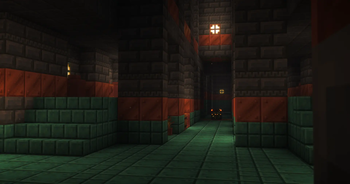

About this Modpack
ClearCut
You want Minecraft to look absolutely stunning, but you also want to actually play it. That’s what ClearCut does.
Built on Fabric, this purely client-side modpack transforms the vanilla experience. You can load it up and jump straight into your favorite server or Realm. It pairs high-end graphics with aggressive optimization, targeting mid-range PCs so you get beautiful lighting and a playable framerate at the same time.
Visuals & Performance
We are using Complementary Shaders combined with Euphoria Patches. Expect vibrant colors, dense volumetric fog, and incredible water reflections. Rendering all that usually kills your FPS. To fix that, ClearCut runs a highly optimized core featuring Sodium and Lithium.
The standout feature here is Voxy. Voxy generates Level of Detail (LOD) chunks. This lets you crank up your view distance and see mountains miles away without your CPU melting down.
Heads up: Because of the visual upgrades, this won't run smoothly on a potato. A decent mid-tier rig is required to push these graphics.
Sound & Quality of Life
Gorgeous graphics feel cheap if the audio falls flat. Included sound overhauls add realistic physical acoustics. Caverns echo. Deep caves sound hollow. Footsteps crunch differently depending on the exact block you step on.
We also fixed the clunkiest parts of the base game:
Inventory Management: Mouse Tweaks lets you drag, drop, and sort through messy chests in seconds.Camera Controls: Better Third Person gives you a functional, over-the-shoulder view that actually works for combat and building.Couch Gaming: Full, plug-and-play controller support is baked right in.
Quick Feature Breakdown
100% Client-Side: Play on any vanilla server without issues.High-End Graphics: Complementary Shaders + Euphoria Patches configured out of the box.Massive Render Distances: Voxy brings high-performance LODs.Optimized Core: Sodium, Lithium, and standard Fabric performance boosters.Immersive Audio: Complete sound overhauls for realistic acoustics.Modern QoL: Controller support, better cameras, and fast inventory sorting.
Available Versions
How to Set Up a ClearCut Server
Order Server
Choose at least 6 GB RAM (8 GB recommended for ClearCut). Based on player count: per 5 players.
Install Modpack in Dashboard
Open the modpack browser in the dashboard, search for "ClearCut" and click "Install". The fabric loader and Minecraft 26.1.2 are configured automatically.
Start Server & Play
Start the server – all mods are loaded automatically. Share the server IP with friends and play together!
Frequently Asked Questions
ClearCut server crashes or won't start – what to do?
Most common causes: insufficient RAM or wrong fabric loader. Check latest.log for "OutOfMemoryError" → increase RAM to at least 8 GB. For "Mixin" or "ClassNotFoundException" errors: modpack version and loader don't match. With Mado Hosting, loader and Minecraft version are auto-configured on modpack install – preventing most startup issues.
How much RAM does a ClearCut server really need?
Minimum 6 GB, recommended 8 GB for stable performance. per 5 players. Important: Minecraft modpacks need more RAM than vanilla – plan extra per additional player. With Mado Hosting, you can scale RAM up live at any time without data loss (from €12/month).
Can I add custom mods to ClearCut without conflicts?
Yes, but check compatibility: only use mods for the same loader (fabric) and same Minecraft version (26.1.2). Common issues: ID conflicts with recipe mods and incompatible coremod versions. The Mado dashboard mod browser only shows compatible mods and warns about known conflicts.
ClearCut server lagging – performance tips
1) Increase RAM to 8 GB+. 2) Reduce server view-distance to 8 (server.properties). 3) Pre-generate chunks with the "Chunky" plugin. 4) Use /spark profiler to check which mods consume the most tick time. With Mado Hosting, all servers run on NVMe SSDs with dedicated CPU cores – eliminating hardware as a bottleneck.
Similar Modpacks
![Cobblemon Official Modpack [Fabric]](https://cdn.modrinth.com/data/5FFgwNNP/e7f9ee2e9d361623847853fe2ddce42f519ee64f.png)
![COBBLEVERSE - Pokemon Adventure [Cobblemon]](https://cdn.modrinth.com/data/Jkb29YJU/581ecf54530972afb18a04660afd820f2f24f6c7.png)
![Better MC [FABRIC] - BMC2](https://cdn.modrinth.com/data/shFhR8Vx/a19c2bcb51d38f32f138d3607e91cb2b7b8e387f_96.webp)


![Better MC [FORGE] - BMC4](https://cdn.modrinth.com/data/4BV47HRn/7f5ef7cc61b2593609aabef3ed07a866a4f11b73_96.webp)
Rent ClearCut Server
Start your own server with automatic modpack installation.
Details
- License
- Creative Commons Attribution 4.0 International
- Server-side
- Unsupported
- Client-side
- Required
Supported Versions
Start your ClearCut Server now
From €12.00/month with 8 GB RAM for the best performance.
Configure Server →