
Client(Plus)
Client side minecraft modpack for a faster, cleaner, and more visually refined experience. It boosts performance, adds thoughtful quality-of-life improvements, and includes immersive visual upgrades.
Screenshots
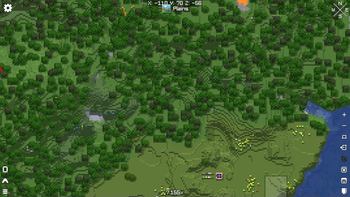


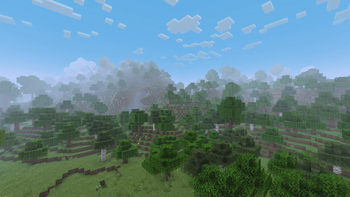
About this Modpack

🌟Client(Plus)
Client(Plus) is a finely tuned, lightweight client-side Minecraft modpack designed to maximize performance, enhance visuals, and boost everyday usability—all without altering core gameplay. Built on the powerful foundation of Fabulously Optimized, Client(Plus) brings your Minecraft experience to the next level with smarter performance, better interfaces, and beautifully refined visuals.
Whether you're on a low-end PC or want more frames for your shaders, Client(Plus) gives you a smoother, cleaner, and more beautiful way to enjoy vanilla Minecraft.

⚙️ Key Features
🚀 Performance Optimization:
Built on Fabulously Optimized, including top-tier performance mods:
- Sodium – lightning-fast rendering engine
- Lithium – efficient game logic processing
- ScalableLux – instant light engine overhaul
- FerriteCore, and more for memory and CPU optimization
🎮 Quality of Life Improvements:
- Mod Menu – easily view and configure your mods
- Sodium Extra / Reese’s Sodium Options – fine-tune video settings
- Zoomify – smooth, customizable zoom feature
- AppleSkin / REI / IPN – clear, helpful overlays
- Mouse Tweaks – better inventory and keybind control
- Dynamic FPS – conserve power and reduce heat when idle or tabbed out
🎨 Visual Enhancements:
Supports stylized resource packs and mods like:
- Not Enough Animations (Resource Pack) – adds missing third-person animations like eating, blocking, and swimming for a more immersive look
- Fogolous (Mod) – enhances the look of fog to blend more naturally with biomes and lighting
- Iris Shaders – enables beautiful shader support with full Sodium compatibility
🖥️ List Of Mods
- 3d-Skin-Layers by tr7zw
- Advancement Plaques by Grend
- AppleSkin by squeek502
- Architectury by shedaniel
- Armor Trim Item Fix by MincraftEinstein
- BadOptimizations by Thosea
- Better Biome Reblend by FionaTheMortal + UTMG
- Better Mount HUD by Lortseam
- Better Ping Display by Quintinity
- Better Third Person by Socolio
- BetterCapes by Notium
- BetterF1 by UltimateBoomer, MovTery
- BetterF3 by cominixo, TreyRuffy
- Boat Item View by 50ap5ud5
- Capes by Cael
- Cave Dust by LizIsTired
- Chat Heads by dzwdz, Fourmisain
- ChatAnimation by Ezzenix
- Chunks Fade In by kerudion (koteinik)
- Cloth Config v17 by shedaniel
- Collective by Rick South
- Concurrent Chunk Management Engine by RelativityMC, ishland
- Continuity by PepperCode1
- Controlify by isXander
- Cubes Without Borders by Kir_Antipov
- Detail Armor Bar by RedLime
- Draggable Lists by MrMelon54
- Dynamic Crosshair by Crendgrim
- Dynamic FPS by juliand665, LostLuma
- Elytra Physics by ImJoshh_
- Enhanced Block Entities by FoundationGames
- EnhancedTooltips by UltimatChamp, yanggx98
- Entity Model Features by Traben
- Entity Texture Features by Traben
- EntityCulling by tr7zw
- Explosive Enhancement by Superkat32
- Fabric API by FabricMC
- Fabric Language Kotlin by FabricMC
- Fabrishot by ramidzkh
- Falling Leaves by Fourmisain, BrekiTomasson, RandomMcSomethin
- Fast IP Ping by Fallen_Breath
- FastQuit by KingContaria
- FerriteCore by malte0811
- Fog by IMB11, Steveplays
- Forge Config API Port by Fuzs
- Full Brightness Toggle by Rick South
- Fzzy Config by fzzyhmstrs
- GPU Tape by Mr.Toad
- Held Item Info by Neecko5b84
- Iceberg by Grend
- ImmediatelyFast by RK_01
- InvMove by PieKing1215
- Inventory Profiles Next by mirinimi/blackd
- Iris by coderbot, IMS212, Justsnoopy30, FoundationGames
- Jade by Snownee
- Just Enough Breeding by Christofmeg
- Krypton by tuxed
- LambDynamicLights by LambdAurora
- Language Reload by Jerozgen
- Lighty by andi_makes
- Lithium by JellySquid, 2No2Name
- M.R.U by IMB11 (mineblock11)
- MCEF (Minecraft Chromium Embedded Framework) by CinemaMod Group
- Main Menu Credits by isXander
- Make Bubbles Pop by Tschipcraft
- MixinTrace by comp500
- Mod Menu by Prospector, haykam821, TerraformersMC
- Model Gap Fix by MehVahdJukaar
- ModernFix by embeddedt
- More Chat History by JackFred
- More Culling by FX - PR0CESS, 1Foxy2
- MoreMcmeta by soir20
- Mouse Tweaks by Ivan Molodetskikh (YaLTeR)
- No Chat Reports by Aizistral
- No Resource Pack Warnings by Space Walker
- NotEnoughAnimations by tr7zw
- OptiGUI by opekope2
- Packet Fixer by TonimatasDEV
- Paginated Advancements by DaFuqs
- Palladium by Mr.Toad
- Particle Core by fzzyhmstrs
- Particle Effects by LopyMine, KlashRaick
- Particle Tweaks by Lunade
- Particular by Chai
- Peek by Max Henkel
- Polytone by MehVahdJukaar
- Puzzle by PuzzleMC, Motschen
- Raise Sound Limit Simplified by ishland
- Raknetify (Fabric) by ishland
- Reese's Sodium Options by FlashyReese
- Remove Reloading Screen by dima_dencep
- Resourcify by DeDiamondPro
- Roughly Enough Items by shedaniel
- ScalableLux by Spottedleaf, ishland
- Server Country Flags by Khajiitos
- Server Pack Unlocker by TheMysterys
- Server Resource Pack Checker by Max Henkel
- Simple Voice Chat by Max Henkel
- Smooth Scroll by SlovakSmileSK
- Sodium by JellySquid (jellysquid3)
- Sodium Extra by FlashyReese
- Sodium Shadowy Path Blocks by Rynnavinx
- Sound Physics Remastered by Sonic Ether, vlad2305m, Max Henkel, Saint
- Sounds by IMB11
- Sprint Indicator by Roundaround
- Status Effect Bars by Neecko5b84
- Subtle Effects by MincraftEinstein
- ToadLib by Mr.Toad
- Variants CIT by Estecka
- Visuality by PinkGoosik
- Wakes by Goby56
- Xaero's Minimap by xaero96
- Xaero's World Map by xaero96
- YOSBR by shedaniel
- YetAnotherConfigLib by isXander
- Your Reputation by Aton-Kish
- Zoomify by isXander
- e4mc by skyevg
- libIPN by mirinimi/blackd
- mcef-cache
- mcef-libraries
- oωo by glisco
🤖 Ideal For:
- Players wanting a boost in FPS and better overall responsiveness
- Anyone looking for subtle, immersive visual polish
- Streamers, content creators, and everyday players who want a clean Vanilla++ experience
🖼️ Gallery

Available Versions
How to Set Up a Client(Plus) Server
Order Server
Choose at least 4 GB RAM (6 GB recommended for Client(Plus)). Based on player count: per 8 players.
Install Modpack in Dashboard
Open the modpack browser in the dashboard, search for "Client(Plus)" and click "Install". The fabric loader and Minecraft 1.21.4 are configured automatically.
Start Server & Play
Start the server – all mods are loaded automatically. Share the server IP with friends and play together!
Frequently Asked Questions
Client(Plus) server crashes or won't start – what to do?
Most common causes: insufficient RAM or wrong fabric loader. Check latest.log for "OutOfMemoryError" → increase RAM to at least 6 GB. For "Mixin" or "ClassNotFoundException" errors: modpack version and loader don't match. With Mado Hosting, loader and Minecraft version are auto-configured on modpack install – preventing most startup issues.
How much RAM does a Client(Plus) server really need?
Minimum 4 GB, recommended 6 GB for stable performance. per 8 players. Important: Minecraft modpacks need more RAM than vanilla – plan extra per additional player. With Mado Hosting, you can scale RAM up live at any time without data loss (from €8/month).
Can I add custom mods to Client(Plus) without conflicts?
Yes, but check compatibility: only use mods for the same loader (fabric) and same Minecraft version (1.21.4). Common issues: ID conflicts with recipe mods and incompatible coremod versions. The Mado dashboard mod browser only shows compatible mods and warns about known conflicts.
Client(Plus) server lagging – performance tips
1) Increase RAM to 6 GB+. 2) Reduce server view-distance to 8 (server.properties). 3) Pre-generate chunks with the "Chunky" plugin. 4) Use /spark profiler to check which mods consume the most tick time. With Mado Hosting, all servers run on NVMe SSDs with dedicated CPU cores – eliminating hardware as a bottleneck.
Rent Client(Plus) Server
Start your own server with automatic modpack installation.
Supported Versions
Start your Client(Plus) Server now
From €8.00/month with 6 GB RAM for the best performance.
Configure Server →