
CloudPack
CloudPack is an exciting modpack for Minecraft, combining technological elements with epic challenges, offering a vast world full of opportunities to explore, discover and create, maintaining the thrilling nature of the adventure.
Screenshots
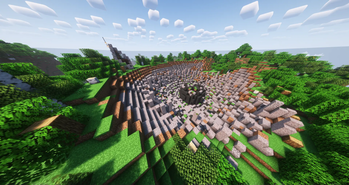
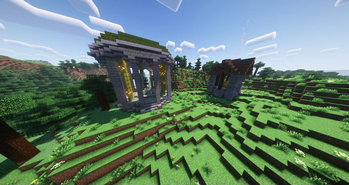
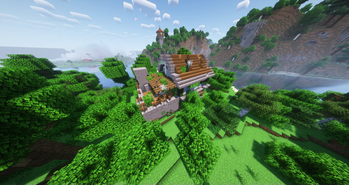
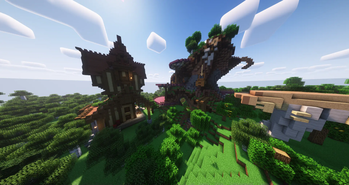
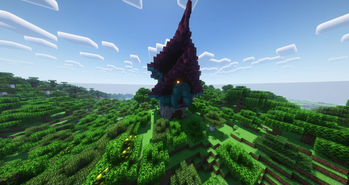
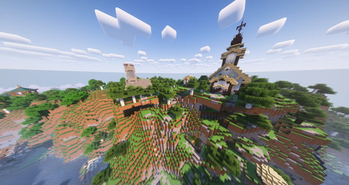
About this Modpack
CloudPack
is a modpack that will transform Minecraft into a fascinating game, combining adventure elements with the technological world. Dive into this amazing world, explore, create and develop your skills to become a true master of this new reality. Ready for a challenge? Embark on your adventure odyssey today!
Technological Evolution
You will find a wide range of technological modifications that allow you to evolve from primitive tools to advanced machines and devices. You'll start by smelting and processing raw materials by hand, and over time build powerful factories and robotic structures.
Exploration and Adventure
The modpack offers new biomes, mysterious caves, magnificent structures and treasure deposits to explore. Dangerous challenges such as powerful bosses, lost temples and hidden dungeons await you.
Expanded interaction with the environment
Experiment with plants, raising animals and creating an authentic ecosystem in your world. Your decisions will affect the nature around you.
Multiplayer and cooperation
Play together with friends and build an expanding world together. Collaborate on projects, trade resources and face challenges together.
Mod List
- 3D Skin Layers
- Additional Banners
- Advancement Plaques
- AmbientSounds
- Amplified Nether
- Animalistic
- Apotheosis
- Aquaculture 2
- AttributeFix
- AutoRegLib
- Bartering Station
- Better Advancements
- Better Tridents
- Beyond Earth
- Bookshelf
- Botania
- Chance Cubes
- Controlling
- CorgiLib
- CreativeCore
- Croptopia
- Cucumber Library
- Cyclops Core
- Dark Utilities
- Decorative Blocks
- Doggy Talents 2
- Double Slabs
- Dungeon Crawl
- When Dungeons Arise
- Easy Anvils
- Easy Magic
- Enchantment Descriptions
- Enhanced Celestials
- Experience Bug Fix
- Falling Leaves (Forge)
- FastLeafDecay
- Fast Workbench
- Flux Networks
- Forge Config API Port
- FramedBlocks
- Galosphere
- Iceberg
- Immersive Engineering
- ItemPhysic
- Jade 🔍
- Just Enough Resources
- Leave My Bars Alone
- Legendary Tooltips
- Mekanism
- Mekanism Additions
- Mekanism Generators
- Mekanism Tools
- More Babies
- Mouse Tweaks
- Mystical Agradditions
- Mystical Agriculture
- Neat
- Nullscape
- OreExcavation
- Paintings ++
- Patchouli
- Pick Up Notifier
- Pig Pen Cipher
- PingHUD
- Placebo
- PlayerRevive
- Portable Crafting Table
- Prism
- Public GUI Announcement
- Puzzles Lib
- Quark
- RSInfinityBooster
- Runelic
- Sky Villages
- Create: Steam 'n' Rails
- Storage Drawers
- Structory
- Structory: Towers
- Structure Compass Mod
- Structures Plus II
- TerraBlender
- Tips
- Tool Stats
- Towns and Towers
- Trading Post
- Traveler's Backpack
- HT's TreeChop
- Unusual End
- Uppers
- Visual Workbench
- Wither Skeleton Tweaks
- Xaero's World Map
- Xaero's Minimap
- Additional Lanterns
- Advanced Netherite
- Alex's Mobs
- AntiGhost
- AppleSkin
- Applied Energistics 2
- Architectury API
- ArmorPlus
- Balm
- Better Statistics Screen
- Bigger Reactors
- Blue Skies
- Better Brightness Slider
- Caelus API
- Capybara - [Forge]
- Carry On
- MrCrayfish's Furniture Mod
- Charm of Undying
- Chat Heads
- chisels-and-bits
- Citadel
- Cloth Config API
- CoFH Core
- Collective
- Connected Glass
- Construction Wand
- Corail Woodcutter
- Corail Woodcutter: Extension BYG
- Create
- Create Confectionery
- Create Stuff & Additions
- Create Enchantment Industry
- Create: Misc and Things
- Create Crafts & Additions
- Curios API
- Deeper and Darker
- Duckling
- Durability Tooltip
- Easy Villagers
- Eating Animation
- Elevator Mod
- Elytra Slot
- Emotecraft
- Enchantment Transfer
- EnderChests
- End Remastered
- Entity Culling
- Explorify
- Fabric API
- Fantasy's Furniture
- FerriteCore
- Fish of Thieves
- Geckolib
- Goblin Traders
- Gravestone Mod
- Guard Villagers
- Immersive Aircraft
- Industrial Reborn
- Industrial Foregoing
- Infinite Trading
- Inventory HUD+(Forge edition)
- Iron Chests
- Iron Furnaces
- Item Filters
- Just Enough Calculation
- Just Enough Effect Descriptions (JEED)
- Just Enough Items
- Just Player Heads
- Lightspeed
- Lootr
- More Axolotl Variants API
- More Axolotl Variants Mod
- Macaw's Bridges
- Macaw's Doors
- Macaw's Fences and Walls
- Macaw's Furniture
- Macaw's Lights and Lamps
- Macaw's Roofs
- Macaw's Trapdoors
- Macaw's Windows
- LAN World Plug-n-Play (mcwifipnp)
- Moonlight Lib
- More Dragon Eggs
- Naturalist
- Oculus
- Pam's HarvestCraft 2 - Food Core
- Phosphophyllite
- playerAnimator
- Plushie-Mod
- Polymorph
- Quartz
- Red’s More Structures
- Refined Storage
- Refined Storage Addons
- Rubidium
- Rubidium Extras
- Screenshot to Clipboard
- ShetiPhian-Core
- Shulker Box Slot
- ShulkerBoxTooltip
- Simple Shops
- Snowy Spirit
- Sophisticated Backpacks
- Sophisticated Core
- Sound Physics Remastered
- Stack Refill
- Stalwart Dungeons
- Structure Gel API
- SuperMartijn642's Config Lib
- SuperMartijn642's Core Lib
- Supplementaries
- The Bumblezone - Forge
- TheDragonLib
- Thermal Cultivation
- Thermal Dynamics
- Thermal Expansion
- Thermal Foundation
- Thermal Innovation
- Thermal Integration
- Thermal Locomotion
- Time In A Bottle
- Titanium
- The Lost Castle
- Transparent
- Trash Cans
- Universal Grid
- Unusual Prehistory
- Upgraded Core
- Upgraded Netherite
- Valhelsia Core
- Valhelsia Furniture
- Valhelsia Structures
- Vein Mining
- Simple Voice Chat
- Void Totem
- Waystones
In the Future
I plan to add a quest system, fix any bugs found, and expand the number of things in the modpack.
Available Versions
How to Set Up a CloudPack Server
Order Server
Choose at least 6 GB RAM (8 GB recommended for CloudPack). Based on player count: per 5 players.
Install Modpack in Dashboard
Open the modpack browser in the dashboard, search for "CloudPack" and click "Install". The forge loader and Minecraft 1.19.2 are configured automatically.
Start Server & Play
Start the server – all mods are loaded automatically. Share the server IP with friends and play together!
Frequently Asked Questions
CloudPack server crashes or won't start – what to do?
Most common causes: insufficient RAM or wrong forge loader. Check latest.log for "OutOfMemoryError" → increase RAM to at least 8 GB. For "Mixin" or "ClassNotFoundException" errors: modpack version and loader don't match. With Mado Hosting, loader and Minecraft version are auto-configured on modpack install – preventing most startup issues.
How much RAM does a CloudPack server really need?
Minimum 6 GB, recommended 8 GB for stable performance. per 5 players. Important: Minecraft modpacks need more RAM than vanilla – plan extra per additional player. With Mado Hosting, you can scale RAM up live at any time without data loss (from €12/month).
Can I add custom mods to CloudPack without conflicts?
Yes, but check compatibility: only use mods for the same loader (forge) and same Minecraft version (1.19.2). Common issues: ID conflicts with recipe mods and incompatible coremod versions. The Mado dashboard mod browser only shows compatible mods and warns about known conflicts.
CloudPack server lagging – performance tips
1) Increase RAM to 8 GB+. 2) Reduce server view-distance to 8 (server.properties). 3) Pre-generate chunks with the "Chunky" plugin. 4) Use /spark profiler to check which mods consume the most tick time. With Mado Hosting, all servers run on NVMe SSDs with dedicated CPU cores – eliminating hardware as a bottleneck.
Similar Modpacks
![Cobblemon Official Modpack [Fabric]](https://cdn.modrinth.com/data/5FFgwNNP/e7f9ee2e9d361623847853fe2ddce42f519ee64f.png)
![COBBLEVERSE - Pokemon Adventure [Cobblemon]](https://cdn.modrinth.com/data/Jkb29YJU/581ecf54530972afb18a04660afd820f2f24f6c7.png)
![Better MC [FABRIC] - BMC2](https://cdn.modrinth.com/data/shFhR8Vx/a19c2bcb51d38f32f138d3607e91cb2b7b8e387f_96.webp)


![Better MC [FORGE] - BMC4](https://cdn.modrinth.com/data/4BV47HRn/7f5ef7cc61b2593609aabef3ed07a866a4f11b73_96.webp)
Rent CloudPack Server
Start your own server with automatic modpack installation.
Supported Versions
Start your CloudPack Server now
From €12.00/month with 8 GB RAM for the best performance.
Configure Server →