
Official Cobblemon Advanced Plus
Cobblemon Advanced adds alot of RPG and Adventure Aspects to the Already Cobblemon Expierience
About this Modpack
Cobblemon Advanced Plus Modpack
Your Ultimate Cobblemon Experience Awaits!
Embark on an unforgettable journey into a world where creativity meets adventure. Cobblemon Adventures is the perfect blend of performance, stunning visuals, and engaging gameplay designed for both seasoned players and newcomers alike.
RESOURCE PACKS MUST BE ENABLED FOR THE DATAPACKS THAT ARE INCLUDED
NOW CONTAINS THE PHYSICS MOD
A new immersive experience
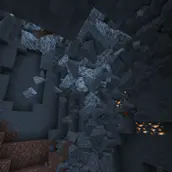
Dive into a new world like never seen before. Collapsing caves, interactive ragdolls, item physics and much more awaits you! ⠀ ⠀
Supported Platforms
Windows, Linux and MacOS (M1/M2 CPUs only work with Minecraft 1.20 and above, the other versions need compatibility mode: Tutorial)! ⠀ ⠀
Mobs
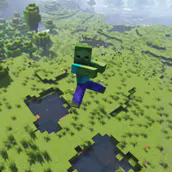
The favourite part of every physics maniac. Each Vanilla Minecraft mob supports ragdolls, fracturing and a blocky version!
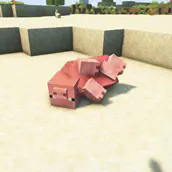
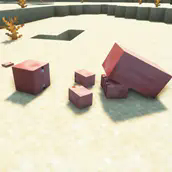

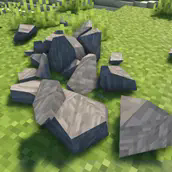
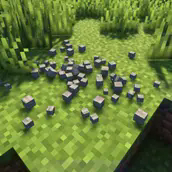
Blocks
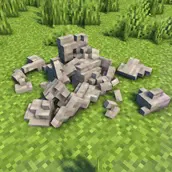
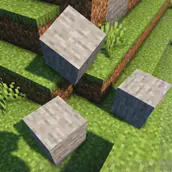
Let the blocks in the Minecraft world crumble into pieces!
Other features
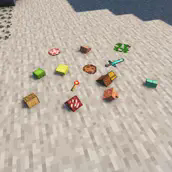
Are you bored of floating items? Try item physics! Gravity? Moon? Mars? Pluto? Earth? Change it to whatever you want! Do you want to bring your PC to its limit? See how long it will last with collapsing structures!
✨Features
Cobblemon Integration
Dive into a world brimming with unique creatures to catch, train, and battle.
Build your dream team and explore their diverse biomes and habitats.
Enhanced Performance
🍃Enjoy smooth gameplay with performance mods
Sodium

Lithium

FerriteCore

Experience stunning, optimized lighting with Starlight.

Dynamic Visuals
🖌️Transform your world into a vibrant masterpiece with
Iris Shaders

Motschen’s Better Leaves

LambDynamicLights

User-Friendly Enhancements
🛠️Streamline crafting, enchanting, and management
Roughly Enough Items (REI)

Enchantment Descriptions

Tool Stats
🗺️Exploration & Navigation
Xaero’s World Map

Xaero’s Minimap

Immerse yourself in the sounds of adventure with Presence Footsteps and Drip Sounds.

Immersive Building

TecTonic

TerraLith

Traveler's Backpack

Traveler's Titles
🛖Elevate creativity with tools for landscapes and interiors
Crafting Tweaks

Continuity

Wavey Capes

Streamlined Multiplayer

Macaws Windows

Macaws Roofs

Better Furnaces Reforged

Iron Chests: Restocked
🛜Multiplayer has never been smoother, thanks to
Better Ping Display

Dynamic FPS
🌟Why Choose Cobblemon Adventures?
Cobblemon Adventures offers:
A balanced blend of performance, visuals, and depth.
Endless opportunities for exploration, competition, and creativity.
Whether you're a Cobblemon expert or a Minecraft newbie, this modpack is your gateway to a truly immersive experience.
📥 Ready to Begin?
Download Cobblemon Adventures today and start exploring, battling, and building your way through an extraordinary Minecraft journey!
Available Versions
How to Set Up a Official Cobblemon Advanced Plus Server
Order Server
Choose at least 6 GB RAM (8 GB recommended for Official Cobblemon Advanced Plus). Based on player count: per 5 players.
Install Modpack in Dashboard
Open the modpack browser in the dashboard, search for "Official Cobblemon Advanced Plus" and click "Install". The fabric loader and Minecraft 1.20.1 are configured automatically.
Start Server & Play
Start the server – all mods are loaded automatically. Share the server IP with friends and play together!
Frequently Asked Questions
Official Cobblemon Advanced Plus server crashes or won't start – what to do?
Most common causes: insufficient RAM or wrong fabric loader. Check latest.log for "OutOfMemoryError" → increase RAM to at least 8 GB. For "Mixin" or "ClassNotFoundException" errors: modpack version and loader don't match. With Mado Hosting, loader and Minecraft version are auto-configured on modpack install – preventing most startup issues.
How much RAM does a Official Cobblemon Advanced Plus server really need?
Minimum 6 GB, recommended 8 GB for stable performance. per 5 players. Important: Minecraft modpacks need more RAM than vanilla – plan extra per additional player. With Mado Hosting, you can scale RAM up live at any time without data loss (from €12/month).
Can I add custom mods to Official Cobblemon Advanced Plus without conflicts?
Yes, but check compatibility: only use mods for the same loader (fabric) and same Minecraft version (1.20.1). Common issues: ID conflicts with recipe mods and incompatible coremod versions. The Mado dashboard mod browser only shows compatible mods and warns about known conflicts.
Official Cobblemon Advanced Plus server lagging – performance tips
1) Increase RAM to 8 GB+. 2) Reduce server view-distance to 8 (server.properties). 3) Pre-generate chunks with the "Chunky" plugin. 4) Use /spark profiler to check which mods consume the most tick time. With Mado Hosting, all servers run on NVMe SSDs with dedicated CPU cores – eliminating hardware as a bottleneck.
Rent Official Cobblemon Advanced Plus Server
Start your own server with automatic modpack installation.
Supported Versions
Start your Official Cobblemon Advanced Plus Server now
From €12.00/month with 8 GB RAM for the best performance.
Configure Server →