
Cobblemon Modpack by ur_jolly
Cobblemon Modpack turns your Minecraft world into a Pokémon-style adventure with mechanics similar to the Pokémon games:
Screenshots
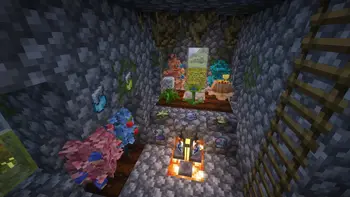
About this Modpack
Pokémon Capture & Training
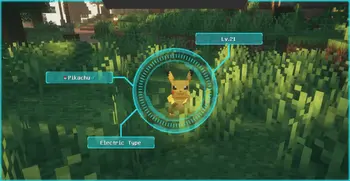
Wild Pokémon spawn throughout your world, and you can capture them, add them to your team, and level them up.
CurseForge
There are over 700 Pokémon from generations 1–9 available to find and catch.
CurseForge
⚔️ Battles & Experience
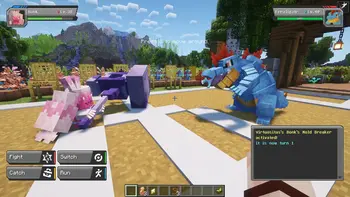
Pokémon battles use a battle system based on the Pokémon Showdown! engine for competitive mechanics.
CurseForge
Winning battles gives experience so your Pokémon can learn moves and evolve.
CurseForge
📒 Pokédex & Scanning
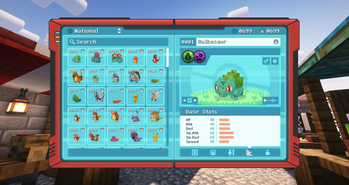
A Pokédex records every Pokémon you encounter and catch, with a scanning feature to analyze wild Pokémon.
CurseForge
🤝 Multiplayer & Interaction
You can trade and battle with friends in multiplayer worlds.
CurseForge
🏡 Pokémon Management
Pastures let wild Pokémon roam freely.
CurseForge
Apricorn trees grow in the world and are used in crafting.
CurseForge
Medicine items can be brewed with crops and berries, working similarly to Minecraft’s brewing stand.
CurseForge
🦴 World Integration & Exploration
Ancient structures and fossils appear in the world; fossils can be turned into Pokémon in a resurrection machine.
CurseForge
Support for biome mods (like Terralith) expands spawn variety.
CurseForge
🐎 New Updates & Extra Mechanics
Recent Cobblemon versions add even more gameplay elements:
Cobblemon Wiki
Rideable Pokémon — select Pokémon can be mounted for faster travel.
Cobblemon Wiki
Cooking & Food mechanics — crafting new campfire pots and foods like Poké Snacks and Aprijuice.
Cobblemon Wiki
🧩 Add-Ons (Optional Enhancements)
There are many community mods and data packs that work with Cobblemon to expand the experience, such as:
CurseForge
+1
Cobblemon Integrations — adds HUD tooltips, JEI/JER info, Waystones and seasonal effects.
9Minecraft
Cobblemon Additions — replaces villages with Pokémon-themed structures.
9Minecraft
Myths & Legends Addon — introduces special key items that trigger legendary Pokémon spawning with custom conditions.
CurseForge
discord-https://discord.gg/QJr4KvBC
Available Versions
How to Set Up a Cobblemon Modpack by ur_jolly Server
Order Server
Choose at least 6 GB RAM (8 GB recommended for Cobblemon Modpack by ur_jolly). Based on player count: per 5 players.
Install Modpack in Dashboard
Open the modpack browser in the dashboard, search for "Cobblemon Modpack by ur_jolly" and click "Install". The fabric loader and Minecraft 1.21.1 are configured automatically.
Start Server & Play
Start the server – all mods are loaded automatically. Share the server IP with friends and play together!
Frequently Asked Questions
Cobblemon Modpack by ur_jolly server crashes or won't start – what to do?
Most common causes: insufficient RAM or wrong fabric loader. Check latest.log for "OutOfMemoryError" → increase RAM to at least 8 GB. For "Mixin" or "ClassNotFoundException" errors: modpack version and loader don't match. With Mado Hosting, loader and Minecraft version are auto-configured on modpack install – preventing most startup issues.
How much RAM does a Cobblemon Modpack by ur_jolly server really need?
Minimum 6 GB, recommended 8 GB for stable performance. per 5 players. Important: Minecraft modpacks need more RAM than vanilla – plan extra per additional player. With Mado Hosting, you can scale RAM up live at any time without data loss (from €12/month).
Can I add custom mods to Cobblemon Modpack by ur_jolly without conflicts?
Yes, but check compatibility: only use mods for the same loader (fabric) and same Minecraft version (1.21.1). Common issues: ID conflicts with recipe mods and incompatible coremod versions. The Mado dashboard mod browser only shows compatible mods and warns about known conflicts.
Cobblemon Modpack by ur_jolly server lagging – performance tips
1) Increase RAM to 8 GB+. 2) Reduce server view-distance to 8 (server.properties). 3) Pre-generate chunks with the "Chunky" plugin. 4) Use /spark profiler to check which mods consume the most tick time. With Mado Hosting, all servers run on NVMe SSDs with dedicated CPU cores – eliminating hardware as a bottleneck.
Similar Modpacks
![Cobblemon Official Modpack [Fabric]](https://cdn.modrinth.com/data/5FFgwNNP/e7f9ee2e9d361623847853fe2ddce42f519ee64f.png)
![COBBLEVERSE - Pokemon Adventure [Cobblemon]](https://cdn.modrinth.com/data/Jkb29YJU/581ecf54530972afb18a04660afd820f2f24f6c7.png)
![Better MC [FABRIC] - BMC2](https://cdn.modrinth.com/data/shFhR8Vx/a19c2bcb51d38f32f138d3607e91cb2b7b8e387f_96.webp)


![Better MC [FORGE] - BMC4](https://cdn.modrinth.com/data/4BV47HRn/7f5ef7cc61b2593609aabef3ed07a866a4f11b73_96.webp)
Rent Cobblemon Modpack by ur_jolly Server
Start your own server with automatic modpack installation.
Supported Versions
Start your Cobblemon Modpack by ur_jolly Server now
From €12.00/month with 8 GB RAM for the best performance.
Configure Server →