
CobbleVersus
Embark on a Pokemon adventure alongside your friends!
Screenshots
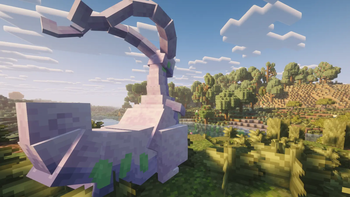
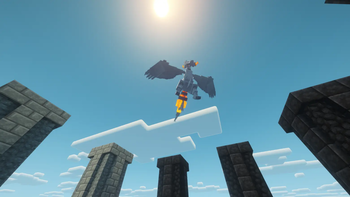
About this Modpack
Presentation
Welcome to CobbleVersus, a Cobblemon modpack that intends to deliver a relaxing and enjoyable experience.
At its core, the modpack is intended to provide the highest-quality overall feel, with smooth gameplay and carefully chosen features that work well together.
Besides the Cobblemon addons there are a variety of mods covering optimization and visual aesthetics.
You can play multiplayer without the need of a server, that being made possible by Essential Mod.
Music is made by Zame, you can find his pages in the Music section below and every song used in the music credits file.
Warning! The modpack is relatively big, so you will need to allocate minimum 6144mb RAM for it to run normally (even more if you want to run smoothly with 0 freeezes)
Content
- Every single Pokémon
- Z-A Megas
- Awesome Poké-Themed Music
- Legend/Mythical Structures
- Gigantamaxes, Terastallizations, Z-Moves, Primal/Origin Forms
- Ultra Beasts
- Stadiums (N, Cynthia, Steven, Lance)
- Paradox Pokémon (including Miraidon and Koraidon)
- More alive nature/terrain
- Enhanced Survival Mode (hydratation, temperature)
- No level cap, you can fight trainers at whatever level
Absences
No gym-like progression yet
No breeding yet
No battle music yet
Tips
Crouch + Left Click near water to drink
Press F6 to enable/disable third-person model in first-person
If experiencing lag, change or disable the shader (Settings > Graphics > Shaderpacks)
Important Notes
If you wish to report any bugs or have any suggestions please join the Discord server
Complete Cobblemon Collection: https://modrinth.com/project/578VPQc9
Music
All music included in this modpack is created by Zame.
Youtube: https://www.youtube.com/channel/UCKKKbeAhjKYJfOy5Opg8lcQ
Apple Music: https://music.apple.com/us/artist/the-zame/1610220239
Spotify: https://open.spotify.com/artist/5fG4nxyGNoxSIITDgr4AgM
Legal Notice
All mods, visual and audio assets belong to their respective creators.
Available Versions
How to Set Up a CobbleVersus Server
Order Server
Choose at least 6 GB RAM (8 GB recommended for CobbleVersus). Based on player count: per 5 players.
Install Modpack in Dashboard
Open the modpack browser in the dashboard, search for "CobbleVersus" and click "Install". The fabric loader and Minecraft 1.21.1 are configured automatically.
Start Server & Play
Start the server – all mods are loaded automatically. Share the server IP with friends and play together!
Frequently Asked Questions
CobbleVersus server crashes or won't start – what to do?
Most common causes: insufficient RAM or wrong fabric loader. Check latest.log for "OutOfMemoryError" → increase RAM to at least 8 GB. For "Mixin" or "ClassNotFoundException" errors: modpack version and loader don't match. With Mado Hosting, loader and Minecraft version are auto-configured on modpack install – preventing most startup issues.
How much RAM does a CobbleVersus server really need?
Minimum 6 GB, recommended 8 GB for stable performance. per 5 players. Important: Minecraft modpacks need more RAM than vanilla – plan extra per additional player. With Mado Hosting, you can scale RAM up live at any time without data loss (from €12/month).
Can I add custom mods to CobbleVersus without conflicts?
Yes, but check compatibility: only use mods for the same loader (fabric) and same Minecraft version (1.21.1). Common issues: ID conflicts with recipe mods and incompatible coremod versions. The Mado dashboard mod browser only shows compatible mods and warns about known conflicts.
CobbleVersus server lagging – performance tips
1) Increase RAM to 8 GB+. 2) Reduce server view-distance to 8 (server.properties). 3) Pre-generate chunks with the "Chunky" plugin. 4) Use /spark profiler to check which mods consume the most tick time. With Mado Hosting, all servers run on NVMe SSDs with dedicated CPU cores – eliminating hardware as a bottleneck.
Similar Modpacks
![Cobblemon Official Modpack [Fabric]](https://cdn.modrinth.com/data/5FFgwNNP/e7f9ee2e9d361623847853fe2ddce42f519ee64f.png)
![COBBLEVERSE - Pokemon Adventure [Cobblemon]](https://cdn.modrinth.com/data/Jkb29YJU/581ecf54530972afb18a04660afd820f2f24f6c7.png)
![Better MC [FABRIC] - BMC2](https://cdn.modrinth.com/data/shFhR8Vx/a19c2bcb51d38f32f138d3607e91cb2b7b8e387f_96.webp)


![Better MC [FORGE] - BMC4](https://cdn.modrinth.com/data/4BV47HRn/7f5ef7cc61b2593609aabef3ed07a866a4f11b73_96.webp)
Rent CobbleVersus Server
Start your own server with automatic modpack installation.
Supported Versions
Start your CobbleVersus Server now
From €12.00/month with 8 GB RAM for the best performance.
Configure Server →