
Cogs and Comforts
A modpack about building an industry and occasionally forgetting about all of that and make dinner and relax instead.
Screenshots
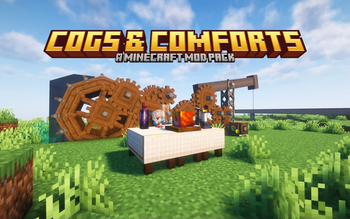
About this Modpack
Cogs and Comforts
Do you want an immersive but not painful experience of building an industry from ground up? But often feels lost while doing so? Don't worry, this modpack is for you! Best played on a server with friends!

Disclaimer
Cogs and Comforts is still in testing. There can and will be bugs, issues or unbalanced stuff. If you have a problem or suggestion, feel free to join The Discord server and open a thread in the bugs or suggestions forum or submitting an issue on github. For more details on the content you can read the changelog.
Major Features
The Create Mod
- An immersive engineering experience from windmills to electricity.
- The foundation of this modpack
Custom Melting and Alloying
- Put a basin over a blaze burner and you can melt metals with the help of a mixer.
- Mixing the molten metals can yield alloys with special properties.
- Custom ponders to guide you through the process
Tetra
- Where you can use all the alloys to forge powerful unique modular weapons
- We have Tinklers Construct at home™
- Custom Tetra weapons and materials!
Bulk Storage
- Store your items in a chest array accesible through a storage terminal
- No more rummaging through chests!
- Crafted through create mod items
Delights
- Mods such as Farmer's Delight and the Let's Do series allow for another immersive experience of cooking and making meals.
- No pressure though, as this modpack does not require a balanced diet. Eat all you like!
- They're here so you can take a break from industrializing when you feel tired.
Furniture
- Furniture mods allow you to decorate your home all you like, whether it's a cozy cottage, a majestic mansion or mountainside dugout.
Quests
- A quest tree to guide you through the create progress, telling you which item is locked behind which so you won't feel lost.
- A dictionary of all possible metals and alloys to tell you which is which and which can do what.
Origins
- Turn yourself into a chicken, an enderman or more if you want to spice things up!
Optimization
I put every single optimization mod that would fit on forge here, so you can enjoy the scenery while worrying less about your computer spontaneously combusting. You can even add shaders to make the scenery more enjoyable and take beautiful screenshots!
If your PC is still burning try turning distant horizons off. Also, since DH 2.0.4 is not officially released yet, you're not able to use it with shaders as of now.
Do note that due to the amount of mods some things might break. I haven't playtested every nook and cranny yet, so backup frequently. If you find a bug or have a suggestion don't hesitate report it at our discord server or at the issue tracker.
Running Cogs and Comforts on a server
This is not tested thoroughly as I'm not very familiar with servers, but installing the pack via any launcher and copy the relevant folders and contained files to the server folder and removing all mods that stops the server from running should work.
Features planned for later versions
- More Detailed descriptions for alloys
Distant Horizons updateCancelled because the game refuses to run- Custom Create Ore Excavation veins(Done!)
- Create quest tree revamp
- Fancy Menu!
- More renewable resources!
Even more soon™ plans
- Create: New age
- Create: Vintage Improvements
Available Versions
How to Set Up a Cogs and Comforts Server
Order Server
Choose at least 6 GB RAM (8 GB recommended for Cogs and Comforts). Based on player count: per 5 players.
Install Modpack in Dashboard
Open the modpack browser in the dashboard, search for "Cogs and Comforts" and click "Install". The forge loader and Minecraft 1.20.1 are configured automatically.
Start Server & Play
Start the server – all mods are loaded automatically. Share the server IP with friends and play together!
Frequently Asked Questions
Cogs and Comforts server crashes or won't start – what to do?
Most common causes: insufficient RAM or wrong forge loader. Check latest.log for "OutOfMemoryError" → increase RAM to at least 8 GB. For "Mixin" or "ClassNotFoundException" errors: modpack version and loader don't match. With Mado Hosting, loader and Minecraft version are auto-configured on modpack install – preventing most startup issues.
How much RAM does a Cogs and Comforts server really need?
Minimum 6 GB, recommended 8 GB for stable performance. per 5 players. Important: Minecraft modpacks need more RAM than vanilla – plan extra per additional player. With Mado Hosting, you can scale RAM up live at any time without data loss (from €12/month).
Can I add custom mods to Cogs and Comforts without conflicts?
Yes, but check compatibility: only use mods for the same loader (forge) and same Minecraft version (1.20.1). Common issues: ID conflicts with recipe mods and incompatible coremod versions. The Mado dashboard mod browser only shows compatible mods and warns about known conflicts.
Cogs and Comforts server lagging – performance tips
1) Increase RAM to 8 GB+. 2) Reduce server view-distance to 8 (server.properties). 3) Pre-generate chunks with the "Chunky" plugin. 4) Use /spark profiler to check which mods consume the most tick time. With Mado Hosting, all servers run on NVMe SSDs with dedicated CPU cores – eliminating hardware as a bottleneck.
Similar Modpacks
![Better MC [FABRIC] - BMC2](https://cdn.modrinth.com/data/shFhR8Vx/a19c2bcb51d38f32f138d3607e91cb2b7b8e387f_96.webp)
![Better MC [FORGE] - BMC4](https://cdn.modrinth.com/data/4BV47HRn/7f5ef7cc61b2593609aabef3ed07a866a4f11b73_96.webp)


![Better MC [FABRIC] - BMC3](https://cdn.modrinth.com/data/NHUidpfR/327e0749bb6d160c41799fd77bf6d3d631569dc8_96.webp)

Rent Cogs and Comforts Server
Start your own server with automatic modpack installation.
Details
- License
- Do What The F*ck You Want To Public License
- Server-side
- Required
- Client-side
- Required
Supported Versions
Start your Cogs and Comforts Server now
From €12.00/month with 8 GB RAM for the best performance.
Configure Server →