
Completecraft
Adds features from Minecraft spin-offs, April Fools versions and old versions to Java Edition.
Screenshots
About this Modpack


Completecraft
Minecraft, as complete as possible

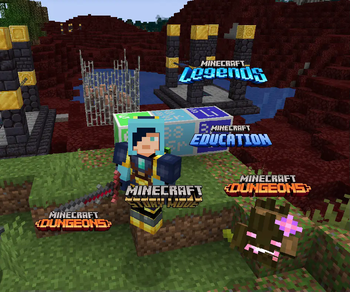
Completecraft is a modpack for Minecraft which aims to bring features from Minecraft spin-offs, old versions and April Fools pranks to the modern Java Edition 1.20.1. Imagine a world where Dungeons, Dungeons II, Legends, Earth, Story Mode, Education and Vanilla meet to form one Minecraft game, this pack is exactly that! To truly complete your experience, everything from beyond 1.20.1 has been added through backport mods and high FPS is guaranteed through tens of performance mods.
Check out the official website for the full pack list, updates and a complete Wiki!
Features
A complete list of features can be found on the Completecraft Wiki.
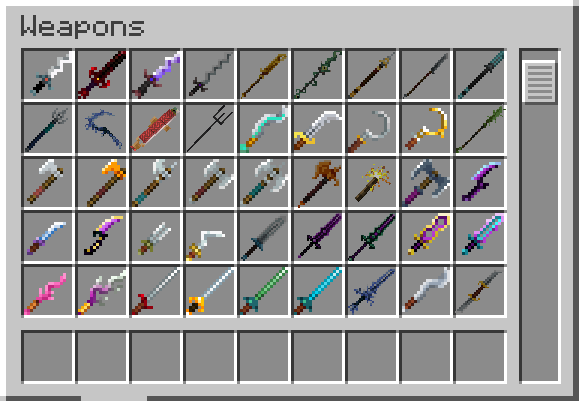
New combat system

Tired of both 1.9 and 1.8 combat? This modpack contains a completely new, third combat system, inspired by Minecraft Dungeons. Weapon timing still matters, but so do the angles at which you hit your opponents.
New bosses

Over 10 new bosses and mini-bosses have invaded the world. When defeated, they will reward you with armor, weaponry and other powerful items.
New blocks

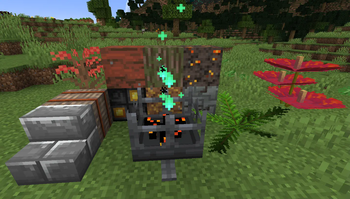
A variety of new blocks have been added - decorative blocks from Dungeons, Story Mode and Legends, elements of the periodic table and even retro versions of vanilla blocks. Redstoners will benefit from the re-added 2024w14potato Floatater block.
The Wither Storm

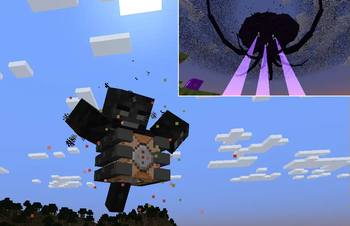
The Ender Dragon is too weak for you? The Wither Storm from Story Mode can be spawned with a custom survival-friendly command block and is guaranteed to destroy at least half of your world by the time you deal the first hit.
Updated End dimension

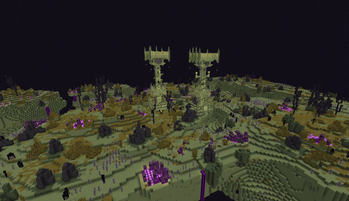
The long-awaited End Update is here - in the form of The End from Minecraft Dungeons. Prepare for new structures, Blastlings, Snarelings, Watchlings and the Vengeful Heart of Ender boss fight (which can also occur in the Overworld).
New structures

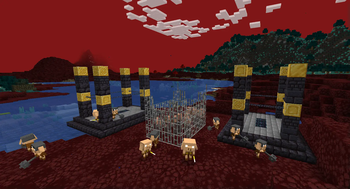
Structures inspired by Story Mode episodes, Dungeons missions and the Piglin invasion have been added. They generate in both vanilla and modded biomes. The chests inside are not always free to open, instead they are guarded by powerful custom mobs.
Required resource packs
The following resource packs should always be enabled to prevent texture glitches.
- Tears and Cheers 1.3
- Gen Assets

Tips for more FPS
To achieve the best frame rate with Completecraft:
- Turn off VSync
- Don't touch the installed mods
- Set your maximum frame rate to unlimited
- Keep your simulation distance at a maximum of 15 chunks
- Keep your render distance at a maximum of 20 chunks
- Allocate around 6 GB of memory, or more, to your instance (how to do this)
Issues
Issue tracker coming soon.
Known issues
- Names of Dungeons items and blocks are literally translated from Russian and sometimes incorrectly capitalized
- The namespace for the Dungeons Content mod is "duneons"
- It can take upwards of 1 minute to create a world
- If you spawn near a Dungeons structure, your world may lag for a few seconds before Let Me Despawn activates
Included packs
See the list of included packs here.
Off-platform packs

Official website
The official website of Completecraft can be found here.
Available Versions
How to Set Up a Completecraft Server
Order Server
Choose at least 6 GB RAM (8 GB recommended for Completecraft). Based on player count: per 5 players.
Install Modpack in Dashboard
Open the modpack browser in the dashboard, search for "Completecraft" and click "Install". The forge loader and Minecraft 1.20.1 are configured automatically.
Start Server & Play
Start the server – all mods are loaded automatically. Share the server IP with friends and play together!
Frequently Asked Questions
Completecraft server crashes or won't start – what to do?
Most common causes: insufficient RAM or wrong forge loader. Check latest.log for "OutOfMemoryError" → increase RAM to at least 8 GB. For "Mixin" or "ClassNotFoundException" errors: modpack version and loader don't match. With Mado Hosting, loader and Minecraft version are auto-configured on modpack install – preventing most startup issues.
How much RAM does a Completecraft server really need?
Minimum 6 GB, recommended 8 GB for stable performance. per 5 players. Important: Minecraft modpacks need more RAM than vanilla – plan extra per additional player. With Mado Hosting, you can scale RAM up live at any time without data loss (from €12/month).
Can I add custom mods to Completecraft without conflicts?
Yes, but check compatibility: only use mods for the same loader (forge) and same Minecraft version (1.20.1). Common issues: ID conflicts with recipe mods and incompatible coremod versions. The Mado dashboard mod browser only shows compatible mods and warns about known conflicts.
Completecraft server lagging – performance tips
1) Increase RAM to 8 GB+. 2) Reduce server view-distance to 8 (server.properties). 3) Pre-generate chunks with the "Chunky" plugin. 4) Use /spark profiler to check which mods consume the most tick time. With Mado Hosting, all servers run on NVMe SSDs with dedicated CPU cores – eliminating hardware as a bottleneck.
Similar Modpacks
![Cobblemon Official Modpack [Fabric]](https://cdn.modrinth.com/data/5FFgwNNP/e7f9ee2e9d361623847853fe2ddce42f519ee64f.png)
![COBBLEVERSE - Pokemon Adventure [Cobblemon]](https://cdn.modrinth.com/data/Jkb29YJU/581ecf54530972afb18a04660afd820f2f24f6c7.png)
![Better MC [FABRIC] - BMC2](https://cdn.modrinth.com/data/shFhR8Vx/a19c2bcb51d38f32f138d3607e91cb2b7b8e387f_96.webp)


![Better MC [FORGE] - BMC4](https://cdn.modrinth.com/data/4BV47HRn/7f5ef7cc61b2593609aabef3ed07a866a4f11b73_96.webp)
Rent Completecraft Server
Start your own server with automatic modpack installation.
Details
- License
- Creative Commons Attribution 4.0 International
- Server-side
- Required
- Client-side
- Required
Supported Versions
Start your Completecraft Server now
From €12.00/month with 8 GB RAM for the best performance.
Configure Server →