
Complexus All Fabric
Complexus All Fabric is a streamlined version of our modpack, All The Forge, optimized for performance while retaining essential mods.
Screenshots
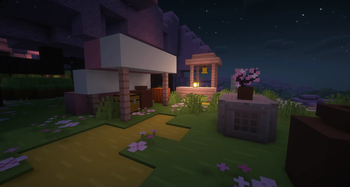
About this Modpack
NO OPTIFINE NEEDED: Access Shaders in Video Settings > Shader Packs > Add Your Shader
Overview
Complexus All Fabric is designed for optimal performance, utilizing the Fabric Loader API. Immerse yourself in a world of possibilities with popular mods like Bewitchment and Applied Energistics 2, enhancing your gaming experience. All The Fabric prioritizes stability and an immersive Minecraft journey, making it the ultimate selection.
Our modpack offers a diverse range of style mods to cater to your unique preferences. Whether you enjoy mixing gameplay styles or need a lighter alternative to our Forge modpack, you've come to the right place. Engineered with performance in mind, this modpack ensures a smooth experience on lower-end PCs with at least 4GB of RAM. However, we strongly recommend avoiding installation on machines with less than 4GB of RAM, as it hasn't been tested and may result in performance issues.
Features
Explore diverse biomes with mods like Terrestria and Traverse.
Experience unique landscapes in Cinderscapes and reach for the stars with Ad Astra.
Dive into advanced technology with Applied Energistics 2 and Create.
Uncover the secrets of the Industrial Revolution using Industrial Revolution and Tech Reborn.
Embrace the mystical world of Bewitchment and enhance gameplay with CC: Tweaked.
Build stunning structures with Chisel Reborn and Macaw’s Bridges.
Enjoy abundant building blocks and delicious food from Farmer's Delight.
Customize your experience with built-in Shader support via Iris Shaders (requires adding your own Shader).
Roll back chat reporting to Pre 1.19 and benefit from quality-of-life improvements like Backpacks, Waystones, recipe fixes/upgrades, optimizations, and handheld device support.
All this and more in a feature-packed modpack with over 100 mods!
You can find the full list of mods under the "Versions" tab by following this link.
Available Versions
How to Set Up a Complexus All Fabric Server
Order Server
Choose at least 6 GB RAM (10 GB recommended for Complexus All Fabric). Based on player count: per 4 players.
Install Modpack in Dashboard
Open the modpack browser in the dashboard, search for "Complexus All Fabric" and click "Install". The fabric loader and Minecraft 1.20.1 are configured automatically.
Start Server & Play
Start the server – all mods are loaded automatically. Share the server IP with friends and play together!
Frequently Asked Questions
Complexus All Fabric server crashes or won't start – what to do?
Most common causes: insufficient RAM or wrong fabric loader. Check latest.log for "OutOfMemoryError" → increase RAM to at least 10 GB. For "Mixin" or "ClassNotFoundException" errors: modpack version and loader don't match. With Mado Hosting, loader and Minecraft version are auto-configured on modpack install – preventing most startup issues.
How much RAM does a Complexus All Fabric server really need?
Minimum 6 GB, recommended 10 GB for stable performance. per 4 players. Important: Minecraft modpacks need more RAM than vanilla – plan extra per additional player. With Mado Hosting, you can scale RAM up live at any time without data loss (from €12/month).
Can I add custom mods to Complexus All Fabric without conflicts?
Yes, but check compatibility: only use mods for the same loader (fabric) and same Minecraft version (1.20.1). Common issues: ID conflicts with recipe mods and incompatible coremod versions. The Mado dashboard mod browser only shows compatible mods and warns about known conflicts.
Complexus All Fabric server lagging – performance tips
1) Increase RAM to 10 GB+. 2) Reduce server view-distance to 8 (server.properties). 3) Pre-generate chunks with the "Chunky" plugin. 4) Use /spark profiler to check which mods consume the most tick time. With Mado Hosting, all servers run on NVMe SSDs with dedicated CPU cores – eliminating hardware as a bottleneck.
Similar Modpacks


Rent Complexus All Fabric Server
Start your own server with automatic modpack installation.
Details
- License
- GNU General Public License v3.0 only
- Server-side
- Required
- Client-side
- Required
Supported Versions
Start your Complexus All Fabric Server now
From €12.00/month with 10 GB RAM for the best performance.
Configure Server →