
Corroxin's optimizations
A performance-focused PvP optimization modpack designed to boost FPS, reduce input delay, and deliver smoother, move responsive gameplay.
Screenshots
About this Modpack
🔥What is Corroxin's optimizations?
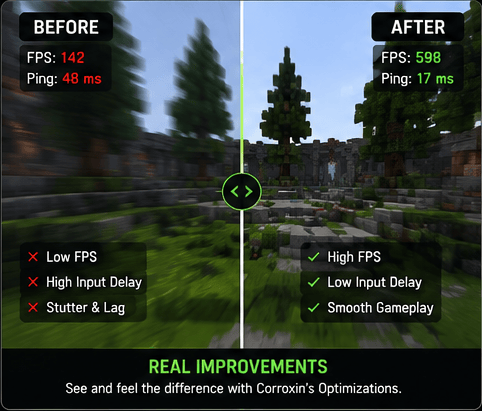
Corroxin’s Optimizations is a PvP-focused performance modpack built to maximize FPS, reduce input delay, and deliver the smoothest possible Minecraft experience.
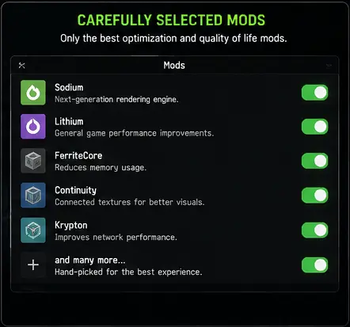
It combines essential optimization and visual enhancement mods to improve overall responsiveness, reduce stuttering, and create smoother combat gameplay.
This modpack is currently in active development, which means frequent updates, ongoing improvements, and occasional fixes as new optimizations are added.
Whether you're playing competitive PvP or simply want better performance, Corroxin’s Optimizations is designed to make Minecraft feel faster, smoother, and more responsive.
⚡Features
Here is a quick rundown of a few features.
- Animation, visual, sound and mod customizations (Edit animations, visuals, sounds how you like)
- Motion blur (To have smoother gameplay, use command /motionblur)
- Fps boost mods (Optimize your games performance with mods that reduce lag and enhance fps)
- Added ingame settings (ensuring smooth and fluid gameplay)
- HUD settings (Customize your HUD how you like)
- Render Settings (Control fog, static entities, and other miscellaneous renderings)
- Details Settings (Control sky, stars, sun/moon, weather, and much more)
- Particles Settings (Control all types of particles, including ones from other mods)
- Reduce missed inputs on high ping (Doesn't change server rules or cooldown it only re‑sends use actions to help them register)
⚡ Key Features
- 🚀 Insane fps boost
- 💻 Works with any launcher
- 🌐 Stable in single/multiplayer
- 💡 Extra ingame settings
📥 How to install
- Download the .mrpack from Modrinth
- Convert it to .zip using: Conventer 1 or Converter 2
- Install the required loader in your launcher (Fabric)
- Open the .zip archive (which you downloaded earlier) and copy everything inside (mods and config) into your created instance folder
⭐ Recommended
Use Modrinth Launcher since its the easiest to use, highly recommended!
🚀 Recommended Versions
Fabric 1.21.11-1.21.10
❤️ Support the Project
This modpack will be allways for free, this modpack is still in early development so there still might be bugs, ill be updating and fixing this modpack everyday!
❓ FAQ
Is it allowed on servers?
Yes, it is allowed on most major servers, including PvPClub and MineMen. However, please check your specific server's rules before joining, as some strict networks may prohibit certain optimization or PvP modifications.
Will more mods be added?
Yes. New modifications will be added over time. Conversely, some current mods may be removed in future updates to resolve incompatibilities or performance issues.
Will your modpack be only on Fabric?
Yes. Recreating the modpack for other loaders would require a significant amount of time. Since these modifications are natively built for Fabric, you will experience optimal performance. Fabric is highly recommended for this setup.
Will you develop your modpack on CurseForge or somewhere else?
Most likely, no. I will definitely never develop my modpack on CurseForge and abandoned it because of the stupid moderation system that does not allow adding mods from other sites, requires a moderator to check every action and imposes a bunch of other useless restrictions. I do not want to spend so much time reworking my modpack for CurseForge, because users end up downloading mods separately.
Are there/will there be mods that everyone needs (like iris)
Not in this specific release. This pack focuses strictly on core optimization, PvP performance, and resource pack compatibility. Features like Iris shaders can significantly lower your FPS. To provide the best experience, I will be releasing two distinct versions: one for pure game optimization, and another combining PvP enhancements with performance tweaks.
Available Versions
How to Set Up a Corroxin's optimizations Server
Order Server
Choose at least 4 GB RAM (6 GB recommended for Corroxin's optimizations). Based on player count: per 8 players.
Install Modpack in Dashboard
Open the modpack browser in the dashboard, search for "Corroxin's optimizations" and click "Install". The fabric loader and Minecraft 26.1.2 are configured automatically.
Start Server & Play
Start the server – all mods are loaded automatically. Share the server IP with friends and play together!
Frequently Asked Questions
Corroxin's optimizations server crashes or won't start – what to do?
Most common causes: insufficient RAM or wrong fabric loader. Check latest.log for "OutOfMemoryError" → increase RAM to at least 6 GB. For "Mixin" or "ClassNotFoundException" errors: modpack version and loader don't match. With Mado Hosting, loader and Minecraft version are auto-configured on modpack install – preventing most startup issues.
How much RAM does a Corroxin's optimizations server really need?
Minimum 4 GB, recommended 6 GB for stable performance. per 8 players. Important: Minecraft modpacks need more RAM than vanilla – plan extra per additional player. With Mado Hosting, you can scale RAM up live at any time without data loss (from €8/month).
Can I add custom mods to Corroxin's optimizations without conflicts?
Yes, but check compatibility: only use mods for the same loader (fabric) and same Minecraft version (26.1.2). Common issues: ID conflicts with recipe mods and incompatible coremod versions. The Mado dashboard mod browser only shows compatible mods and warns about known conflicts.
Corroxin's optimizations server lagging – performance tips
1) Increase RAM to 6 GB+. 2) Reduce server view-distance to 8 (server.properties). 3) Pre-generate chunks with the "Chunky" plugin. 4) Use /spark profiler to check which mods consume the most tick time. With Mado Hosting, all servers run on NVMe SSDs with dedicated CPU cores – eliminating hardware as a bottleneck.
Similar Modpacks

![Better MC [FABRIC] - BMC2](https://cdn.modrinth.com/data/shFhR8Vx/a19c2bcb51d38f32f138d3607e91cb2b7b8e387f_96.webp)
![Better MC [FORGE] - BMC4](https://cdn.modrinth.com/data/4BV47HRn/7f5ef7cc61b2593609aabef3ed07a866a4f11b73_96.webp)


Rent Corroxin's optimizations Server
Start your own server with automatic modpack installation.
Supported Versions
Start your Corroxin's optimizations Server now
From €8.00/month with 6 GB RAM for the best performance.
Configure Server →