
Cozy Visuals
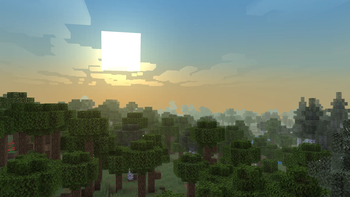
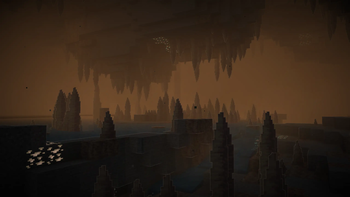
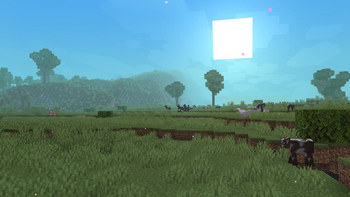
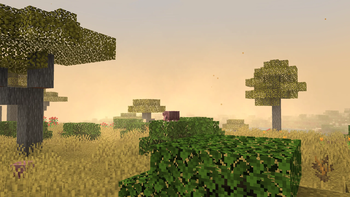
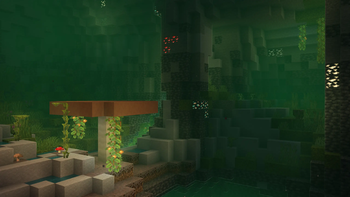
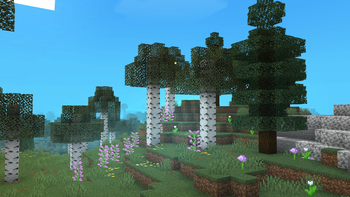
This isn’t just another visual pack that makes Minecraft unrecognizable. Every change has a purpose, not just looks. it keeps vanilla Minecraft intact while making it more immersive and satisfying to play!
Screenshots
About this Modpack

Cozy Visuals is not just another visual modpack that turns Minecraft into something flashy, cartoony, or completely different from vanilla.
Every change is carefully chosen with a purpose, focusing on improving the atmosphere and overall feel of the game rather than adding effects for the sake of it.
The goal is to make normal Minecraft more immersive, polished, and satisfying to play while staying true to its original style!
⛏️ This pack adds:
Animation Overhaul
- Everything's now more fun and springy icluding the players, almost every mob, and even in first-person
- And smaller stuff, like hanging chains and lanterns, or a little pop-up when opening an inventory
Cozier visuals
- Especially small details like enchantment outline glint, lightrays from the sun and bloom on snow or lava.
- But there are also more noticeable stuff, like outline on blocks without the use of shaders, fancier clouds, more beautiful sky colors and water caustics.
Enhanced audio system
- footsteps sound wet when rainings, hotbar and inventory sounds, and atmospheric sounds like birds, crickets or wind.
New particles
- Specific block-breaking particles, immersive brain particles, sandstorm particles in deserts, and more quiet and subtle particles
- like stripping log or passing with a shovel, particles, running particles, punching specific mobs particles. And not just particles, also glowing, emssive or blooming stuff.
3D stuff
- Not everything is 3D, but all kind of armor, all food, Books, discs and more are.
- Some of them even have outline like enchanted tools, and some are glowing.
New Main Menu
- New panorama and title.
+ Many more!
🗒️ Notes
This modpack has its own vibe. Shaders mess with the atmosphere, so please play without
them for the intended experience.I’m not an expert in optimization mods, but I’ve done my best to keep the pack running at a playable FPS.
To make the game look just like it's supposed to, you'll have to set 'Particles' to 'All in video settings. Basically don't play too much with the default settings.
❓ FAQ
- Can I install shaders?
Read the notes.
- I have a suggestion/I found a bug, what should I do?
Join the Discord server! :D

🔗 Credits / Attributions
Attributions
Credits
- Credit to MincraftEinstein for his mod, Subtle Effects
Available Versions
How to Set Up a Cozy Visuals Server
Order Server
Choose at least 6 GB RAM (8 GB recommended for Cozy Visuals). Based on player count: per 5 players.
Install Modpack in Dashboard
Open the modpack browser in the dashboard, search for "Cozy Visuals" and click "Install". The fabric loader and Minecraft 1.21.11 are configured automatically.
Start Server & Play
Start the server – all mods are loaded automatically. Share the server IP with friends and play together!
Frequently Asked Questions
Cozy Visuals server crashes or won't start – what to do?
Most common causes: insufficient RAM or wrong fabric loader. Check latest.log for "OutOfMemoryError" → increase RAM to at least 8 GB. For "Mixin" or "ClassNotFoundException" errors: modpack version and loader don't match. With Mado Hosting, loader and Minecraft version are auto-configured on modpack install – preventing most startup issues.
How much RAM does a Cozy Visuals server really need?
Minimum 6 GB, recommended 8 GB for stable performance. per 5 players. Important: Minecraft modpacks need more RAM than vanilla – plan extra per additional player. With Mado Hosting, you can scale RAM up live at any time without data loss (from €12/month).
Can I add custom mods to Cozy Visuals without conflicts?
Yes, but check compatibility: only use mods for the same loader (fabric) and same Minecraft version (1.21.11). Common issues: ID conflicts with recipe mods and incompatible coremod versions. The Mado dashboard mod browser only shows compatible mods and warns about known conflicts.
Cozy Visuals server lagging – performance tips
1) Increase RAM to 8 GB+. 2) Reduce server view-distance to 8 (server.properties). 3) Pre-generate chunks with the "Chunky" plugin. 4) Use /spark profiler to check which mods consume the most tick time. With Mado Hosting, all servers run on NVMe SSDs with dedicated CPU cores – eliminating hardware as a bottleneck.
Similar Modpacks
![Cobblemon Official Modpack [Fabric]](https://cdn.modrinth.com/data/5FFgwNNP/e7f9ee2e9d361623847853fe2ddce42f519ee64f.png)
![COBBLEVERSE - Pokemon Adventure [Cobblemon]](https://cdn.modrinth.com/data/Jkb29YJU/581ecf54530972afb18a04660afd820f2f24f6c7.png)
![Better MC [FABRIC] - BMC2](https://cdn.modrinth.com/data/shFhR8Vx/a19c2bcb51d38f32f138d3607e91cb2b7b8e387f_96.webp)


![Better MC [FORGE] - BMC4](https://cdn.modrinth.com/data/4BV47HRn/7f5ef7cc61b2593609aabef3ed07a866a4f11b73_96.webp)
Rent Cozy Visuals Server
Start your own server with automatic modpack installation.
Details
- License
- LicenseRef-All-Rights-Reserved
- Server-side
- Unsupported
- Client-side
- Required
Supported Versions
Start your Cozy Visuals Server now
From €12.00/month with 8 GB RAM for the best performance.
Configure Server →