
Craft 4 Fun
A fun vanilla-plus, lightweight modpack designed to bring quality-of-life improvements and better graphics. Perfect for playing with friends.
Screenshots
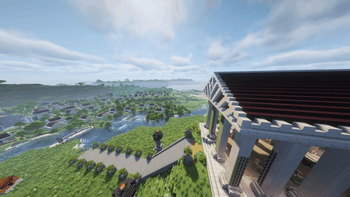
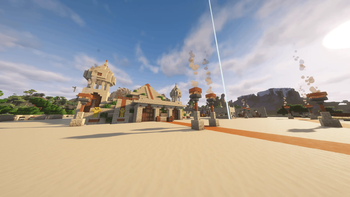
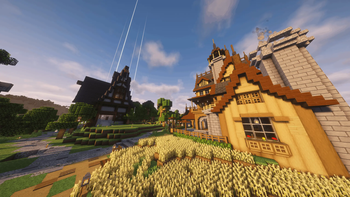
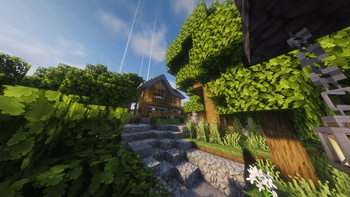
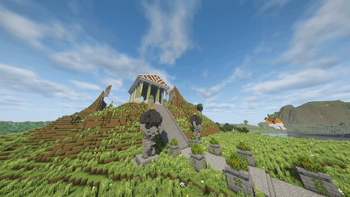
About this Modpack
Craft 4 Fun: The Ultimate Vanilla+ Experience
Craft 4 Fun is a comprehensive Minecraft modpack that strikes the perfect balance between performance optimization and aesthetic enhancement. Designed as a polished Vanilla+ overlay, it elevates your gameplay by making the world more visually stunning and lively without ever changing the core mechanics of the game.
Enhance Your World, Risk-Free
The most important feature of Craft 4 Fun is its total reversibility:
- Save-Safe: This pack acts as a non-intrusive layer. It is 100% safe to add to your existing worlds without any risk of corruption.
- Fully Reversible: You can return to a full vanilla client at any time. Your save remains completely usable and unbroken, as the pack adds no "modded" blocks or items that would break your game upon removal.
- Streamlined Utility: Includes a carefully selected collection of utility mods that simplify the game and provide a smoother, more immersive experience.
Join the community and discover a faster, more beautiful version of Minecraft that respects your progress. Experience the best of Vanilla+, with zero strings attached.
Recommendations
To get the most out of the modpack, we recommend installing shader packs and texture packs.
Checkmates Adventures — Mod List
Performance & Optimization
| Mod | Author |
|---|---|
| Sodium | CaffeineMC |
| Lithium | CaffeineMC |
| FerriteCore | malte0811 |
| Spark | lucko |
Graphics & Visuals
| Mod | Author |
|---|---|
| Iris Shaders | IrisShaders Team |
| Distant Horizons | James Seibel |
| Continuity | PepperCode1 |
| LambDynamicLights | LambdAurora |
| Entity Model Features (EMF) | Traben |
| Entity Texture Features (ETF) | Traben |
| Fancy World Animations (FWA) | axamon |
| Not Enough Animations | tr7zw |
| Chat Animation | YurinD |
| Cubes Without Borders | StellaTheCat |
| Dark Loading Screen | alexnijjar |
Sound
| Mod | Author |
|---|---|
| Sound Physics Remastered | henkelmax |
World, Map & HUD
| Mod | Author |
|---|---|
| Xaero's Minimap | xaero96 |
| Dynmap | mikeprimm |
| MiniHUD | masa |
| Jade | Snownee |
| Just Enough Items (JEI) | mezz |
| Just Enough Professions (JEP) | MehVahdJukaar |
| AppleSkin | squeek502 |
| Shulker Box Tooltip | misterpemodder |
| Enchantment Descriptions | Darkhax |
| Nether Coords | Cyl1 |
Inventory & Controls
| Mod | Author |
|---|---|
| Lightweight Inventory Sorting | Aksel |
| Mouse Tweaks | YaLTeR |
| Stack Refill | Serilum |
| Controlling | Jaredlll08 |
| Searchables | Jaredlll08 |
| Auto Clicker | happyandjust |
Camera & Movement
| Mod | Author |
|---|---|
| Zoomify | isXander |
| Freecam | xolt-ya |
Utility & Tools
| Mod | Author |
|---|---|
| Litematica | masa |
| MaLiLib | masa |
| Visual Workbench | Fuzs |
| Clumps | Jaredlll08 |
| Mod Menu | Prospector |
Server & Multiplayer
| Mod | Author |
|---|---|
| Auth Me | axieum |
| Simple RPC | HypherionSA |
| Placeholder API | Patbox |
Libraries (required by other mods)
| Mod | Author |
|---|---|
| Fabric API | FabricMC |
| Fabric Language Kotlin | FabricMC |
| Architectury API | shedaniel |
| Cloth Config | shedaniel |
| Balm | BlayTheNinth |
| CraterLib | HypherionSA |
| Forge Config API Port | Fuzs |
| Puzzles Lib | Fuzs |
| YetAnotherConfigLib (YACL) | isXander |
| libIPN | mirinimi |
| Collective | Serilum |
| PrickleMC | Fuzs |
Checkmates Adventures — Mod List updated April 2026
Available Versions
How to Set Up a Craft 4 Fun Server
Order Server
Choose at least 4 GB RAM (6 GB recommended for Craft 4 Fun). Based on player count: per 8 players.
Install Modpack in Dashboard
Open the modpack browser in the dashboard, search for "Craft 4 Fun" and click "Install". The fabric loader and Minecraft 1.21.11 are configured automatically.
Start Server & Play
Start the server – all mods are loaded automatically. Share the server IP with friends and play together!
Frequently Asked Questions
Craft 4 Fun server crashes or won't start – what to do?
Most common causes: insufficient RAM or wrong fabric loader. Check latest.log for "OutOfMemoryError" → increase RAM to at least 6 GB. For "Mixin" or "ClassNotFoundException" errors: modpack version and loader don't match. With Mado Hosting, loader and Minecraft version are auto-configured on modpack install – preventing most startup issues.
How much RAM does a Craft 4 Fun server really need?
Minimum 4 GB, recommended 6 GB for stable performance. per 8 players. Important: Minecraft modpacks need more RAM than vanilla – plan extra per additional player. With Mado Hosting, you can scale RAM up live at any time without data loss (from €8/month).
Can I add custom mods to Craft 4 Fun without conflicts?
Yes, but check compatibility: only use mods for the same loader (fabric) and same Minecraft version (1.21.11). Common issues: ID conflicts with recipe mods and incompatible coremod versions. The Mado dashboard mod browser only shows compatible mods and warns about known conflicts.
Craft 4 Fun server lagging – performance tips
1) Increase RAM to 6 GB+. 2) Reduce server view-distance to 8 (server.properties). 3) Pre-generate chunks with the "Chunky" plugin. 4) Use /spark profiler to check which mods consume the most tick time. With Mado Hosting, all servers run on NVMe SSDs with dedicated CPU cores – eliminating hardware as a bottleneck.
Similar Modpacks

![Cobblemon Official Modpack [Fabric]](https://cdn.modrinth.com/data/5FFgwNNP/e7f9ee2e9d361623847853fe2ddce42f519ee64f.png)
![COBBLEVERSE - Pokemon Adventure [Cobblemon]](https://cdn.modrinth.com/data/Jkb29YJU/581ecf54530972afb18a04660afd820f2f24f6c7.png)
![Better MC [FABRIC] - BMC2](https://cdn.modrinth.com/data/shFhR8Vx/a19c2bcb51d38f32f138d3607e91cb2b7b8e387f_96.webp)


Rent Craft 4 Fun Server
Start your own server with automatic modpack installation.
Supported Versions
Start your Craft 4 Fun Server now
From €8.00/month with 6 GB RAM for the best performance.
Configure Server →