
CreamyCraft Client
Elevate your vanilla Minecraft experience with refined visuals and seamless quality-of-life improvements, now smoother than ever with render distance spanning thousands of blocks!
Screenshots
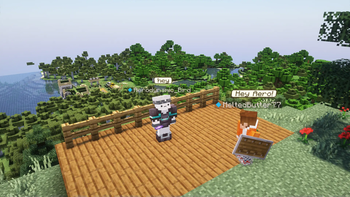
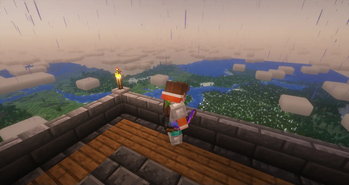

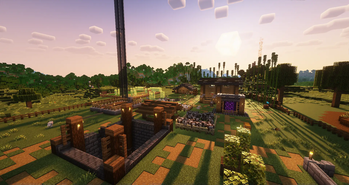
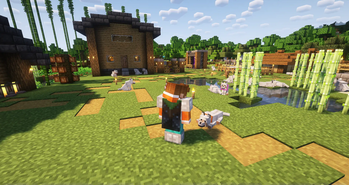
About this Modpack
About the CreamyCraft Modpack
The CreamyCraft Client modpack, curated by MeltedButter, is designed for the discerning Minecraft player who values an authentic experience. This modpack specifically caters to those who wish to maintain the integrity of the base game, while seeking visual and quality-of-life enhancements without the bloat.
Features:
- High render distance. You will be able to see 100s of blocks away with minimal preformance impact, even on any server.
- Player heads appear next to their messages and what they say appears above their head!
- Shaders are supported and make the game stunning
- Quality of life features improve item management
- Better visuals like more animations and dynamic light sources
- Dynamic Fulbright - allows for seeing in the dark without making caves look odd
- Added visual effects like water splashes and other small additions
Yes this modpack can be run on vanilla servers. Make sure to follow the rules of the server and have fun!
Click to view the extended mod list for CreamyCraft Client
- 3D Skin Layers
- Advancement Info
- Ambient Sounds
- Animatica
- Anti Ghost
- Apple Skin
- Axolotl Buckets
- Better F3
- Better Ping Display
- Better Stats Screen
- Better Third Person
- Borderless Mining
- Chat Heads
- Chat Notify
- Cherished Worlds
- Clear Despawn
- Cloth Config
- Continuity
- Controlling
- Coordinates Display
- Craft Presence
- Creative Core
- Cupboard
- Dash Loader
- Distant Horizons
- Dynamic Fullbright
- Eating Animation
- Enhanced Block Entities
- Entity Model Features
- Entity Texture Features
- Entity Culling
- Essential
- Explosive Enhancement
- Fabric API
- Falling Leaves
- Fast Load
- Forge Config API Port
- Iceberg
- Immersive Portals
- Indium
- In Move
- Iris MC
- Item Borders
- Krypton
- Lamb Dynamic Lights
- Make Bubbles Pop O2O
- Map in Slot
- Modern Fix
- Mod Menu
- More Chat History
- Mouse Tweaks
- Mouse Wheelie
- No Chat Reports
- Not Enough Animations
- Not Enough Crashes
- Particle Rain
- Plasmovoice
- Presence Footsteps
- Prism
- PV Addon Replay Mod
- PV Addon Sound Physics
- Reeses Sodium Options
- Replay Mod
- Screenshot to Clipboard
- Searchables
- Shut Up Experimental Settings
- Simple Skin Helper Preview
- Sodium Extra
- Sodium Fabric
- Sound Physics
- Starlight
- Stendhal
- Talk Bubbles
- Visuality
- VMP Fabric
- Wakes
- World Edit
- Yet Another Config Lib
World Gen & Structures
- Dungeons and Taverns
- Dungeons and Taverns Ancient City Overhaul
- Dungeons and Taverns Pillager Outpost Rework
- Dungeons and Taverns Stronghold Rework
- Dungeons and Taverns Swamp Hut Rework
Please remember to ask server admins before using this pack as some features may be considered cheating.
Contact
Discord: meltedbutter77
Available Versions
How to Set Up a CreamyCraft Client Server
Order Server
Choose at least 4 GB RAM (6 GB recommended for CreamyCraft Client). Based on player count: per 8 players.
Install Modpack in Dashboard
Open the modpack browser in the dashboard, search for "CreamyCraft Client" and click "Install". The fabric loader and Minecraft 1.20.1 are configured automatically.
Start Server & Play
Start the server – all mods are loaded automatically. Share the server IP with friends and play together!
Frequently Asked Questions
CreamyCraft Client server crashes or won't start – what to do?
Most common causes: insufficient RAM or wrong fabric loader. Check latest.log for "OutOfMemoryError" → increase RAM to at least 6 GB. For "Mixin" or "ClassNotFoundException" errors: modpack version and loader don't match. With Mado Hosting, loader and Minecraft version are auto-configured on modpack install – preventing most startup issues.
How much RAM does a CreamyCraft Client server really need?
Minimum 4 GB, recommended 6 GB for stable performance. per 8 players. Important: Minecraft modpacks need more RAM than vanilla – plan extra per additional player. With Mado Hosting, you can scale RAM up live at any time without data loss (from €8/month).
Can I add custom mods to CreamyCraft Client without conflicts?
Yes, but check compatibility: only use mods for the same loader (fabric) and same Minecraft version (1.20.1). Common issues: ID conflicts with recipe mods and incompatible coremod versions. The Mado dashboard mod browser only shows compatible mods and warns about known conflicts.
CreamyCraft Client server lagging – performance tips
1) Increase RAM to 6 GB+. 2) Reduce server view-distance to 8 (server.properties). 3) Pre-generate chunks with the "Chunky" plugin. 4) Use /spark profiler to check which mods consume the most tick time. With Mado Hosting, all servers run on NVMe SSDs with dedicated CPU cores – eliminating hardware as a bottleneck.
Similar Modpacks

![Cobblemon Official Modpack [Fabric]](https://cdn.modrinth.com/data/5FFgwNNP/e7f9ee2e9d361623847853fe2ddce42f519ee64f.png)
![COBBLEVERSE - Pokemon Adventure [Cobblemon]](https://cdn.modrinth.com/data/Jkb29YJU/581ecf54530972afb18a04660afd820f2f24f6c7.png)
![Better MC [FABRIC] - BMC2](https://cdn.modrinth.com/data/shFhR8Vx/a19c2bcb51d38f32f138d3607e91cb2b7b8e387f_96.webp)


Rent CreamyCraft Client Server
Start your own server with automatic modpack installation.
Supported Versions
Start your CreamyCraft Client Server now
From €8.00/month with 6 GB RAM for the best performance.
Configure Server →