
Create: Adventure Begins!
A modpack to make the create mod less of a hustle and more of a adventure!
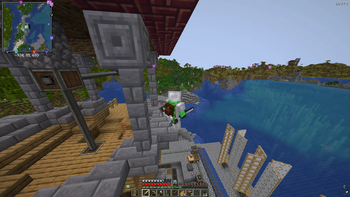
Screenshots
About this Modpack
Create: Adventure Begins!
Welcome to a world where engineering meets exploration. Create: Adventure Begins! is designed to be a balanced experience that enhances the core charm of Minecraft without making it feel like a completely different game. Whether you want to build a massive automated factory, trek through overhauled dungeons, or simply enjoy a more vibrant world, this pack is built to provide a stable and immersive journey.
Features
- Mechanical Mastery: Build intricate moving contraptions and automated systems using the Create mod. This version expands your engineering toolkit with The Factory Must Grow, Dreams n' Desires, and Power Loader.
- A Living World: Encounter a massive variety of wildlife with Alex's Mobs. Explore beautifully enhanced biomes from Geophilic.
- Total Dungeon Overhaul: Discover completely redesigned caves, mineshafts, and strongholds thanks to the full YUNG’s Better series and Explorify.
- Homesteading & Storage: Master the culinary arts with Farmer’s Delight and Ratatouille. Keep your items organized with Sophisticated Backpacks, Tom’s Simple Storage, and Lootr.
- The Stars Above: Journey beyond the world with the Northstar Redux space expansion.
- Atmospheric Detail: Experience the world through AmbientSounds, Presence Footsteps, and Sound Physics Remastered.
Performance First
This pack is built on a high-performance foundation. By utilizing Sodium, Lithium, Ferrite Core, and ModernFix, we ensure the game runs as smoothly as possible even with complex machinery.
PC Specification Settings (Recommended)
Low-End PCs (Integrated Graphics / 4GB RAM)
- Video Settings: Set Render Distance to 6-8 chunks.
- Graphics: Set to 'Fast'.
- Clouds: Set to 'Fast' or 'Off'.
- Shaders: Keep disabled for best performance.
- Resource Packs: Disable "Stay True" to save memory.
Mid-Range PCs (Dedicated GPU / 8GB RAM)
- Video Settings: Set Render Distance to 10-12 chunks.
- Graphics: Set to 'Fancy'.
- Shaders: Complementary or BSL (Medium settings).
- Resource Packs: All enabled.
High-End PCs (Modern GPU / 12GB+ RAM)
- Video Settings: Set Render Distance to 16+ chunks.
- Graphics: Set to 'Fabulous!'.
- Shaders: Bliss or Photon (Ultra settings).
- Resource Packs: All enabled.
Setup & Launch Guide
How to Launch
- Download the pack via the Modrinth App.
- Ensure you have allocated at least 4GB to 6GB of RAM in the profile settings.
- Hit Play and wait for the Seamless Loading Screen to finish.
Shaders Setup (Optional)
The pack includes Iris for shader support. To use them:
- Go to Options > Video Settings > Shader Packs.
- Select your preferred shader from the list:
- Bliss: For a realistic, atmospheric look.
- BSL: The classic, high-performance standard.
- Complementary: A perfect balance of visuals and performance.
- Photon: Lightweight and modern.
Resource Packs Setup (Optional)
To enable the custom look of the pack, go to Options > Resource Packs and move these to the right side:
- Fresh Animations: (Classic horses, Creepers, Details, Emissive, Objects, and Quivers).
- Lower utilities and eating animations: For a cleaner first-person view.
- Mandala's GUI: For a polished, themed interface.
- Stay True: For enhanced vanilla-style textures.
Available Versions
How to Set Up a Create: Adventure Begins! Server
Order Server
Choose at least 6 GB RAM (8 GB recommended for Create: Adventure Begins!). Based on player count: per 5 players.
Install Modpack in Dashboard
Open the modpack browser in the dashboard, search for "Create: Adventure Begins!" and click "Install". The neoforge loader and Minecraft 1.21.1 are configured automatically.
Start Server & Play
Start the server – all mods are loaded automatically. Share the server IP with friends and play together!
Frequently Asked Questions
Create: Adventure Begins! server crashes or won't start – what to do?
Most common causes: insufficient RAM or wrong neoforge loader. Check latest.log for "OutOfMemoryError" → increase RAM to at least 8 GB. For "Mixin" or "ClassNotFoundException" errors: modpack version and loader don't match. With Mado Hosting, loader and Minecraft version are auto-configured on modpack install – preventing most startup issues.
How much RAM does a Create: Adventure Begins! server really need?
Minimum 6 GB, recommended 8 GB for stable performance. per 5 players. Important: Minecraft modpacks need more RAM than vanilla – plan extra per additional player. With Mado Hosting, you can scale RAM up live at any time without data loss (from €12/month).
Can I add custom mods to Create: Adventure Begins! without conflicts?
Yes, but check compatibility: only use mods for the same loader (neoforge) and same Minecraft version (1.21.1). Common issues: ID conflicts with recipe mods and incompatible coremod versions. The Mado dashboard mod browser only shows compatible mods and warns about known conflicts.
Create: Adventure Begins! server lagging – performance tips
1) Increase RAM to 8 GB+. 2) Reduce server view-distance to 8 (server.properties). 3) Pre-generate chunks with the "Chunky" plugin. 4) Use /spark profiler to check which mods consume the most tick time. With Mado Hosting, all servers run on NVMe SSDs with dedicated CPU cores – eliminating hardware as a bottleneck.
Similar Modpacks
![Cobblemon Official Modpack [Fabric]](https://cdn.modrinth.com/data/5FFgwNNP/e7f9ee2e9d361623847853fe2ddce42f519ee64f.png)
![COBBLEVERSE - Pokemon Adventure [Cobblemon]](https://cdn.modrinth.com/data/Jkb29YJU/581ecf54530972afb18a04660afd820f2f24f6c7.png)
![Better MC [FABRIC] - BMC2](https://cdn.modrinth.com/data/shFhR8Vx/a19c2bcb51d38f32f138d3607e91cb2b7b8e387f_96.webp)


![Better MC [FORGE] - BMC4](https://cdn.modrinth.com/data/4BV47HRn/7f5ef7cc61b2593609aabef3ed07a866a4f11b73_96.webp)
Rent Create: Adventure Begins! Server
Start your own server with automatic modpack installation.
Supported Versions
Start your Create: Adventure Begins! Server now
From €12.00/month with 8 GB RAM for the best performance.
Configure Server →