
Create & Craft
Custom create-based modpack created for me & some friends to run on an SMP server.
Screenshots




About this Modpack
Create & Craft
Create & Craft is a modpack I made to play on an SMP with some friends.
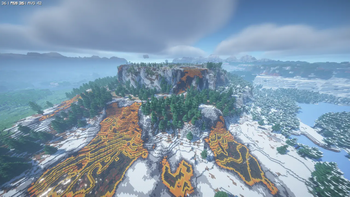
The main focus is on Create & some of its addons, but I've also included Mekanism, new worldgen (with Terralith and Tectonic), some performance improving mods (including Sodium), and a bunch of QoL improvements.
No recipe changes, no quests, just good stuff.
Mod List
Spoiler
- Amendments by MehVahdJukaar, Plantkillable
- Animal Feeding Trough by Slexom
- AppleSkin by squeek
- Architectury by shedaniel
- Areas by Rick South
- Athena by ThatGravyBoat
- Backported Animal Variants by AkacioBahno
- Balm by BlayTheNinth
- Bartering Station by Fuzs
- Basic Discord Rich Presence by HyCraftHD
- Beautified Chat Client by Rick South
- Beautified Chat Server by Rick South
- Better Advancements by way2muchnoise
- Better Compatibility Checker by Gaz(Gaz492)
- Better Controls (Multiloader) by chylex
- Better Mods Button by Fuzs
- Better Ping Display by Quintinity
- Better Tridents by Fuzs
- BetterThanMending by Legobmw99
- Bookshelf by Darkhax
- Caelus API by Illusive Soulworks
- Cerbons API by CerbonXD
- Charm of Undying by Illusive Soulworks
- Chloride by SrRapero720
- Chunky by pop4959
- Client Tweaks by BlayTheNinth
- ClientSort by NotRyken
- Cloth Config v15 API by shedaniel
- Clumps by Jared
- Collective by Rick South
- Comfortable Campfires by cassiancc
- Comforts by Illusive Soulworks
- Compact Help Command by Rick South
- Configured by MrCrayfish
- Continuity by PepperCode1
- Controlify by isXander
- Controlling by Jaredlll08
- CoroUtil by Corosus
- Crafting Tweaks by BlayTheNinth
- Create by simibubi
- Create Bionics by Dshbwlto
- Create Compressed by NoCube
- Create Contraption Terminals by tom5454
- Create Crafts & Additions by MRH0
- Create Encased by iglee42
- Create Let The Adventure Begin
- Create New Beginnings by Kessatsu
- Create Ore Excavation by tom5454
- Create Quality of Life by iglee42
- Create Stuff & Additions by Furti_Two
- Create: Bells & Whistles by lev
- Create: Better Motors by Reggarf
- Create: Central Kitchen by DragonsPlus
- Create: Deep Dark by robinfrt
- Create: Desires 2 Dreams by LopyLuna
- Create: Dragons Plus by DragonsPlus
- Create: Enchantment Industry by DragonsPlus
- Create: Essential recipes by matkos
- Create: Framed by DakotaPride
- Create: Generators by robinfrt
- Create: Lazy Engines by NatiM6
- Create: Mechanical spawner by oierbravo
- Create: Pattern Schematics by Cake
- Create: Renewable Diamonds by 0xDED
- Create: Stones by 0xDED
- Create: Structures Arise by SmartStreamLabs
- Create: Trading Floor by Cake, Tazer
- Create: Ultimate Factory by robinfrt
- Create: Vibrant Vaults by ZLT
- Create: Waystones Recipes by Reggarf
- Create: Wizardry by TTZPlayz
- CreateHavenQualities by CathieNova
- Create_Better_Villagers by Reggarf aka Anoop Singh
- Curios API by C4
- Cut Through by Fuzs
- Distant Horizons
- Distinguished Potions by Fuzs
- Distraction Free Recipes (EMI) by Toni
- Double Doors by Rick South
- Durability Tooltip by SuperMartijn642
- Dynamic FPS by juliand665 & LostLuma
- EMI by Emi
- EMI Enchanting by fzzyhmstrs
- EMI Loot by fzzyhmstrs, lxly9 (art), unilock (ports)
- EMI Ores by Abbie
- EMI Professions (EMIP) by Mrbysco, ShyNieke
- Easy Elytra Takeoff by Rick South
- EdivadLib by Edivad99
- ElevatorMod by VsnGamer
- Elytra Slot by Illusive Soulworks
- Elytra Trims by KikuGie
- Elytra physics by ImJoshh
- Emi Create Schematics by LiukRast
- EnchantmentDescriptions by Darkhax
- Ender IO by CrazyPants, tterrag, HenryLoenwind, MatthiasM, CyanideX, EpicSquid, Rover656, HypherionSA, agnor99, Ferri_Arnus, dphaldes
- Entity Model Features by Traben
- Entity Texture Features by Traben
- EntityCulling by tr7zw
- Explorer's Compass by ChaosTheDude
- Extra Delight by Lance5057, Alan199921, DivineAspect, Skysom, FreneticScribbler, Lanse505, Belathus, RoyalJelly, ParadigmOne, Robynster
- Extra Mod Integrations by Kneelawk, abbie, KirboEatsFood
- ExtraStorage by Edivad99
- Extreme Sound Muffler by LeoBeliik
- Farmer's Delight by vectorwing
- Ferrite Core by malte0811
- Fixed Anvil Repair Cost by Rick South
- Forge Config API Port by Fuzs
- Forgematica by TexTrue, ThinkingStudio
- Forgified Fabric API by Sinytra, FabricMC
- Full Brightness Toggle by Rick South
- Fzzy Config by fzzyhmstrs
- GUI Clock by Rick South
- GeckoLib 4 by Gecko, Eliot, AzureDoom, DerToaster, Tslat, Witixin
- Gravestone Mod by Max Henkel
- Hide Experimental Warning by Rick South
- Hoe Tweaks by Rick South
- Horse Expert by Fuzs
- Iceberg by Grend
- ImmediatelyFast by RK_01
- Incendium by Stardust Labs
- Iris by coderbot, IMS212
- Iron's Spells 'n Spellbooks by Iron431, Lab3
- Item Borders by Grend
- Jade by Snownee
- Jade Addons by Snownee
- JamLib by Jamalam
- JourneyMap Integration by frankV
- JourneyMap WebMap by Techbrew, Mysticdrew
- JourneyPAC by KosmosPrime
- Journeymap by Techbrew, Mysticdrew
- Just Enough Beacons by CerbonXD
- Just Enough Breeding by Christofmeg
- Just Enough Effects Descriptions by MehVahdJukaar
- Just Enough Items by mezz
- Just Enough Mekanism Multiblocks by gisellevonbingen
- Just Enough Professions (JEP) by Mrbysco, ShyNieke
- Just Enough Resources by way2muchnoise
- Just Zoom by Keksuccino
- KleeSlabs by BlayTheNinth
- Konkrete by Keksuccino
- Kotlin for Forge
- Legendary Tooltips by Grend
- Lithium by 2No2Name, JellySquid
- Lithostitched by Apollo
- Lootr by Noobanidus
- MaFgLib by TexTrue, ThinkingStudio
- Magnum Torch by Fuzs
- MapFrontiers by Alejandro Coria (MemeSapiens)
- Mechanicals Lib by oierbravo
- Mekanism by Aidancbrady, Thommy101, Thiakil, pupnewfster, dizzyd
- Mekanism Covers by D4rkness_King
- Mekanism Curios by TonimatasDEV
- Mekanism Lasers
- Mekanism Unleashed by WhitePhantom
- Mekanism: Additions by Aidancbrady, Thommy101, Thiakil, pupnewfster, dizzyd
- Mekanism: Generators by Aidancbrady, Thommy101, Thiakil, pupnewfster, dizzyd
- Mekanism: Tools by Aidancbrady, Thommy101, Thiakil, pupnewfster, dizzyd
- Mekanistic Routers by Matyrobbrt
- MidnightLib by TeamMidnightDust, Motschen
- Model Gap Fix by MehVahdJukaar
- ModernFix by embeddedt
- Modular Routers by Des Herriott
- Monsters In The Closet by Minenash
- Moonlight Lib by MehVahdJukaar
- More Culling by FX - PR0CESS, 1Foxy2
- Mouse Tweaks by Ivan Molodetskikh (YaLTeR)
- Move Boats by Rick South
- Move Minecarts by Rick South
- Name Tag Tweaks by Rick South
- Nature's Compass by ChaosTheDude
- No Chat Reports by Aizistral
- No Feather Trample by Rick South
- No Hostiles Around Campfire by Rick South
- Not Enough Crashes by Fudge
- NotEnoughAnimations by tr7zw
- Nullscape by Stardust Labs
- Open Parties and Claims by Xaero96 and other contributors
- Ore Harvester by Rick South
- Pick Up Notifier by Fuzs
- Ping Wheel by Luken, RXJpaw
- Player Animator by KosmX
- Polymorph by Illusive Soulworks
- Polytone by MehVahdJukaar
- Ponder by simibubi, Pepper, zelophed
- PrickleMC by Darkhax
- Prism by Grend
- Puzzle by PuzzleMC, Motschen
- Puzzles Lib by Fuzs
- Random Shulker Colours by Rick South
- Random Village Names by Rick South
- Reese's Sodium Options by FlashyReese
- Refined Storage by Refined Mods
- Refined Storage - Curios Integration by Refined Mods
- Refined Storage - EMI Integration by Refined Mods
- Refined Storage - JEI Integration by Refined Mods
- Refined Storage - Mekanism Integration by Refined Mods
- Refined Storage - Quartz Arsenal by Refined Mods
- Remove Terralith Intro Message
- Respawn Delay by Rick South
- Right Click Harvest by Jamalam
- RightClickHarvest Supplementaries Compat by Jamalam
- Scaffolding Drops Nearby by Rick South
- Searchables by Jaredlll08
- ServerCore by Wesley1808
- ShulkerBoxTooltip by MisterPeModder
- Simple Voice Chat by Max Henkel
- Sinytra Connector
- Sodium by JellySquid (jellysquid3), IMS212
- Sodium Dynamic Lights by toni, LambdAurora
- Sodium Extra by FlashyReese
- Sodium Extras by toni
- Sodium Leaf Culling by toni
- Sodium Options API by toni
- Sodium Options Mod Compat by Toni, DeeChael
- Softer Hay Bales by Rick South
- Sophisticated Backpacks by P3pp3rF1y, Ridanisaurus
- Sophisticated Backpacks Create Integration by P3pp3rF1y
- Sophisticated Core by P3pp3rF1y
- Sophisticated Emerald Upgrade by Reggarf aka Anoop Singh
- Sophisticated Storage by P3pp3rF1y, Ridanisaurus
- Sophisticated Storage Create Integration by P3pp3rF1y
- Sophisticated Storage In Motion by P3pp3rF1y
- Sound Physics Remastered by Sonic Ether, vlad2305m, Max Henkel
- Spelunker's Torch by Alejandro Coria (MemeSapiens)
- Stack Refill by Rick South
- Sticky Enchanting Lapis by Rick South
- SuperMartijn642's Config Library by SuperMartijn642
- Supplementaries by MehVahdJukaar, Plantkillable
- Tectonic
- Terralith by Stardust Labs
- Tom's Simple Storage Mod by tom5454
- Traveler's Titles by YUNGNICKYOUNG
- Tree Harvester by Rick South
- TxniLib by Toni
- Universal Grid by Ultramega
- Villager Names by Rick South
- Waystones by BlayTheNinth
- What Are They Up To by Corosus
- YUNG's API by YUNGNICKYOUNG
- YetAnotherConfigLib by isXander
- create: things and misc by To0pa, Unusual Squad, MCreator
- create_dimension by Reggarf
- oωo by glisco, Blodhgarm, BasiqueEvangelist, Noaaan
- spark by Luck
- underground_village by Reggarf
Resource Packs
- Sparkles: Official custom textures for incendium & nullscape mods.
- Sparkles Addon - Alpha Islands: Optional custom textures for the rare alpha islands biome.
Shader Packs
- BSL Shaders: Good looking shaders made by Capt Tatsu.
- Complementary Reimagined*: Detailed shader pack, more in line with minecraft's style.
- Complementary Unbound*: Detailed shader pack, with less blockiness and more realism.
- MakeUp Ultra Fast: Performance focused shaders that also look good.
* Any issues that arise due to using these shader packs with this modpack should be taken up with this modpack, not the shader pack's author.
Available Versions
How to Set Up a Create & Craft Server
Order Server
Choose at least 6 GB RAM (8 GB recommended for Create & Craft). Based on player count: per 5 players.
Install Modpack in Dashboard
Open the modpack browser in the dashboard, search for "Create & Craft" and click "Install". The neoforge loader and Minecraft 1.21.1 are configured automatically.
Start Server & Play
Start the server – all mods are loaded automatically. Share the server IP with friends and play together!
Frequently Asked Questions
Create & Craft server crashes or won't start – what to do?
Most common causes: insufficient RAM or wrong neoforge loader. Check latest.log for "OutOfMemoryError" → increase RAM to at least 8 GB. For "Mixin" or "ClassNotFoundException" errors: modpack version and loader don't match. With Mado Hosting, loader and Minecraft version are auto-configured on modpack install – preventing most startup issues.
How much RAM does a Create & Craft server really need?
Minimum 6 GB, recommended 8 GB for stable performance. per 5 players. Important: Minecraft modpacks need more RAM than vanilla – plan extra per additional player. With Mado Hosting, you can scale RAM up live at any time without data loss (from €12/month).
Can I add custom mods to Create & Craft without conflicts?
Yes, but check compatibility: only use mods for the same loader (neoforge) and same Minecraft version (1.21.1). Common issues: ID conflicts with recipe mods and incompatible coremod versions. The Mado dashboard mod browser only shows compatible mods and warns about known conflicts.
Create & Craft server lagging – performance tips
1) Increase RAM to 8 GB+. 2) Reduce server view-distance to 8 (server.properties). 3) Pre-generate chunks with the "Chunky" plugin. 4) Use /spark profiler to check which mods consume the most tick time. With Mado Hosting, all servers run on NVMe SSDs with dedicated CPU cores – eliminating hardware as a bottleneck.
Rent Create & Craft Server
Start your own server with automatic modpack installation.
Supported Versions
Start your Create & Craft Server now
From €12.00/month with 8 GB RAM for the best performance.
Configure Server →