
Create: Bamboo Sky
Old versions of Create: Bamboo Island...
Screenshots

About this Modpack
Create: Bamboo Sky
THIS PROJECT IS OUTDATED! PLEASE DOWNLOAD Create: Bamboo Island TO GET THE NEW FEATURES.
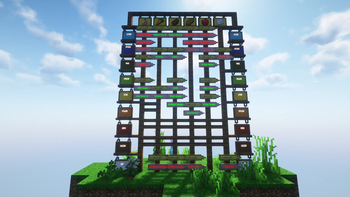
Create: Bamboo Sky is simply a modpack with the mod Create (and a few addons) that makes it possible to (hopefully) get all the important resources in Skyblock. But the special thing about this pack is that, unlike most other modpacks, it works without Ex Nihilo or KubeJS. I simply created a small vanilla Minecraft data pack as a replacement.
Sometimes I needed to adjust features, but in general I tried to put only necessary, well fitting mods in my pack to keep them mostly as they are.
Many thanks at this point also to all mod authors, not only those in this pack. Without you, what I am doing here wouldn't be possible.
Mob spawning:
Since I don't want Skyblock to depend on mob farms for the most part, I decided to disable mob spawning in the overworld. But beware, there are still Phantoms and Wandering Traders!
Instead, the 1.20 Sniffer will dig for animal spawn eggs.
The Nether still contains mob spawn as it is supposed to be a dangerous dimension. Especially for Blazes, I added a new recipe for their spawn egg to make Blaze Burners easier to farm.
Planned features
- End portal recipe (already in Create: Bamboo Island)
- Trailer in Create Mod Style
- ... (Your ideas)
Ideas
If you have any suggestions on what I could change or add to the modpack, please open a GitHub issue immediately, this would help me a lot to make this pack even better: here are a few suggestions:
- New recipes/modify recipes
- too complicated
- too simple
- too op
- New advancements, change advancements
- too convoluted
- Intermediate steps necessary
- Advancement obvious
- New mods (please check criteria above first)
- Better spawning conditions for players or mobs (to yet only nether)
- New/improved language translations
Available Versions
How to Set Up a Create: Bamboo Sky Server
Order Server
Choose at least 6 GB RAM (8 GB recommended for Create: Bamboo Sky). Based on player count: per 5 players.
Install Modpack in Dashboard
Open the modpack browser in the dashboard, search for "Create: Bamboo Sky" and click "Install". The fabric loader and Minecraft 1.20.1 are configured automatically.
Start Server & Play
Start the server – all mods are loaded automatically. Share the server IP with friends and play together!
Frequently Asked Questions
Create: Bamboo Sky server crashes or won't start – what to do?
Most common causes: insufficient RAM or wrong fabric loader. Check latest.log for "OutOfMemoryError" → increase RAM to at least 8 GB. For "Mixin" or "ClassNotFoundException" errors: modpack version and loader don't match. With Mado Hosting, loader and Minecraft version are auto-configured on modpack install – preventing most startup issues.
How much RAM does a Create: Bamboo Sky server really need?
Minimum 6 GB, recommended 8 GB for stable performance. per 5 players. Important: Minecraft modpacks need more RAM than vanilla – plan extra per additional player. With Mado Hosting, you can scale RAM up live at any time without data loss (from €12/month).
Can I add custom mods to Create: Bamboo Sky without conflicts?
Yes, but check compatibility: only use mods for the same loader (fabric) and same Minecraft version (1.20.1). Common issues: ID conflicts with recipe mods and incompatible coremod versions. The Mado dashboard mod browser only shows compatible mods and warns about known conflicts.
Create: Bamboo Sky server lagging – performance tips
1) Increase RAM to 8 GB+. 2) Reduce server view-distance to 8 (server.properties). 3) Pre-generate chunks with the "Chunky" plugin. 4) Use /spark profiler to check which mods consume the most tick time. With Mado Hosting, all servers run on NVMe SSDs with dedicated CPU cores – eliminating hardware as a bottleneck.
Similar Modpacks

![COBBLEVERSE - Pokemon Adventure [Cobblemon]](https://cdn.modrinth.com/data/Jkb29YJU/581ecf54530972afb18a04660afd820f2f24f6c7.png)




Rent Create: Bamboo Sky Server
Start your own server with automatic modpack installation.
Supported Versions
Start your Create: Bamboo Sky Server now
From €12.00/month with 8 GB RAM for the best performance.
Configure Server →