
Create: Farming & Delights!
Combining the Create Mod with Farmer's Delight plus a little QoL and worldgen
Screenshots
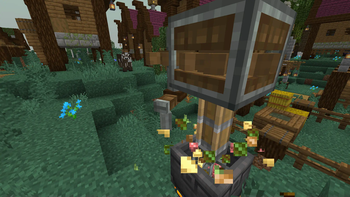
About this Modpack



A modpack with the goal of bridging the gap between Create and Farmer's Delight, while including a few nifty addons for both mods and maintaining decent performance.
Important Note
This was my first ever published modpack and is not a very cohesive experience. It is mostly me dumping a bunch of mods and only doing tweaks to get the packs to work together. If you are looking for a complete and well integrated experience you might enjoy something like Raspberry Flavored, my all time favorite modpack which does include both Create and Farmer's Delight with fantastic integration.
Included mods
Farmer's Delight
Create
Worldgen
- Terralith
- ChoiceTheorem's Overhauled Village
- YUNG's Better Witch Huts
- YUNG's Better Mineshafts
- YUNG's Better Strongholds
- YUNG's Better Nether Fortresses
- YUNG's Better Desert Temples
- YUNG's Better Dungeons
- YUNG's Better Ocean Monuments
- YUNG's Better End Island
- YUNG's Better Jungle Temples
- YUNG's Extras
- YUNG's Bridges
Experience
- Iris
- Continuity
- LambDynamicLights
- Presence Footsteps
- Sound Physics Remastered
- AmbientSounds
- Visuality
- Falling Leaves
- Capes
- Fast Better Grass (Texture Pack)
- xali's Enhanced Vanilla (Texture Pack)
Optimization
Useful bits
- Mod Menu
- Just Enough Items
- Reese's Sodium Options
- Accurate Block Placement Reborn
- Litematica (This mod is from Curseforge!)
- Simple Voice Chat
- Zoomify
- No Chat Reports
- InvMove
- Controlify
- FastQuit
- AppleSkin
- Enchantment Descriptions
- BetterF3
- Borderless Mining
- Better Mount HUD
- AdvancementInfo
- Mouse Wheelie
- YOSBR
Libraries, APIs, and other stuff
- Fabric API
- Cloth Config API
- Architectury API
- Fabric Language Kotlin
- Indium
- Lithostitched
- CreativeCore
- YUNG's API
- MaLiLib
- Model Gap Fix
- Debugify
- Remove Reloading Screen
- CTOV - Farmer Delight Compat
- Disable Custom Worlds Advice
- Remove Terralith Intro Message
- YetAnotherConfigLib
- Bookshelf
- Searchables
- Forge Config API Port
Please inform me if any links or formatting are broken, I'm missing some mods in this list, or if I missed anything else! :)
Feel free to make suggestions for the pack on github too!
Available Versions
How to Set Up a Create: Farming & Delights! Server
Order Server
Choose at least 6 GB RAM (8 GB recommended for Create: Farming & Delights!). Based on player count: per 5 players.
Install Modpack in Dashboard
Open the modpack browser in the dashboard, search for "Create: Farming & Delights!" and click "Install". The fabric loader and Minecraft 1.20.1 are configured automatically.
Start Server & Play
Start the server – all mods are loaded automatically. Share the server IP with friends and play together!
Frequently Asked Questions
Create: Farming & Delights! server crashes or won't start – what to do?
Most common causes: insufficient RAM or wrong fabric loader. Check latest.log for "OutOfMemoryError" → increase RAM to at least 8 GB. For "Mixin" or "ClassNotFoundException" errors: modpack version and loader don't match. With Mado Hosting, loader and Minecraft version are auto-configured on modpack install – preventing most startup issues.
How much RAM does a Create: Farming & Delights! server really need?
Minimum 6 GB, recommended 8 GB for stable performance. per 5 players. Important: Minecraft modpacks need more RAM than vanilla – plan extra per additional player. With Mado Hosting, you can scale RAM up live at any time without data loss (from €12/month).
Can I add custom mods to Create: Farming & Delights! without conflicts?
Yes, but check compatibility: only use mods for the same loader (fabric) and same Minecraft version (1.20.1). Common issues: ID conflicts with recipe mods and incompatible coremod versions. The Mado dashboard mod browser only shows compatible mods and warns about known conflicts.
Create: Farming & Delights! server lagging – performance tips
1) Increase RAM to 8 GB+. 2) Reduce server view-distance to 8 (server.properties). 3) Pre-generate chunks with the "Chunky" plugin. 4) Use /spark profiler to check which mods consume the most tick time. With Mado Hosting, all servers run on NVMe SSDs with dedicated CPU cores – eliminating hardware as a bottleneck.
Similar Modpacks
![Better MC [FABRIC] - BMC2](https://cdn.modrinth.com/data/shFhR8Vx/a19c2bcb51d38f32f138d3607e91cb2b7b8e387f_96.webp)
![Better MC [FORGE] - BMC4](https://cdn.modrinth.com/data/4BV47HRn/7f5ef7cc61b2593609aabef3ed07a866a4f11b73_96.webp)


![Better MC [FABRIC] - BMC3](https://cdn.modrinth.com/data/NHUidpfR/327e0749bb6d160c41799fd77bf6d3d631569dc8_96.webp)

Rent Create: Farming & Delights! Server
Start your own server with automatic modpack installation.
Details
- License
- Creative Commons Attribution 4.0 International
- Server-side
- Required
- Client-side
- Required
Supported Versions
Start your Create: Farming & Delights! Server now
From €12.00/month with 8 GB RAM for the best performance.
Configure Server →