
Create: Forced Expansion
A modpack that forces you to not live in one place!
Screenshots

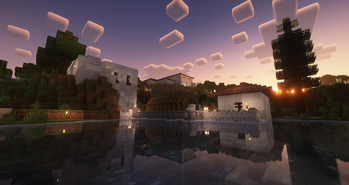
About this Modpack


Video Placeholder
Expand your Empire
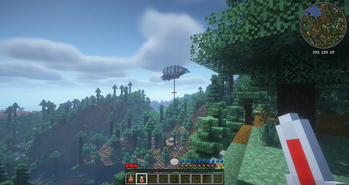
- Explore a Minecraft world with striking visuals and challenging structures using block-built airships and boats.
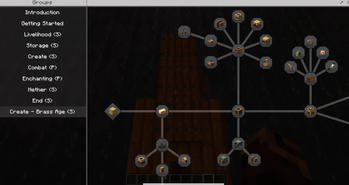
- Progress through the completely fresh Quest system, making use of Create to overcome the various challenges.
- Manage your temperature and meals with homeostatic and spice of fabric.
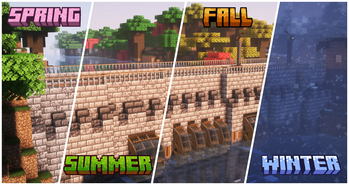
- Learn where to build your farms as well as how to support your saplings and seedlings from the seasons and climate.
- Establish outposts strategically to harvest a diverse array of resources essential for your survival as you follow new rules around your factories.
- Build yourself a home and numerous factories with an extended block pallet from rechiseled and chipped.
- Make the world your own using Create and its multiple add-ons.
- Store your gear in Sophisticated Backpacks and Tom's simple storage.
- Gear up to survive this harsh world and unravel the mysteries of runic stones scattered throughout the world.
- Conquer the Better Nether and Better End.
FAQ
Multiplayer
Q: Does Distant Creations support Multiplayer?
A: Yes, but you have to host your own Server!
Performance/Shaders
Q: The game is not running well, what can I do?
A: First and foremost, depending on your computer, change the Distant Horizon Settings.
By default, they are set to a pretty high view distance, so that should be the first change. Afterwards, the LOD quality setting can have a big impact as well.
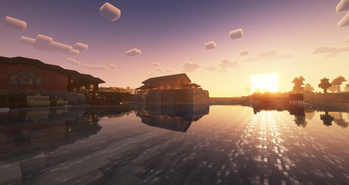
Finally, consider changing the Shaders. By default the modpack comes with BSL and Complimentary Reimagined installed. If you wish to install other shaders, check their compability with Distant Horizons here.
Help/Bug Reports
Q: Where can I ask for help or report bugs?
A: Head over to the blunthorn Discord
Available Versions
How to Set Up a Create: Forced Expansion Server
Order Server
Choose at least 6 GB RAM (8 GB recommended for Create: Forced Expansion). Based on player count: per 5 players.
Install Modpack in Dashboard
Open the modpack browser in the dashboard, search for "Create: Forced Expansion" and click "Install". The fabric loader and Minecraft 1.20.1 are configured automatically.
Start Server & Play
Start the server – all mods are loaded automatically. Share the server IP with friends and play together!
Frequently Asked Questions
Create: Forced Expansion server crashes or won't start – what to do?
Most common causes: insufficient RAM or wrong fabric loader. Check latest.log for "OutOfMemoryError" → increase RAM to at least 8 GB. For "Mixin" or "ClassNotFoundException" errors: modpack version and loader don't match. With Mado Hosting, loader and Minecraft version are auto-configured on modpack install – preventing most startup issues.
How much RAM does a Create: Forced Expansion server really need?
Minimum 6 GB, recommended 8 GB for stable performance. per 5 players. Important: Minecraft modpacks need more RAM than vanilla – plan extra per additional player. With Mado Hosting, you can scale RAM up live at any time without data loss (from €12/month).
Can I add custom mods to Create: Forced Expansion without conflicts?
Yes, but check compatibility: only use mods for the same loader (fabric) and same Minecraft version (1.20.1). Common issues: ID conflicts with recipe mods and incompatible coremod versions. The Mado dashboard mod browser only shows compatible mods and warns about known conflicts.
Create: Forced Expansion server lagging – performance tips
1) Increase RAM to 8 GB+. 2) Reduce server view-distance to 8 (server.properties). 3) Pre-generate chunks with the "Chunky" plugin. 4) Use /spark profiler to check which mods consume the most tick time. With Mado Hosting, all servers run on NVMe SSDs with dedicated CPU cores – eliminating hardware as a bottleneck.
Similar Modpacks
![Cobblemon Official Modpack [Fabric]](https://cdn.modrinth.com/data/5FFgwNNP/e7f9ee2e9d361623847853fe2ddce42f519ee64f.png)
![COBBLEVERSE - Pokemon Adventure [Cobblemon]](https://cdn.modrinth.com/data/Jkb29YJU/581ecf54530972afb18a04660afd820f2f24f6c7.png)
![Better MC [FABRIC] - BMC2](https://cdn.modrinth.com/data/shFhR8Vx/a19c2bcb51d38f32f138d3607e91cb2b7b8e387f_96.webp)


![Better MC [FORGE] - BMC4](https://cdn.modrinth.com/data/4BV47HRn/7f5ef7cc61b2593609aabef3ed07a866a4f11b73_96.webp)
Rent Create: Forced Expansion Server
Start your own server with automatic modpack installation.
Supported Versions
Start your Create: Forced Expansion Server now
From €12.00/month with 8 GB RAM for the best performance.
Configure Server →