
Create FreundeMC
A modpack that focuses on the CreateMod and adds new features, biomes and more but still keeps the vanilla Minecraft progression.
Screenshots

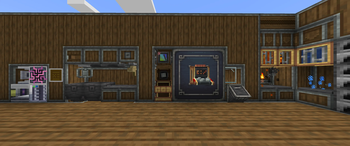
About this Modpack
This Modpack adds tech and utility mods for a better modded experience and harmony with vanilla and modded minecraft.
It's focused on keeping the Vanilla Minecraft feeling but still being able to explore new and exciting stuff. So if you want a Create Modpack that doesn't feel too modded you should try this!
This Modpack includes Create and many Create Addons. It also includes mods like Farmer's Delight, Applied Energistics 2 and many more.
All included mods
The mods listed below are always from the latest release!
- EMF
- ETF
- Accessories
- Almanac
- Almost Unified
- AppleSkin
- Applied Energistics 2
- Applied Energistics 2 Wireless Terminals
- Architectury API
- Artifacts
- Artifacts crafting
- BadOptimizations
- Biomes O' Plenty
- Carry On
- Chat Heads
- Cloth Config API
- Clumps
- Collective
- Comforts
- Continuity
- Controlling
- Create
- Create Big Cannons
- Create Contraption Terminals
- Create Crafts & Additions
- Create Deco
- Create Encased
- Create Jetpack
- Create Nuclear
- Create Railways Navigator
- Create Slice & Dice
- Create: Applied Kinetics
- Create: Bells & Whistles
- Create: Bitterballen
- Create: Central Kitchen
- Create: Connected
- Create: Copper & Zinc
- Create: Copycats+
- Create: Curios Jetpack & Backtank
- Create: Design n' Decor
- Create: Diesel Generators
- Create: Dragons Plus
- Create: Dreams & Desires
- Create: Easy Structures
- Create: Enchantment Industry
- Create: Food
- Create: Framed
- Create: Interiors
- Create: liquid Fuel
- Create: Metalwork
- Create: Misc and Things
- Create: New Age
- Create: Numismatics
- Create: Pattern Schematics
- Create: Power Grid
- Create: Power Loader
- Create: The Factory Must Grow
- Create: Threaded Trains
- Create: Tranding floor
- Create: Trimmed
- Create: Ultimate Factory
- CreativeCore
- Cubes Without Borders
- Curios API
- Distant Horizons
- DragonLib
- Drippy Loading Screen
- Dynamic Crosshair
- Dynamic FPS
- Entity Culling
- FancyMenu
- Farmer's Delight
- Farmer's Expanse
- FerriteCore
- Forgified Fabric API
- Freecam
- Full Brightness Toggle
- GlitchCore
- GraveStone Mod
- GuideME
- Iceberg
- ImmediatlyFast
- Iris Shaders
- Item Highlighter
- Jade
- JEI
- Just Zoom
- Konkrete
- Kotlin for Forge
- KryptonFoxified
- Legend's Missing Blocks
- Let Me Despawn
- Lithium
- Melody
- Model Gap Fix
- ModernFix
- Moonlight Lib
- More Culling
- Mouse Tweaks
- owo-lib
- Packet Fixer
- Quark
- Recipe Modification library
- Reese's Sodium Options
- Ritchie's Projectile Library
- Searchables
- Shulker Box Tooltip
- Simple Hats
- Simple Voice Chat
- Sinytra Connector
- Smarter Farmers
- Sodium
- Sodium Extra
- Sophisticated Backpacks
- Sophisticated Core
- Sound Physics Remastered
- spark
- Steam 'n' Rails Neoforge
- Storage Drawers
- TerraBlender
- Tom's Simple Storage Mod
- Traveler's Backpack
- Vegan Delight
- Xaero Train Map
- Xaero's Minimap
- Xaero's World Map
- YACL
- YUNG's API
- YUNG's Better Desert Temples
- YUNG's Better Dungeons
- YUNG's Better End Island
- YUNG's Better Jungle Temples
- YUNG's Better Mineshafts
- YUNG's Better Nether Fortresses
- YUNG's Better Ocean Monuments
- YUNG's Better Strongholds
- YUNG's Better Witch Huts
- YUNG's Bridges
- Zeta

Available Versions
How to Set Up a Create FreundeMC Server
Order Server
Choose at least 6 GB RAM (8 GB recommended for Create FreundeMC). Based on player count: per 5 players.
Install Modpack in Dashboard
Open the modpack browser in the dashboard, search for "Create FreundeMC" and click "Install". The neoforge loader and Minecraft 1.21.1 are configured automatically.
Start Server & Play
Start the server – all mods are loaded automatically. Share the server IP with friends and play together!
Frequently Asked Questions
Create FreundeMC server crashes or won't start – what to do?
Most common causes: insufficient RAM or wrong neoforge loader. Check latest.log for "OutOfMemoryError" → increase RAM to at least 8 GB. For "Mixin" or "ClassNotFoundException" errors: modpack version and loader don't match. With Mado Hosting, loader and Minecraft version are auto-configured on modpack install – preventing most startup issues.
How much RAM does a Create FreundeMC server really need?
Minimum 6 GB, recommended 8 GB for stable performance. per 5 players. Important: Minecraft modpacks need more RAM than vanilla – plan extra per additional player. With Mado Hosting, you can scale RAM up live at any time without data loss (from €12/month).
Can I add custom mods to Create FreundeMC without conflicts?
Yes, but check compatibility: only use mods for the same loader (neoforge) and same Minecraft version (1.21.1). Common issues: ID conflicts with recipe mods and incompatible coremod versions. The Mado dashboard mod browser only shows compatible mods and warns about known conflicts.
Create FreundeMC server lagging – performance tips
1) Increase RAM to 8 GB+. 2) Reduce server view-distance to 8 (server.properties). 3) Pre-generate chunks with the "Chunky" plugin. 4) Use /spark profiler to check which mods consume the most tick time. With Mado Hosting, all servers run on NVMe SSDs with dedicated CPU cores – eliminating hardware as a bottleneck.
Similar Modpacks
![Cobblemon Official Modpack [Fabric]](https://cdn.modrinth.com/data/5FFgwNNP/e7f9ee2e9d361623847853fe2ddce42f519ee64f.png)
![COBBLEVERSE - Pokemon Adventure [Cobblemon]](https://cdn.modrinth.com/data/Jkb29YJU/581ecf54530972afb18a04660afd820f2f24f6c7.png)
![Better MC [FABRIC] - BMC2](https://cdn.modrinth.com/data/shFhR8Vx/a19c2bcb51d38f32f138d3607e91cb2b7b8e387f_96.webp)


![Better MC [FORGE] - BMC4](https://cdn.modrinth.com/data/4BV47HRn/7f5ef7cc61b2593609aabef3ed07a866a4f11b73_96.webp)
Rent Create FreundeMC Server
Start your own server with automatic modpack installation.
Supported Versions
Start your Create FreundeMC Server now
From €12.00/month with 8 GB RAM for the best performance.
Configure Server →