
Create-ive
A large modpack made around Create with a lot of Create Add-ons and building mods while being moderately optimized.
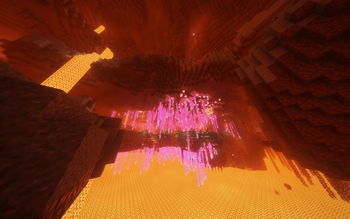
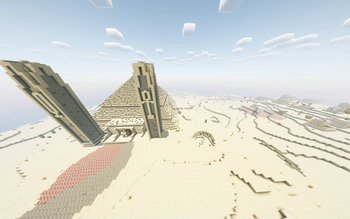
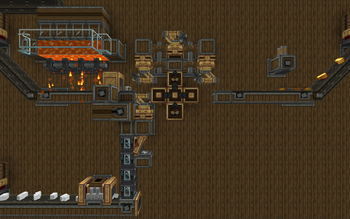
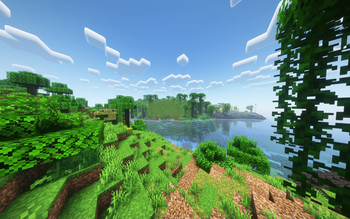
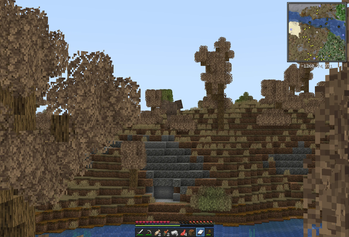
Screenshots

About this Modpack
Create-ive Modpack
Tips for New Users
When opening or creating your first world, you will be asked to configure Axiom and Simple Voice Chat.
Configuring Axiom is just a few button clicks and can be skipped, and setting up Simple Voice Chat asks you a few more questions but isn't too complicated.
All the mods and resourcepacks this modpack requires consume a lot of memory and, with the default amount of allocated memory, can crash a lot. To fix that, you should adjust the allocated memory settings immediately after installing the modpack to about 8192 (2^13) like this:

This option is available in the instance's options.
If you see a bug...
If the bug is related to a specific mod, report it to that mod's developers, and if it's a bug with the modpack, DM me on discord: @minetomek.
Recommended Resourcepack Order
Expand
Installing (not updating to) version 1.3.0 or later automatically sets the resourcepack preferences to the recommended order!
There isn't one required order because most packs won't override themselves. However, a few combinations should be in a specific order.
A lower number next to the pack name means a higher position
Create UI Packs:
They should be in this order:
- [Moonsu] Better GUI Create Style for Tom's Simple Storage
- Tom's Create Storage
- Create Darkmode
It also should be placed above Unique Dark.
Continuity's Packs:
They should be in this order:
- Glass Pane Culling Fix
- Default Connected Textures
Categorized Content List
Expand
Create and it's Add-ons
- Create Fabric
- Create Contraption Terminals
- Create Crafts & Additions
- Create Deco
- Create Enchantment Industry
- Create Jetpack
4.2.0by possible_triangle - Create Railways Navigator
- Create Slice & Dice
3.2.3by possible_triangle - Create Track Map
- Create: Big Contraptions
1.0by muriplz - Create: Copycats+
- Create: Curios Jetpack [Forge/Fabric]
1.0.0by robinfrt - Create: Design n' Decor
- Create: Diesel Generator
- Create: Food
- Create: Garnished
1.9.4+1.20.1-fabricby DakotaPrideModding - Create: High Pressure
- Create: Interiors
- Create: Metalwork
- Create: New Age
- Create: Numismatics
- Create: Oxidized
- Create: Steam 'n' Rails
- Create: Storage
- Create: Train Perspective
- Create: Trimmed
- Create: Vibrant Vaults
Building Mods
- Amendments
- Axiom
- Chipped
- Comforts
- Handcrafted
3.0.6by Terrarium - Macaw's Bridges
- Macaw's Doors
- Macaw's Fences and Walls
- Macaw's Furniture
- Macaw's Lights and Lamps
- Macaw's Paths and Pavings
- Macaw's Roofs
- Macaw's Trapdoors
- Macaw's Windows
- Rechiseled
- Supplementaries
World-gen Mods
- BetterEnd
- BetterNether
- Tectonic
- Terralith
- YUNG's Better Desert Temples
- YUNG's Better Dungeons
- YUNG's Better End Island
- YUNG's Better Jungle Temples
- YUNG's Better Mineshafts
- YUNG's Better Nether Fortresses
- YUNG's Better Ocean Monuments
- YUNG's Better Strongholds
- YUNG's Better Witch Huts
- YUNG's Bridges
- YUNG's Extras
- [Let’s Do Addon] Structures
1.7.1
QoL Mods
- AppleSkin
- Armor Statues
v8.0.6-1.20.1-Fabric - Better Advancements
- Better Mount HUD
- Better Statistics Screen
3.12.4+fabric-1.20.1 - BetterF3
- Cherished Worlds
- Continue Button
- Controlling
- Detail Armor Bar
2.6.3+1.20.1-fabric - Do a Barrel Roll
- Dynamic Crosshair
- EMI
- EMI Addon: Extra Mod Integrations
- EMI Enchants
- EMI Loot
- EMI Ores
- EMI Trades
- EMIffect
- Easy Anvils
- Easy Magic
- Easy Shulker Boxes
- Elytra Time
- Elytra Trinket
- Equipment Compare
- Essential Mod
- FastQuit
- Fastload
- Hand Over Your Items
1.20.1-3.5-fabric+forge+neoby Serilum - Held Item Info
1.5.0by A5b84 - ItemSwapper
- Jade Addons (Fabric)
- Jade 🔍
- Labelling Containers
- Mod Menu
- Model Gap Fix
- Mouse Tweaks
- Rolling Down in the Deep
- Visual Workbench
- What Are They Up To (Watut)
1.20.1-1.1.1 - YUNG's Menu Tweaks
- Your Reputation
Optimization Mods
- Dynamic FPS
3.6.3by juliand665 - ImmediatelyFast
- Indium
- Lithium
- Memory Leak Fix
- ModernFix
5.19.0+mc1.20.1 - Reese's Sodium Options
- Sodium
- Sodium Extra
- Starlight (Fabric)
Compatibility Mods
- CC:C Bridge
- Create Support for Open Parties and Claims
- Every Compat (Wood Good)
1.20-2.6.69MehVahdJukaar - Rechiseled: Create
- [Let’s Do Addon] EMI Compat
1.2 - [Let’s Do Addon] Fluids
1.3.0-fabric
Other Mods
- 3D Skin Layers
- AmbientSounds
- Better Third Person
- CameraOverhaul
- Capes
- CC: Tweaked
1.112.0by sqiddev - CIT Resewn
- Chat Heads
0.12.9by dzwdz - Controlify
- Eating Animation
- Falling Leaves
- Farmer's Delight Refabricated
1.20.1-2.1.2 - Immersive Aircraft
1.0.1+1.20.1 - Immersive UI
- Immersive Weathering
- Legendary Tooltips
- Man of Many Planes
0.1.0+1.20.1 - Mod-erate Loading Screen
- Ngrok LAN
- Not Enough Animations
- Open Parties and Claims
- Presence Footsteps
- Show Me Your Skin!
- Simple Voice Chat
- Sounds
1.1.3+1.20.1by mineblock11 - Tom's Peripherals
- Tom's Simple Storage Mod
- Traveler's Titles
- Visuality
- Voice Chat Interaction
- Wakes
- Xaero's Minimap
- Xaero's World Map
- Your Options Shall Be Respected (YOSBR)
- [Let’s Do] Bakery
1.1.15by satisfyu - [Let’s Do] Brewery
1.1.9by satisfyu - [Let’s Do] HerbalBrews
1.0.8.1by satisfyu - [Let’s Do] Meadow
1.3.19by satisfyu - [Let’s Do] NetherVinery
1.2.14by satisfyu - [Let’s Do] Vinery
1.4.27by satisfyu
Libraries and APIs
- Architectury API
- Athena
- BCLib
- Botarium
- CICADA
- Cloth Config API
- Collective
1.20.1-7.80-fabric+forge+neoby Serilum - Continuity
- CoroUtil
1.20.1-1.3.7by Corosus - CreativeCore
2.11.33 - Essential Dependencies (generated by Essential)
- Fabric API
- Fabric Language Kotlin
- Fast Config API
- Forge Config API Port
- Fusion (Connected Textures)
- Geckolib
- Iceberg
- Moonlight Lib
- Prism
- Puzzles Lib
- Resourceful Lib
2.1.28 - Searchables
- SuperMartijn642's Config Lib
- SuperMartijn642's Core Lib
- TCDCommons API
3.12.2+fabric-1.20.1 - Trinkets
- YUNG's API
- YetAnotherConfigLib
- [EMF] Entity Model Features
- [ETF] Entity Texture Features
- [Let’s Do] API
1.2.15 - oωo (owo-lib)
Resourcepacks
- ComputerCraft Create
5.0.1by sashakoshka - CRN Create-ive
- Create Darkmode
- Enchant Icons
- Fresh Animations
- Icons
- Motschen's Better Leaves
- Tom's Create Storage
- Unique Dark
- [Moonsu] Better GUI Create Style for Tom's Simple Storage
Shaders
- Complementary Shaders - Reimagined
- BSL Shaders
- Builder's QOL Shaders
Known Issues
Expand
- Shaders can cause occasional problems with rendering UI
- Shaders can cause wakes (from, well… Wakes) to render incorrectly
Available Versions
How to Set Up a Create-ive Server
Order Server
Choose at least 6 GB RAM (8 GB recommended for Create-ive). Based on player count: per 5 players.
Install Modpack in Dashboard
Open the modpack browser in the dashboard, search for "Create-ive" and click "Install". The fabric loader and Minecraft 1.20.1 are configured automatically.
Start Server & Play
Start the server – all mods are loaded automatically. Share the server IP with friends and play together!
Frequently Asked Questions
Create-ive server crashes or won't start – what to do?
Most common causes: insufficient RAM or wrong fabric loader. Check latest.log for "OutOfMemoryError" → increase RAM to at least 8 GB. For "Mixin" or "ClassNotFoundException" errors: modpack version and loader don't match. With Mado Hosting, loader and Minecraft version are auto-configured on modpack install – preventing most startup issues.
How much RAM does a Create-ive server really need?
Minimum 6 GB, recommended 8 GB for stable performance. per 5 players. Important: Minecraft modpacks need more RAM than vanilla – plan extra per additional player. With Mado Hosting, you can scale RAM up live at any time without data loss (from €12/month).
Can I add custom mods to Create-ive without conflicts?
Yes, but check compatibility: only use mods for the same loader (fabric) and same Minecraft version (1.20.1). Common issues: ID conflicts with recipe mods and incompatible coremod versions. The Mado dashboard mod browser only shows compatible mods and warns about known conflicts.
Create-ive server lagging – performance tips
1) Increase RAM to 8 GB+. 2) Reduce server view-distance to 8 (server.properties). 3) Pre-generate chunks with the "Chunky" plugin. 4) Use /spark profiler to check which mods consume the most tick time. With Mado Hosting, all servers run on NVMe SSDs with dedicated CPU cores – eliminating hardware as a bottleneck.
Similar Modpacks
![Cobblemon Official Modpack [Fabric]](https://cdn.modrinth.com/data/5FFgwNNP/e7f9ee2e9d361623847853fe2ddce42f519ee64f.png)
![COBBLEVERSE - Pokemon Adventure [Cobblemon]](https://cdn.modrinth.com/data/Jkb29YJU/581ecf54530972afb18a04660afd820f2f24f6c7.png)
![Better MC [FABRIC] - BMC2](https://cdn.modrinth.com/data/shFhR8Vx/a19c2bcb51d38f32f138d3607e91cb2b7b8e387f_96.webp)


![Better MC [FORGE] - BMC4](https://cdn.modrinth.com/data/4BV47HRn/7f5ef7cc61b2593609aabef3ed07a866a4f11b73_96.webp)
Rent Create-ive Server
Start your own server with automatic modpack installation.
Supported Versions
Start your Create-ive Server now
From €12.00/month with 8 GB RAM for the best performance.
Configure Server →