
Create Madness
Every (almost) Create Fabric mod used here (multiplayer support)
Screenshots
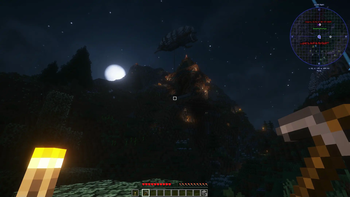
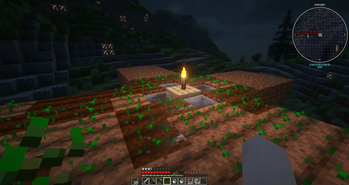
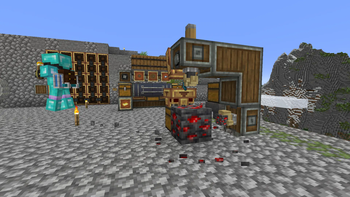
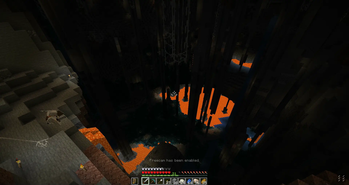
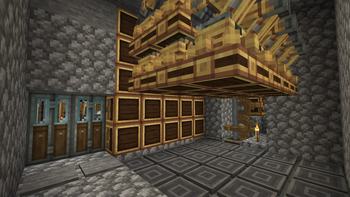
About this Modpack
Complex modpack with 230+ mods and multiplayer targeting
Modpack has been tested by 2 peoples in multiplayer with several days of playing and it works pretty stable. Yes, in that modpack bugs still exists, but they mostly visual. All modes, that broke gameplay has been deleted or disabled
Server files included in modpack itself, launch via .bat and .sh. Tested on a custom home server (Debian 12, java 17) and it uses 150-200% CPU cores (Ryzen 3 3200G) and approx. 6GB + 1GB every 12 hours. Better way to use it - reload server every night. Read README.md to learn more
What this modpack contains
- All core Create addons:
Crafts and Additions, New Age, Nuclear, Dreams and Desires, Food, Enchantment Industry... - Also added
Valkyrien Skiesand other related Create mods:Interactive, Eureka, Clockwork, Trackwork - Many small mods about everything, they mostly add new recipes and adds some interesting mechanices
Ad Astra...- Added several dungeons mods:
Dungeons Arise, Create Structures, Dungeons and Taverns - Add many optimization mods from Modrinth. Mostly it's
Sodium, Indium and Iris Shaders - Using
Biomes'O Plentyto update world generation. More mods broke server performance - Added many UI and inventory mods, for convenience and productivity
- Added several mods from Serilum
- Mods, that without category, but you need to know about it:
PatPat, Sit, Wraith Waystones, You're in Grave Danger, Backpacks, THE COOLEST SAUSAGE
This modpack is not about hard gameplay, it's about exploring mods and content in it. Story: we discover ultra efficient electricity engine with 3.3 kWt output (approx. 400k rotation force) just using different mods (New Age + Crafts & Additions)
My recommendations
- I didn't test in singleplayer, but I'm pretty sure if multiplayer with it ok, then singleplayer ok too
- Use Linux server, it's more performance
- Text me about your experience (@vertoker), it would be interesting to read
Available Versions
How to Set Up a Create Madness Server
Order Server
Choose at least 6 GB RAM (8 GB recommended for Create Madness). Based on player count: per 5 players.
Install Modpack in Dashboard
Open the modpack browser in the dashboard, search for "Create Madness" and click "Install". The fabric loader and Minecraft 1.20.1 are configured automatically.
Start Server & Play
Start the server – all mods are loaded automatically. Share the server IP with friends and play together!
Frequently Asked Questions
Create Madness server crashes or won't start – what to do?
Most common causes: insufficient RAM or wrong fabric loader. Check latest.log for "OutOfMemoryError" → increase RAM to at least 8 GB. For "Mixin" or "ClassNotFoundException" errors: modpack version and loader don't match. With Mado Hosting, loader and Minecraft version are auto-configured on modpack install – preventing most startup issues.
How much RAM does a Create Madness server really need?
Minimum 6 GB, recommended 8 GB for stable performance. per 5 players. Important: Minecraft modpacks need more RAM than vanilla – plan extra per additional player. With Mado Hosting, you can scale RAM up live at any time without data loss (from €12/month).
Can I add custom mods to Create Madness without conflicts?
Yes, but check compatibility: only use mods for the same loader (fabric) and same Minecraft version (1.20.1). Common issues: ID conflicts with recipe mods and incompatible coremod versions. The Mado dashboard mod browser only shows compatible mods and warns about known conflicts.
Create Madness server lagging – performance tips
1) Increase RAM to 8 GB+. 2) Reduce server view-distance to 8 (server.properties). 3) Pre-generate chunks with the "Chunky" plugin. 4) Use /spark profiler to check which mods consume the most tick time. With Mado Hosting, all servers run on NVMe SSDs with dedicated CPU cores – eliminating hardware as a bottleneck.
Similar Modpacks
![Cobblemon Official Modpack [Fabric]](https://cdn.modrinth.com/data/5FFgwNNP/e7f9ee2e9d361623847853fe2ddce42f519ee64f.png)
![COBBLEVERSE - Pokemon Adventure [Cobblemon]](https://cdn.modrinth.com/data/Jkb29YJU/581ecf54530972afb18a04660afd820f2f24f6c7.png)
![Better MC [FABRIC] - BMC2](https://cdn.modrinth.com/data/shFhR8Vx/a19c2bcb51d38f32f138d3607e91cb2b7b8e387f_96.webp)


![Better MC [FORGE] - BMC4](https://cdn.modrinth.com/data/4BV47HRn/7f5ef7cc61b2593609aabef3ed07a866a4f11b73_96.webp)
Rent Create Madness Server
Start your own server with automatic modpack installation.
Supported Versions
Start your Create Madness Server now
From €12.00/month with 8 GB RAM for the best performance.
Configure Server →