
Create+ Modern
Create Modern is a streamlined Minecraft 1.21.1 NeoForge modpack focused on Create, automation, and rail transport. Featuring Steam 'n' Rails, advanced storage solutions, performance optimizations, and essential quality-of-life mods, it provides everything
About this Modpack
Minecraft 1.21.1 | NeoForge | Create Modpack
Industry, ingenuity, and innovation — reimagined.
Create+ | Modern Edition is a carefully curated NeoForge modpack built around Create — the mechanical wonder that turns gears, shafts, and contraptions into works of art. Pair it with Steam 'n' Rails for an expansive railway network, Sophisticated Storage and Sophisticated Backpacks for elegant organization, and a full suite of performance and quality-of-life mods that keep everything running silky smooth.
Whether you're building a sprawling industrial factory, a cozy automated farm, or a continent-spanning rail empire — this modpack gives you every tool you need.
🔧 Automation & Transport
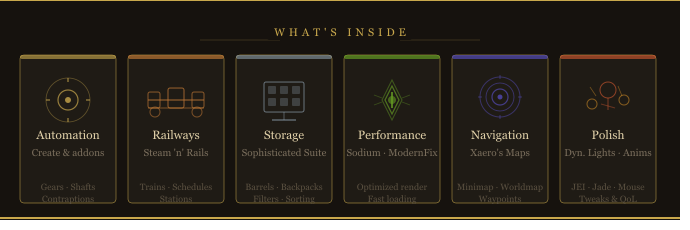
Build complex machinery, automate everything, and connect your world with a full railway network. Powered by Create, Create Aeronautics, Steam 'n' Rails, and a suite of Create add-ons covering electricity, diesel engines, enchanting, cooking, and more.
📦 Storage & Logistics
Keep your base organized with Sophisticated Storage and Sophisticated Backpacks — both deeply integrated with Create. Upgrade your chests, barrels, and backpacks with filters, sorting, and auto-crafting. Never lose track of your items again.
✨ Quality of Life
From JEI for recipe lookup to Jade for block info, LambDynamicLights for immersive lighting, and Leaves Be Gone for cleaner tree chopping — every small annoyance has been addressed.
🗺️ Navigation
Xaero's Minimap and Xaero's World Map keep you oriented across your world with waypoints, cave maps, and a full-screen map view.
⚡ Performance
Sodium, Iris Shaders, ModernFix, Ferrite Core, ImmediatelyFast, and Entity Culling work together to keep the game fast and smooth — even with shaders enabled.
🖥️ PC Requirements
| 🔴 Minimum | ⭐ Recommended | 🟢 High-end | |
|---|---|---|---|
| CPU | i5-8400 / Ryzen 5 2600 | i7-10700 / Ryzen 7 3700X | i7-13700K / Ryzen 9 7900X |
| GPU | GTX 1060 6GB / RX 580 | RTX 2060 / RX 6600 XT | RTX 3080 / RX 7800 XT+ |
| RAM | 8 GB (6 GB to Java) | 16 GB (8 GB to Java) | 32 GB (12 GB to Java) |
| Storage | HDD · 4 GB free | SSD · 4 GB free | NVMe SSD · 4 GB free |
| Java | Java 21 (64-bit) | Java 21 (64-bit) | Java 21 (64-bit) |
| FPS | 40–80 fps | 80–200 fps | 200+ fps |
Java 21 required — set
-Xmxto your allocated RAM in your launcher (e.g.-Xmx8G).
Requires NeoForge for Minecraft 1.21.1 · All mods included — no manual downloads needed.
Available Versions
How to Set Up a Create+ Modern Server
Order Server
Choose at least 6 GB RAM (8 GB recommended for Create+ Modern). Based on player count: per 5 players.
Install Modpack in Dashboard
Open the modpack browser in the dashboard, search for "Create+ Modern" and click "Install". The neoforge loader and Minecraft 1.21.1 are configured automatically.
Start Server & Play
Start the server – all mods are loaded automatically. Share the server IP with friends and play together!
Frequently Asked Questions
Create+ Modern server crashes or won't start – what to do?
Most common causes: insufficient RAM or wrong neoforge loader. Check latest.log for "OutOfMemoryError" → increase RAM to at least 8 GB. For "Mixin" or "ClassNotFoundException" errors: modpack version and loader don't match. With Mado Hosting, loader and Minecraft version are auto-configured on modpack install – preventing most startup issues.
How much RAM does a Create+ Modern server really need?
Minimum 6 GB, recommended 8 GB for stable performance. per 5 players. Important: Minecraft modpacks need more RAM than vanilla – plan extra per additional player. With Mado Hosting, you can scale RAM up live at any time without data loss (from €12/month).
Can I add custom mods to Create+ Modern without conflicts?
Yes, but check compatibility: only use mods for the same loader (neoforge) and same Minecraft version (1.21.1). Common issues: ID conflicts with recipe mods and incompatible coremod versions. The Mado dashboard mod browser only shows compatible mods and warns about known conflicts.
Create+ Modern server lagging – performance tips
1) Increase RAM to 8 GB+. 2) Reduce server view-distance to 8 (server.properties). 3) Pre-generate chunks with the "Chunky" plugin. 4) Use /spark profiler to check which mods consume the most tick time. With Mado Hosting, all servers run on NVMe SSDs with dedicated CPU cores – eliminating hardware as a bottleneck.
Similar Modpacks
![Cobblemon Official Modpack [Fabric]](https://cdn.modrinth.com/data/5FFgwNNP/e7f9ee2e9d361623847853fe2ddce42f519ee64f.png)
![COBBLEVERSE - Pokemon Adventure [Cobblemon]](https://cdn.modrinth.com/data/Jkb29YJU/581ecf54530972afb18a04660afd820f2f24f6c7.png)
![Better MC [FABRIC] - BMC2](https://cdn.modrinth.com/data/shFhR8Vx/a19c2bcb51d38f32f138d3607e91cb2b7b8e387f_96.webp)


![Better MC [FORGE] - BMC4](https://cdn.modrinth.com/data/4BV47HRn/7f5ef7cc61b2593609aabef3ed07a866a4f11b73_96.webp)
Rent Create+ Modern Server
Start your own server with automatic modpack installation.
Supported Versions
Start your Create+ Modern Server now
From €12.00/month with 8 GB RAM for the best performance.
Configure Server →