Create: SoulFire
Create: SoulFire is a Souls-like RPG modpack that aims to completely change Minecraft. The pack enhances nearly every aspect of game. Making a world that feels alive and everchanging along with you as you play.
About this Modpack
What is Create: SoulFire?
Create: SoulFire is a Semi-Hardcore Souls-like RPG modpack with heavy Create mod influence that aims to completely change Minecraft. The pack enhances nearly every aspect of the game. New Visuals, New Terrain Generation that makes your world feel alive and everchanging along with you as you play. New dimensions to unlock. New ways to advance your technology with Create. New ways to fight, battle, move and new enemies and foes to face with those moves. New ways to eat and survive. New ways to build. New ways to travel and explore with your friends. All with a story rich quest line that encourages learning about everything in the game. you'll have to survive difficult terrain and battle strong enemies to unlock the secrets of your world. The secret of SoulFire! But to get there you'll have to climb your way through a challenging progression system. Play with your friends, or travel on your own adventure.
Build a cozy village by the river, or build a massive factory, there are no limits.
You can expect this pack to feel challenging for crafting and general survival, but fair and rewarding. It encourages exploration and advancing your technology in an unfamiliar world that never limits your creativity.
Modpack Status: BETA
This modpack is currently in very early development and is unstable, expect crashes and bugs. You can help track issues in the discord. It's recommended that if you find mod specific issues, that you report them to their respective mod author. You can find links to their mod pages below.
Development
If you would like to help with playtesting the pack or to stay up to date with development, join the Discord below.
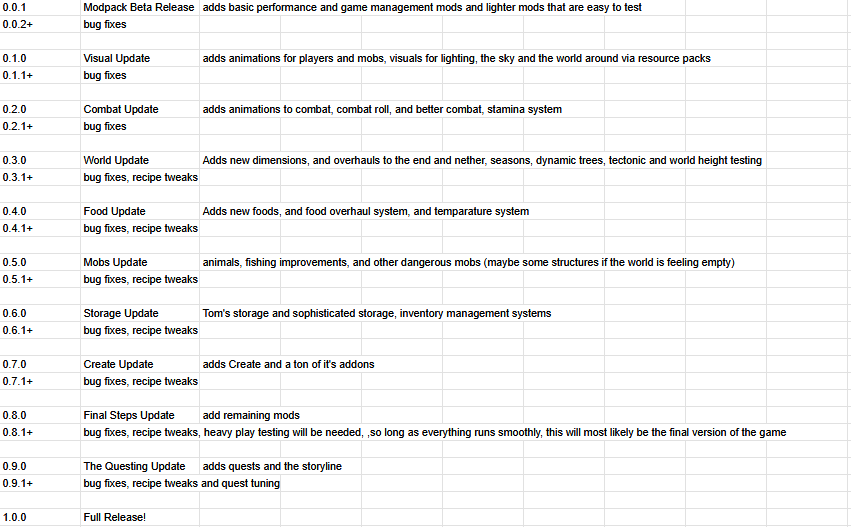
Roadmap
Discord
Modlist
List up to date as of pack version 0.0.1
Support the mod authors below!
Spoiler
- Appleskin
- Architectury
- Bad Optimizations
- Better Advancements
- Better Statistics Screen
- Bookshelf Lib
- Concurrent Chunk Management
- Cloth Config
- Clumps
- Configured
- Controlling
- Cubes Without Borders
- Dynamic Crosshair
- Dynamic FPS
- Enchantment Descriptions
- Entity Culling
- Fast Paintings
- FerriteCore
- FeyTweaks
- Forgified Fabric API
- Freecam
- Immediately Fast
- JEI
- JEI Integration Reborn
- JEFA
- JER
- Kotlin For Forge
- Language Reload
- LibJF
- Lithium
- Mod Menu (NeoForge Edition)
- Modern Fix
- Moonlight Lib
- More Culling
- Mouse Tweaks
- Not Enough Crashes
- Prickle
- Reacharound
- Rebind Narrator
- Reese's Sodium Options
- Remove Reloading Screen
- Respackopts
- Sable
- Searchables
- Sinytra Connector
- Smooth Scrolling Refurbished
- Sodium
- Sodium Extra
- Sodium Options API
- Sodium Options Mod Compat
- Sodium Dynamic Lights
- TCD Commons API
- TXnilib
- YOSBR
Available Versions
How to Set Up a Create: SoulFire Server
Order Server
Choose at least 6 GB RAM (8 GB recommended for Create: SoulFire). Based on player count: per 5 players.
Install Modpack in Dashboard
Open the modpack browser in the dashboard, search for "Create: SoulFire" and click "Install". The neoforge loader and Minecraft 1.21.1 are configured automatically.
Start Server & Play
Start the server – all mods are loaded automatically. Share the server IP with friends and play together!
Frequently Asked Questions
Create: SoulFire server crashes or won't start – what to do?
Most common causes: insufficient RAM or wrong neoforge loader. Check latest.log for "OutOfMemoryError" → increase RAM to at least 8 GB. For "Mixin" or "ClassNotFoundException" errors: modpack version and loader don't match. With Mado Hosting, loader and Minecraft version are auto-configured on modpack install – preventing most startup issues.
How much RAM does a Create: SoulFire server really need?
Minimum 6 GB, recommended 8 GB for stable performance. per 5 players. Important: Minecraft modpacks need more RAM than vanilla – plan extra per additional player. With Mado Hosting, you can scale RAM up live at any time without data loss (from €12/month).
Can I add custom mods to Create: SoulFire without conflicts?
Yes, but check compatibility: only use mods for the same loader (neoforge) and same Minecraft version (1.21.1). Common issues: ID conflicts with recipe mods and incompatible coremod versions. The Mado dashboard mod browser only shows compatible mods and warns about known conflicts.
Create: SoulFire server lagging – performance tips
1) Increase RAM to 8 GB+. 2) Reduce server view-distance to 8 (server.properties). 3) Pre-generate chunks with the "Chunky" plugin. 4) Use /spark profiler to check which mods consume the most tick time. With Mado Hosting, all servers run on NVMe SSDs with dedicated CPU cores – eliminating hardware as a bottleneck.
Similar Modpacks
![Cobblemon Official Modpack [Fabric]](https://cdn.modrinth.com/data/5FFgwNNP/e7f9ee2e9d361623847853fe2ddce42f519ee64f.png)
![COBBLEVERSE - Pokemon Adventure [Cobblemon]](https://cdn.modrinth.com/data/Jkb29YJU/581ecf54530972afb18a04660afd820f2f24f6c7.png)
![Better MC [FABRIC] - BMC2](https://cdn.modrinth.com/data/shFhR8Vx/a19c2bcb51d38f32f138d3607e91cb2b7b8e387f_96.webp)


![Better MC [FORGE] - BMC4](https://cdn.modrinth.com/data/4BV47HRn/7f5ef7cc61b2593609aabef3ed07a866a4f11b73_96.webp)
Rent Create: SoulFire Server
Start your own server with automatic modpack installation.
Supported Versions
Start your Create: SoulFire Server now
From €12.00/month with 8 GB RAM for the best performance.
Configure Server →