
Create: Synthesis
A modpack that combines Vanilla+ with Create Mod (as well as a little bit of magic)
Screenshots
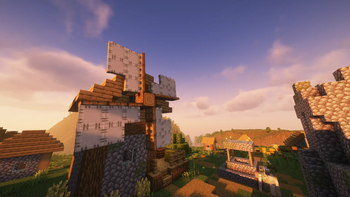
About this Modpack
Create: Synthesis
This modpack, created originally for a server, aims to just simply be fun.
Mods
Note: This is not every single mod in the pack, just the more important ones.
Gameplay
These mods greatly effect gameplay of Minecraft
- Create Mod: engineering and technology
- Better Combat + Simply Swords: Combat and Weapon overhaul
- YUNG's Mods: overhaul of vanilla structures
- Tectonic: overhaul of world generation
- Decorative Blocks, Supplementaries: adds many different building blocks to the game
- Fabric Seasons: adds seasons to the game
- You're in Grave Danger: adds gravestones to the game when you die, saving your items
- Farmer's Delight Refabricated: adds many new crops and foods to the game
- Inmis: adds backpacks to the game
Vanilla+
These mods just make some small QoL changes to the game
- AdditionZ, VanillaRefresh, VanillaTweaks: all of these mods make miscellaneous additions to the game
- AmbientSounds and Auditory Continued: adds misc sounds into the game
- Artifacts: adds artifacts to the game that give the user unique abilities, and can only be found in loot chests
- Trinkets: works with Create, Artifacts, and Inmis to provide extra inventory slots for those items
- Banner Flags, More Banner Features: adds more uses for banners
- AudioPlayer: allows for the creation of custom music discs
- BlossomHomes, adds a /home command, configurable by server
- Botany Pots, adds pots that you can grow crops in
- Carry On, carry mobs, players, and chests
- Comforts, adds sleeping bags, hammocks and other changes to sleeping in Minecraft
- Easy Anvils, Easy Magic: respectively changes how anvils and enchanting tables work
- Ender Dragon Fight Remastered: Overhauls the Ender Dragon fight
- Elytra Slot: adds a slot to Trinkets for Elytra
- Figura: allows players to create custom BlockBench models to use as skins
- Lootr: makes player specific loot chests, so even if someone loots something before you, you still get loot
- More Mob Variants: adds variants of mobs
- Not Enough Animations, Eating Animation: Adds misc animations to the game that should be in vanilla
- Smarter Farmers: farming villagers replant crops
- Simple Voice Chat: adds voice chat
Performance + Bugs + Additions
Mods to gain as much performance as possible, fix bugs, and add more non-gameplay related features
- Animatica
- AntiGhost
- Auth Me
- Bad Wither No Cookie
- Bad Optimizations
- Better F3
- Blur
- Bobby
- Borderless Mining
- CIT Resewn
- Capes + Wavey Capes
- Chat Heads
- Clumps
- Connectivity
- Controlling
- Cull Less Leaves
- Debugify
- Dynamic FPS
- Enchantment Descriptions
- Enhanced Block Entities
- Entity Culling
- FabricSkyboxes + FabricSkyboxes Interop
- FastAnim
- FastQuit
- FerriteCore
- ImmediatelyFast
- Iris Shaders
- Jade
- Jade Addons
- JourneyMap
- Just Enough Breeding
- Just Enough Effect Descriptions
- Just Enough Items
- Just Enough Professions
- Krypton
- Language Reload
- LazyDFU
- LibreExpFix
- Lithium
- MC-249136 Fix
- Model Gap Fix
- ModernFix
- More Chat History
- Mouse Tweaks
- No Chat Reports
- OptiGUI
- PolyMorph
- Puzzle
- RecipeCooldown
- Reese's Sodium Options
- ReplayMod
- Sodium
- Sodium Extra
- Starlight
- Zoomify
- Entity Model Features
- Entity Texture Features
- ClientCrafting
- e4mc
- leaky
Available Versions
How to Set Up a Create: Synthesis Server
Order Server
Choose at least 6 GB RAM (8 GB recommended for Create: Synthesis). Based on player count: per 5 players.
Install Modpack in Dashboard
Open the modpack browser in the dashboard, search for "Create: Synthesis" and click "Install". The fabric loader and Minecraft 1.20.1 are configured automatically.
Start Server & Play
Start the server – all mods are loaded automatically. Share the server IP with friends and play together!
Frequently Asked Questions
Create: Synthesis server crashes or won't start – what to do?
Most common causes: insufficient RAM or wrong fabric loader. Check latest.log for "OutOfMemoryError" → increase RAM to at least 8 GB. For "Mixin" or "ClassNotFoundException" errors: modpack version and loader don't match. With Mado Hosting, loader and Minecraft version are auto-configured on modpack install – preventing most startup issues.
How much RAM does a Create: Synthesis server really need?
Minimum 6 GB, recommended 8 GB for stable performance. per 5 players. Important: Minecraft modpacks need more RAM than vanilla – plan extra per additional player. With Mado Hosting, you can scale RAM up live at any time without data loss (from €12/month).
Can I add custom mods to Create: Synthesis without conflicts?
Yes, but check compatibility: only use mods for the same loader (fabric) and same Minecraft version (1.20.1). Common issues: ID conflicts with recipe mods and incompatible coremod versions. The Mado dashboard mod browser only shows compatible mods and warns about known conflicts.
Create: Synthesis server lagging – performance tips
1) Increase RAM to 8 GB+. 2) Reduce server view-distance to 8 (server.properties). 3) Pre-generate chunks with the "Chunky" plugin. 4) Use /spark profiler to check which mods consume the most tick time. With Mado Hosting, all servers run on NVMe SSDs with dedicated CPU cores – eliminating hardware as a bottleneck.
Similar Modpacks
![Cobblemon Official Modpack [Fabric]](https://cdn.modrinth.com/data/5FFgwNNP/e7f9ee2e9d361623847853fe2ddce42f519ee64f.png)
![COBBLEVERSE - Pokemon Adventure [Cobblemon]](https://cdn.modrinth.com/data/Jkb29YJU/581ecf54530972afb18a04660afd820f2f24f6c7.png)
![Better MC [FABRIC] - BMC2](https://cdn.modrinth.com/data/shFhR8Vx/a19c2bcb51d38f32f138d3607e91cb2b7b8e387f_96.webp)


![Better MC [FORGE] - BMC4](https://cdn.modrinth.com/data/4BV47HRn/7f5ef7cc61b2593609aabef3ed07a866a4f11b73_96.webp)
Rent Create: Synthesis Server
Start your own server with automatic modpack installation.
Details
- License
- Creative Commons Attribution Non Commercial Share Alike 4.0 International
- Server-side
- Required
- Client-side
- Required
Supported Versions
Start your Create: Synthesis Server now
From €12.00/month with 8 GB RAM for the best performance.
Configure Server →