
Create: Too Many Addons
A technical 1.20.1 modpack centered around Create and Applied Energistics 2 with a wide range of Create addons
Screenshots
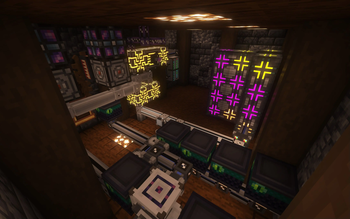
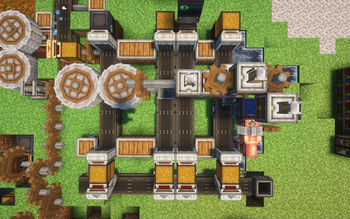
About this Modpack
This modpack is a pack around the Create mod with a LOT of Create addons, a few storage mods, some Quality of Life mods, and a few decoration mods.
This pack is a good way to get better at Create and Applied Energistics 2 and automation with the Create mod in general, enhanced by Create Ender Transmission for long distance item, fluid, and rotation transpostation.
This pack also includes the Simple Voice Chat mod to play with friends, although you can remove it if you are planning on playing in singleplayer mode.
Key mods:
- Create
- Applied Energistics
- Create: Steam n' Rails
- Create Enchantment Industry
- Create: Connected
- Create: More Drill Heads
- Corpse
- Sophisticated Backpacks
- Waystones
- Rechiseled
Issues and feature requests can be posted on my issue tracker.
Complete mod list:
Mod List
- AE2WTLib by mari_023, Ridanisaurus, DomamaN202
- Alex's Mobs by Alexthe668, Carro1001, Paint_Ninja
- AppleSkin by squeek
- Applied Energistics 2 by TeamAppliedEnergistics
- Architectury by shedaniel
- Balm by BlayTheNinth
- Citadel by Alexthe666
- Cloth Config v10 API by shedaniel
- Connected Glass by SuperMartijn642
- Corpse by Max Henkel
- Create by simibubi
- Create Crafts & Additions by MRH0
- Create Diesel Generators by kamień-bot AKA George VI AKA Jesz
- Create Enchantment Industry by MarbleGateKeeper & LimonBlaze
- Create Ender Transmission by Forsteri
- Create Goggles by Robocraft999
- Create Jetpack by possible_triangle
- Create Mechanical Spawner by oierbravo
- Create: Connected by Lysine
- Create: More Automation by Snakeypro
- Create: More Drill Heads by Forsteri
- Create: Steam 'n' Rails by The Railways Team
- Curios API by C4
- Embeddium by embeddedt
- EntityCulling by tr7zw
- Farmer's Delight by vectorwing
- Ferrite Core by malte0811
- FramedBlocks by XFactHD
- Freecam (Modrinth Edition) by hashalite
- Fusion by SuperMartijn642
- Jade by Snownee
- Journeymap by Techbrew, Mysticdrew
- Just Enough Items by mezz
- Kotlin for Forge
- Macaw's Bridges by Sketch Macaw & Peachy Macaw
- Macaw's Fences and Walls by Sketch Macaw & Peachy Macaw
- Macaw's Lights and Lamps by Sketch Macaw & Peachy Macaw
- Nature's Compass by ChaosTheDude
- Noisium by Steveplays28
- Oculus by NanoLive, dima_dencep, coderbot, IMS212, Justsnoopy30, FoundationGames
- Oculus Flywheel Compat by Leon
- Rechiseled by SuperMartijn642
- Rechiseled: Create by SuperMartijn642
- Simple Voice Chat by Max Henkel
- Sophisticated Backpacks by P3pp3rF1y, Ridanisaurus
- Sophisticated Core by P3pp3rF1y
- SuperMartijn642's Config Library by SuperMartijn642
- SuperMartijn642's Core Lib by SuperMartijn642
- Waystones by BlayTheNinth
Available Versions
How to Set Up a Create: Too Many Addons Server
Order Server
Choose at least 6 GB RAM (8 GB recommended for Create: Too Many Addons). Based on player count: per 5 players.
Install Modpack in Dashboard
Open the modpack browser in the dashboard, search for "Create: Too Many Addons" and click "Install". The forge loader and Minecraft 1.20.1 are configured automatically.
Start Server & Play
Start the server – all mods are loaded automatically. Share the server IP with friends and play together!
Frequently Asked Questions
Create: Too Many Addons server crashes or won't start – what to do?
Most common causes: insufficient RAM or wrong forge loader. Check latest.log for "OutOfMemoryError" → increase RAM to at least 8 GB. For "Mixin" or "ClassNotFoundException" errors: modpack version and loader don't match. With Mado Hosting, loader and Minecraft version are auto-configured on modpack install – preventing most startup issues.
How much RAM does a Create: Too Many Addons server really need?
Minimum 6 GB, recommended 8 GB for stable performance. per 5 players. Important: Minecraft modpacks need more RAM than vanilla – plan extra per additional player. With Mado Hosting, you can scale RAM up live at any time without data loss (from €12/month).
Can I add custom mods to Create: Too Many Addons without conflicts?
Yes, but check compatibility: only use mods for the same loader (forge) and same Minecraft version (1.20.1). Common issues: ID conflicts with recipe mods and incompatible coremod versions. The Mado dashboard mod browser only shows compatible mods and warns about known conflicts.
Create: Too Many Addons server lagging – performance tips
1) Increase RAM to 8 GB+. 2) Reduce server view-distance to 8 (server.properties). 3) Pre-generate chunks with the "Chunky" plugin. 4) Use /spark profiler to check which mods consume the most tick time. With Mado Hosting, all servers run on NVMe SSDs with dedicated CPU cores – eliminating hardware as a bottleneck.
Similar Modpacks
![Cobblemon Official Modpack [Fabric]](https://cdn.modrinth.com/data/5FFgwNNP/e7f9ee2e9d361623847853fe2ddce42f519ee64f.png)
![COBBLEVERSE - Pokemon Adventure [Cobblemon]](https://cdn.modrinth.com/data/Jkb29YJU/581ecf54530972afb18a04660afd820f2f24f6c7.png)
![Better MC [FABRIC] - BMC2](https://cdn.modrinth.com/data/shFhR8Vx/a19c2bcb51d38f32f138d3607e91cb2b7b8e387f_96.webp)


![Better MC [FORGE] - BMC4](https://cdn.modrinth.com/data/4BV47HRn/7f5ef7cc61b2593609aabef3ed07a866a4f11b73_96.webp)
Rent Create: Too Many Addons Server
Start your own server with automatic modpack installation.
Details
- License
- GNU Lesser General Public License v3.0 or later
- Server-side
- Required
- Client-side
- Required
Supported Versions
Start your Create: Too Many Addons Server now
From €12.00/month with 8 GB RAM for the best performance.
Configure Server →