
creating delights
Create and farmers delight based modpack
Screenshots
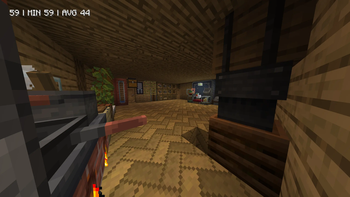
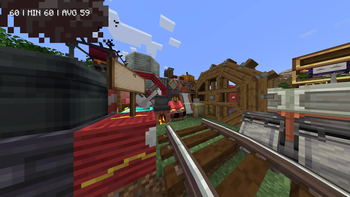
About this Modpack
A multiplayer-focused modpack built around Create and related tech/decoration mods, plus performance and QoL improvements. Designed for cooperative basebuilding, automation, exploration, and creativity while keeping performance smooth for mid-range systems. Expect a stable play experience with two known incompatible mods (being investigated) — otherwise ready for friends and server (with some tweaks).
Highlights
Deep Create ecosystem: Create and 40+ Create addons and integrations for machines, trains, new content, decoration, and factory gameplay.
Performance & rendering: Sodium + Lithium + FerriteCore + Sodium extras and compatibility layers for smoother FPS.
QoL & UX: JEI, AppleSkin, Cloth Config/YACL, Curios, Sophisticated Backpacks, Carry On, Freecam, video/options improvements.
Food & biomes: Farmer’s Delight and multiple “Delight” expansions, Veggies Delight, My Nether’s Delight, Underground Village, Stoneholm.
Tools, utilities & mapping: WorldEdit, Xaero’s minimaps/world map, Controlify (controller support), More Delight content mods.
Visual & playback additions:
Create: Sound of Steam and tuning wrench, shader support hooks, sodium dynamic lights.
Inventory, crafting &
resource helpers: JER, Resourceful Lib, Chipped, Chipped Express (decorative storage/blocks).
- AppleSkin
Architectury API
Ash API
Athena
BaguetteLib
Better Library
Better Sodium Video Settings Button
Carry On
Cheaper Clocks
Chipped
Chipped Express
Cloth Config API
Collective
Controlify (Controller Support)
Corpse
Corpse x Curios API Compat
Create
Create Confectionery
Create Deco
Create Encased
Create Factory Logistics
Create Jetpack
Create Slice & Dice
Create: Bells & Whistles
Create: Better Villagers
Create: Blocks & Bogies
Create: Central Kitchen
Create: Copper & Zinc
Create: Copycats+
Copycats Plus
Create: Curios Jetpack & Backtank
Create: Design n' Decor
Create: Dragons Plus
Create: Enchantment Industry
Create: Extended Wrenches
Create: Factory
Create: Framed
Create: Interiors
Create: Liquid Fuel
Create: Oxidized
Create: Power Loader
Create: Sound of Steam
Create: Sound of Steam: Tuning Wrench
Create: Threaded Trains
Create: Trimmed
Create: Ultimate Factory
Create: Vibrant Vaults
Curios API
Entity Culling
Essential Mod
Farmer’s Delight
FerriteCore
Freecam
Full Brightness Toggle
ImmediatelyFast
In-Game Account Switcher
Jade
Jade Addons
Just Enough Items (JEI)
Just Enough Resources (JER)
Kotlin for Forge
Lithium
Model Gap Fix
ModernFix
More Delight
My Nether’s Delight
Pretty In Pink
Reese’s Sodium Options
Resourceful Lib
Shuffle
Sodium
Sodium Core Shader Support
Sodium Dynamic Lights
Sodium Extra
Sodium Extra Information
Sodium Extras
Sodium Leaf Culling
Sodium Options API
Sodium Options Mod Compat
Sodium Shadowy Path Blocks
Sophisticated Backpacks
Sophisticated Backpacks Create Integration
Sophisticated Core
Steam 'n' Rails
UnChipped
Underground Village, Stoneholm
Veggies Delight
WorldEdit
Xaero Zoomout
Xaero’s Minimap
Xaero’s World Map
YetAnotherConfigLib (YACL)
Available Versions
How to Set Up a creating delights Server
Order Server
Choose at least 6 GB RAM (8 GB recommended for creating delights). Based on player count: per 5 players.
Install Modpack in Dashboard
Open the modpack browser in the dashboard, search for "creating delights" and click "Install". The neoforge loader and Minecraft 1.21.1 are configured automatically.
Start Server & Play
Start the server – all mods are loaded automatically. Share the server IP with friends and play together!
Frequently Asked Questions
creating delights server crashes or won't start – what to do?
Most common causes: insufficient RAM or wrong neoforge loader. Check latest.log for "OutOfMemoryError" → increase RAM to at least 8 GB. For "Mixin" or "ClassNotFoundException" errors: modpack version and loader don't match. With Mado Hosting, loader and Minecraft version are auto-configured on modpack install – preventing most startup issues.
How much RAM does a creating delights server really need?
Minimum 6 GB, recommended 8 GB for stable performance. per 5 players. Important: Minecraft modpacks need more RAM than vanilla – plan extra per additional player. With Mado Hosting, you can scale RAM up live at any time without data loss (from €12/month).
Can I add custom mods to creating delights without conflicts?
Yes, but check compatibility: only use mods for the same loader (neoforge) and same Minecraft version (1.21.1). Common issues: ID conflicts with recipe mods and incompatible coremod versions. The Mado dashboard mod browser only shows compatible mods and warns about known conflicts.
creating delights server lagging – performance tips
1) Increase RAM to 8 GB+. 2) Reduce server view-distance to 8 (server.properties). 3) Pre-generate chunks with the "Chunky" plugin. 4) Use /spark profiler to check which mods consume the most tick time. With Mado Hosting, all servers run on NVMe SSDs with dedicated CPU cores – eliminating hardware as a bottleneck.
Similar Modpacks
![Cobblemon Official Modpack [Fabric]](https://cdn.modrinth.com/data/5FFgwNNP/e7f9ee2e9d361623847853fe2ddce42f519ee64f.png)
![COBBLEVERSE - Pokemon Adventure [Cobblemon]](https://cdn.modrinth.com/data/Jkb29YJU/581ecf54530972afb18a04660afd820f2f24f6c7.png)
![Better MC [FABRIC] - BMC2](https://cdn.modrinth.com/data/shFhR8Vx/a19c2bcb51d38f32f138d3607e91cb2b7b8e387f_96.webp)


![Better MC [FORGE] - BMC4](https://cdn.modrinth.com/data/4BV47HRn/7f5ef7cc61b2593609aabef3ed07a866a4f11b73_96.webp)
Rent creating delights Server
Start your own server with automatic modpack installation.
Supported Versions
Start your creating delights Server now
From €12.00/month with 8 GB RAM for the best performance.
Configure Server →