
Crisp
The crispiest way to play Minecraft.
Screenshots

About this Modpack
Crisp
The crispiest way to play Minecraft.
Fast, beautiful, vanilla+. No bloat, no kitchen-sink content, no compromises.
What is Crisp?
Crisp is a Fabric modpack for Minecraft 26.1.2 built around one idea: Minecraft should feel fast and look great without sacrificing one for the other.
No new dimensions, no tech mods, no hundreds of new biomes. Just the base game — smoother, sharper, and a lot better looking.
Features
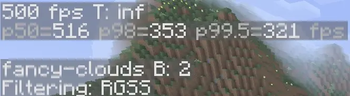
- 500+ FPS on modern hardware at render distance 8
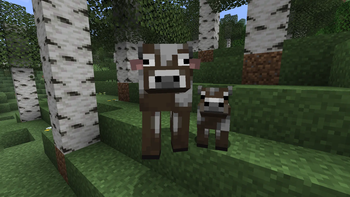
- Fresh Animations — entities actually move like they're alive
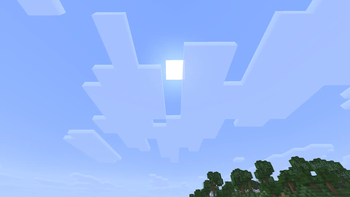
- Fluffy Fancy Clouds — softer, more cinematic clouds
- LambdaBetterGrass — smooth grass on every surface
- LambDynamicLights — torches and glowing items light up the world around them
- Dynamic Crosshair — crosshair changes depending on what you're looking at
- Dark Loading Screen — because the white flash on startup is painful
- VeinMiner — mine entire ore veins at once
- Fully compatible with vanilla servers
Mod List
Performance
Sodium · Sodium Extra · Reese's Sodium Options · Lithium · FerriteCore · ModernFix · ImmediatelyFast · BadOptimizations · Noisium · C2ME · ScalableLux · Entity Culling · More Culling · Cull Leaves · Dynamic FPS
Visual
ETF · EMF · Continuity · LambdaBetterGrass · LambDynamicLights · Dynamic Crosshair · Dark Loading Screen
Resource Packs
Fresh Animations · FA+ Player · FA+ All Extensions · Fluffy Fancy Clouds · Vanilla Experience +
Gameplay
VeinMiner
Libraries
Fabric API · Cloth Config · Fabric Language Kotlin · Lithostitched · Not Enough Crashes
Installation
Modrinth App
- Search for Crisp
- Click Install
- Click Play
Prism Launcher
- Add Instance → Modrinth
- Search for Crisp
- Click OK
Requirements
- Minecraft Java Edition 26.1.2
- Fabric Loader 0.19.3+
- Java 21+
- 4GB RAM minimum (6GB recommended)
Recommended Settings
Open Options → Video Settings:
- Render Distance → 8
- Simulation Distance → 8
- Translucency Sorting → Off
- Chunk Builder → Async
- Entity Distance → 75%
Support the Ocean 🌊
Crisp is completely free. If you want to give something back, consider donating to our fundraiser for Ocean Conservancy — every dollar goes directly to them, we receive nothing.
Play Crisp, protect the ocean →
Disclaimer
Crisp is a modpack — a curated collection of mods made by their respective authors. All mods, resource packs, and assets remain the property of their original creators. Crisp does not claim ownership over any included content. Please support the mod authors directly on Modrinth.
Not affiliated with Mojang or Microsoft.
Available Versions
How to Set Up a Crisp Server
Order Server
Choose at least 6 GB RAM (8 GB recommended for Crisp). Based on player count: per 5 players.
Install Modpack in Dashboard
Open the modpack browser in the dashboard, search for "Crisp" and click "Install". The fabric loader and Minecraft 26.1.2 are configured automatically.
Start Server & Play
Start the server – all mods are loaded automatically. Share the server IP with friends and play together!
Frequently Asked Questions
Crisp server crashes or won't start – what to do?
Most common causes: insufficient RAM or wrong fabric loader. Check latest.log for "OutOfMemoryError" → increase RAM to at least 8 GB. For "Mixin" or "ClassNotFoundException" errors: modpack version and loader don't match. With Mado Hosting, loader and Minecraft version are auto-configured on modpack install – preventing most startup issues.
How much RAM does a Crisp server really need?
Minimum 6 GB, recommended 8 GB for stable performance. per 5 players. Important: Minecraft modpacks need more RAM than vanilla – plan extra per additional player. With Mado Hosting, you can scale RAM up live at any time without data loss (from €12/month).
Can I add custom mods to Crisp without conflicts?
Yes, but check compatibility: only use mods for the same loader (fabric) and same Minecraft version (26.1.2). Common issues: ID conflicts with recipe mods and incompatible coremod versions. The Mado dashboard mod browser only shows compatible mods and warns about known conflicts.
Crisp server lagging – performance tips
1) Increase RAM to 8 GB+. 2) Reduce server view-distance to 8 (server.properties). 3) Pre-generate chunks with the "Chunky" plugin. 4) Use /spark profiler to check which mods consume the most tick time. With Mado Hosting, all servers run on NVMe SSDs with dedicated CPU cores – eliminating hardware as a bottleneck.
Similar Modpacks
![Cobblemon Official Modpack [Fabric]](https://cdn.modrinth.com/data/5FFgwNNP/e7f9ee2e9d361623847853fe2ddce42f519ee64f.png)
![COBBLEVERSE - Pokemon Adventure [Cobblemon]](https://cdn.modrinth.com/data/Jkb29YJU/581ecf54530972afb18a04660afd820f2f24f6c7.png)
![Better MC [FABRIC] - BMC2](https://cdn.modrinth.com/data/shFhR8Vx/a19c2bcb51d38f32f138d3607e91cb2b7b8e387f_96.webp)


![Better MC [FORGE] - BMC4](https://cdn.modrinth.com/data/4BV47HRn/7f5ef7cc61b2593609aabef3ed07a866a4f11b73_96.webp)
Rent Crisp Server
Start your own server with automatic modpack installation.
Details
- License
- Creative Commons Attribution Share Alike 4.0 International
- Server-side
- Optional
- Client-side
- Required
Supported Versions
Start your Crisp Server now
From €12.00/month with 8 GB RAM for the best performance.
Configure Server →