
Cube of Thought
Light modpack made for a group of friends (Кубът Мисъл)
Screenshots
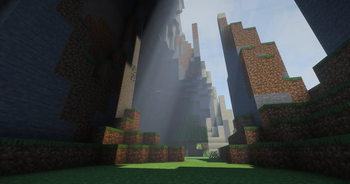
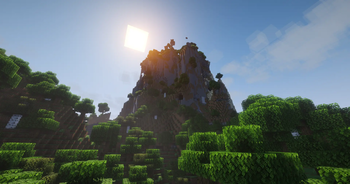
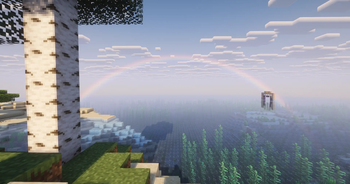
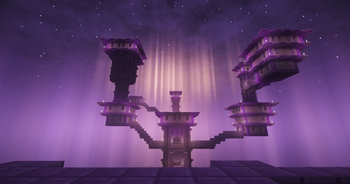
About this Modpack
This is a light modpack made for a group of friends (Кубът Мисъл) including only the most essential optimization mods along with a handful of visual/audio enhancement mods to make the experience prettier & more fun!
Below is a list of all mods and what they do (for whoever's interested):
Optimization
- Sodium - Core optimization mod used. Optimizes rendering, therefore increasing FPS, among many other things (The modern OptiFine).
- Lithium - Game logic optimization.
- Entity Culling - Hides entities that aren't visible.
- FerriteCore - Reduces the memory usage.
Utilities
- Mod Menu - Adds a mod menu to view the list of mods you have installed.
- Mouse Tweaks - Makes moving items much faster (allows draging your mouse over slots, instead of having to click each one individually.) Check the mod page for more info!
- Client Sort - Adds button for quick sorting of inventories.
- Durability Tooltip - Shows you how much uses are left for tools (without having to use F3+H which shows unecessary details).
- Enchantment Descriptions - Describes what enchantment books do.
- RightClickHarvest - Allows you to harvest crops with right click (no need to break & replace them!).
- Veinminer - Adds the ability to break a clump of blocks (ores, wooden logs) together.
- Veinminer Enchantment - Makes it so only tools with the Veinminer enchantment can veinmine.
- Veinminer Hotkey - Makes veinmining active only when pressing a button (set to "~").
- Shulker Box Tooltip - View the contents of shulker boxes from your inventory.
- Freecam - Press F4 to activate a Spectator Mode to observe builds easier or just look around the world.
- Litematica - Allows creation of schematics of builds that can be copied over from world to world.
- Cut Through - Weapons now slash through grass instead of breaking it.
- Leaves Be Gone - Leaves decay instantly so you don't have to wait for them to disappear.
- NetherPortalFix - Ensures correct destinations when travelling back and forth through Nether Portals in Multiplayer.
- Resourcify - Service for downloading resource packs, data packs & shaders in-game.
- Datapack Injector - Automatically injects datapacks into any world.
- Default Options - Keeps settings (video settings, controls, etc.) saved for modpacks.
Visual Enhancements
- Iris Shaders - Loads Shaders.
- LambDynamicLights - Holding blocks/items that emit light, they'll illuminate your surroundings.
- Voxy - Allows for infinite chunk rendering (using LODs so it's very performant).
- Skin Restorer - Used for loading player skins.
- Skin Shuffle - For addings skins using local files / switching between skins.
- Status Effect Bars - Adds timer to the potion effect overlay to track when they'll run out.
- Better Clouds - Makes clouds prettier. (especially at sunset)
- Particle Rain - Makes rain and snow much prettier, adds surface fog & sandstorms.
- More Leaf Particles - Adds more variants to the new falling leaves so all tree types have distinct ones.
- Xaero's World Map - Adds a map with many features: mapping explored chunks, making waypoints, tracking where other players are (Press M to view).
- Xaero's Minimap - Adds the map into the interface (disabled by default).
- Advancements Reloaded - Makes the Advancements tab more visually appealing, keeps track of completion goals. (e.g. Tracks all biomes discovered for the advancement Adventuring Time)
- Euphoria Patches - mod that adds extra settings to Complementary Shaders.
Audio Enhancements
- Simple Voice Chat - In-game voice chat for spontaneous discussions even when not in Discord.
- Voice Chat Interaction - Lets talking using Simple Voice Chat get detected by Sculk Sensors.
- Sound Physics Remastered - Adds echo to caves among other cool audio enhancements.
- Sounds - Add sounds to inventory interactions & to some in-game actions (swinging a sword, pulling a bow).
- Cool Rain - Adds ambient sounds for certain blocks during rain.
Resource Packs / Data Packs / Shaders
- Authentic Shadows - Lowers the resolution of mob shadows to make them fit the Minecraft artstyle better.
- Even Better Enchants - Adds unique textures for all Enchanted Books.
- Complementary Shaders - Reimagined - Great Shaders that remain close to Minecraft's artstyle.
Vanilla Tweaks - Website with small additions to enhance the game. Those include a Resource Pack, Data Pack & Crafting Recipes Data Pack:
Resource Pack: has 2 versions ->
- Main_DarkMode_Cookies (the way I prefer to play, set as the default).
- Main (with some specific additions separated into individual resource packs so you can add/remove whatever you want).
Note: if something that bothers you isn't removed in Main, you can open the resource pack on the website and pick & choose whatever features you desire.
Features exclusive to Main_DarkMode_Cookies (& separated into individual packs for use together with Main):
- Dark UI - Makes all interfaces Dark Mode
- Numbered Hotbar - Adds small numbers to hotbar slots to make quick switching easier.
- Cookie Hunger Bar - Replaces the default hunger bar with a Cookie icon.
All other features (included in both versions):
- Hunger Preview - Adds info to each food item about how much they fill you up.
- Lower Shield - Lowers the height of the shield so it doesn't obscure a quarter of the screen when equipped.
- Brewing Guide - Adds a picture guide showing the ingredients for making all potions.
- HD Shield Banner Patterns - in Vanilla (the game without mods) the banner patterns get compressed in an ugly way when applied to a shield.
- Clearer Wither Hearts - Brightens the texture of hearts for when the players is withered (as they're too dark in Vanilla and hard to distinguish from empty hearts)
- Visual Waxed Copper Items - Makes copper items that have been waxed easier to distinguish in inventories (in Vanilla the only way to tell the difference between waxed and unwaxed is reading their names).
- Ashless Campfires - Removes the ash pile under unlit campfires.
- Plain Leather Armor - Removes features of leather armor that keep the leather color even when the armor is dyed.
- Unique Axolotl Buckets - Axolotl Buckets now depict the correct color of the Axolotl inside (in Vanilla they depict only pink axolotls).
- Visual Honey Stages - Makes Beehives & Bee Nests show how full of honey they are in 5 stages (in Vanilla they have only an empty & full state which don't represent the actual filling process).
- Sticky Piston Sides - Adds a slime texture to the sides of Sticky Pistons so they're easier to distinguish in tight Redstone contraptions.
- Directional Hoppers - Adds arrow to all sides of hoppers to make it clear where they're pointing, again helps in tight contraptions.
- Directional Dispensers & Droppers - Same thing but for Dispensers & Droppers.
- Directional Observers - Same thing.
- Unobtrusive Rain - Reduces the amount of rain particles.
- Unobtrusive Snow - Reduces the amount of snow particles.
- Unique Painting Items - Adds icons to all paintings in the Creative inventory for easy distinction.
- Colored Ping Indicator - Adds more colors to the ping icon when pressing Tab.
Data Pack
Teleport-commands:
- back - Go back to where you where, useful after dying.
- home - Teleports you to your home (location must be set first).
- spawn - Teleport to the spawn.
- tpa - Request to be teleported to another player.
Other cool tools:
- Armor statues - Adds a book for tweaking the positioning of Armor Stands (you can now give them arms).
- Silence mobs - Using a name tag renamed to "Silence me" mutes any mob it's applied to.
- Cauldron Mud - Throwing Dirt into a Cauldron filled with water turns it into Mud.
- Cauldron Concrete - Throwing Concrete Powder into a Cauldron filled with water turns it into Concrete.
- Fast Leaf Decay - Does the same thing as the mod Leaves Be Gone, added in case the mod doesn't update quickly to new versions.
Crafting Recipes Data Pack
- Straight to Shapeless - Recipes like Bread & Paper are now craftable in a 2x2 crafting grid.
- Universal Dyeing - Allows dyeing already colored blocks (not just white ones)
- Back to Blocks - Make stairs and slabs back into blocks.
- Blackstone Cobblestone - Adds missing recipes for Blackstone to make it equivalent to cobble.
- Craftable Coral Blocks 2x2 - Adds way to craft Coral Blocks from Corals/Coral Fans.
- Dropper to Dispenser - Can add the bow recipe to a Dropper to make it a Dispenser
- Sandstone Dyeing - Allows crafting of Red Sandstone blocks using red dye.
Libraries / APIs
Note: these mods don't add any features that players interact with, they serve as a shared code base which the mods above use. You can ignore these.
Available Versions
How to Set Up a Cube of Thought Server
Order Server
Choose at least 4 GB RAM (6 GB recommended for Cube of Thought). Based on player count: per 8 players.
Install Modpack in Dashboard
Open the modpack browser in the dashboard, search for "Cube of Thought" and click "Install". The fabric loader and Minecraft 1.21.11 are configured automatically.
Start Server & Play
Start the server – all mods are loaded automatically. Share the server IP with friends and play together!
Frequently Asked Questions
Cube of Thought server crashes or won't start – what to do?
Most common causes: insufficient RAM or wrong fabric loader. Check latest.log for "OutOfMemoryError" → increase RAM to at least 6 GB. For "Mixin" or "ClassNotFoundException" errors: modpack version and loader don't match. With Mado Hosting, loader and Minecraft version are auto-configured on modpack install – preventing most startup issues.
How much RAM does a Cube of Thought server really need?
Minimum 4 GB, recommended 6 GB for stable performance. per 8 players. Important: Minecraft modpacks need more RAM than vanilla – plan extra per additional player. With Mado Hosting, you can scale RAM up live at any time without data loss (from €8/month).
Can I add custom mods to Cube of Thought without conflicts?
Yes, but check compatibility: only use mods for the same loader (fabric) and same Minecraft version (1.21.11). Common issues: ID conflicts with recipe mods and incompatible coremod versions. The Mado dashboard mod browser only shows compatible mods and warns about known conflicts.
Cube of Thought server lagging – performance tips
1) Increase RAM to 6 GB+. 2) Reduce server view-distance to 8 (server.properties). 3) Pre-generate chunks with the "Chunky" plugin. 4) Use /spark profiler to check which mods consume the most tick time. With Mado Hosting, all servers run on NVMe SSDs with dedicated CPU cores – eliminating hardware as a bottleneck.
Similar Modpacks

![Cobblemon Official Modpack [Fabric]](https://cdn.modrinth.com/data/5FFgwNNP/e7f9ee2e9d361623847853fe2ddce42f519ee64f.png)
![COBBLEVERSE - Pokemon Adventure [Cobblemon]](https://cdn.modrinth.com/data/Jkb29YJU/581ecf54530972afb18a04660afd820f2f24f6c7.png)
![Better MC [FABRIC] - BMC2](https://cdn.modrinth.com/data/shFhR8Vx/a19c2bcb51d38f32f138d3607e91cb2b7b8e387f_96.webp)


Rent Cube of Thought Server
Start your own server with automatic modpack installation.
Supported Versions
Start your Cube of Thought Server now
From €8.00/month with 6 GB RAM for the best performance.
Configure Server →