
Vanilla Enhanced
A lightweight Vanilla+ Fabric modpack with 200+ mods focused on performance, visuals, and exploration.
Screenshots

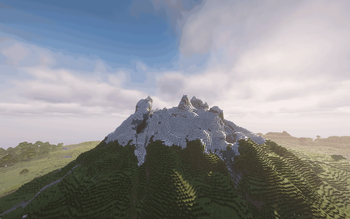



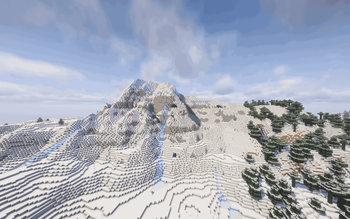
About this Modpack

Vanilla Enhanced
A Vanilla+ Fabric Modpack for Minecraft 1.21.11
By DarkhawkJP99
Vanilla Enhanced is a performance-focused, exploration-rich Vanilla+ modpack for Fabric 1.21.11.
It enhances Minecraft’s visuals, smoothness, combat feel, structure density, and quality-of-life — while keeping the core gameplay unmistakably vanilla.
No overhaul.
No progression rewrite.
Just Minecraft — refined.
🚀 Performance Optimised (Fabric 1.21.11)
Vanilla Enhanced is built on a modern Fabric optimisation stack designed for high FPS, smoother chunk generation, and reduced lag spikes.
Core Performance Mods
- Sodium
- Sodium Extra
- Reese’s Sodium Options
- Lithium
- FerriteCore
- ModernFix
- Noisium
- ImmediatelyFast
- EntityCulling
- MoreCulling
- BadOptimizations
- Dynamic FPS
- FastQuit
Result:
✔ Higher FPS
✔ Faster world loading
✔ Reduced memory usage
✔ Smoother gameplay in large worlds
🎨 Visual Enhancements (Shader Ready)
Minecraft keeps its vanilla aesthetic — but becomes more immersive and polished.
Shader & Rendering
- Iris Shaders
- Complementary Unbound (included & preconfigured)
- LambDynamicLights
Models & Animation
- Continuity
- Animatica
- Entity Texture Features
- Entity Model Features
- 3D Skin Layers
- 3D Hands
- 3D Armor
Included Resource Packs
- Fresh Animations
- Better Leaves
- Eating Animation
- Enchant Icons
- Additional visual polish packs
Everything is preconfigured for a clean, modern look straight away.
⚔️ Combat & Gameplay Feel
Combat is smoother and more dynamic, without changing vanilla balance.
- Better Combat
- WeaponMaster
- Player Animation Library
This modernises animations and combat flow — not progression.
🏘️ Villagers & Trading Improvements
Villager systems are expanded and refined for better immersion and usability.
- More Villagers (Re-)
- Villager Trading Plus
- Improved Village Placement
- Village Hero Plus
- Villager Names
- Villager Death Messages
- Village Healthcare
- ClickVillagers
- Villager Converting
More professions.
Better trade control.
Less frustration.
🗺️ Exploration & Structure Density
This is where Vanilla Enhanced truly stands out.
The pack intentionally increases world structure density while preserving vanilla world generation.
🌍 Sparse Structures (Custom Configuration)
Vanilla Enhanced includes Sparse Structures, configured specifically to make structures appear more frequently than vanilla.
Instead of rewriting worldgen, structure spacing multipliers are adjusted.
Significant Increases (0.25 multiplier – much more common)
- Buried Treasure
- Pillager Outposts
Roughly Twice As Common (0.5 multiplier)
- Ancient Cities
- End Cities
- Igloos
- Jungle Temples
- Ocean Ruins
- Shipwrecks
- Nether Complexes
- Swamp Huts
- Trail Ruins
- Villages
Moderately Increased (0.75 multiplier)
- Desert Pyramids
- Mineshafts
- Ruined Portals
- Trial Chambers
- Ocean Monuments
- Nether Fossils
- Woodland Mansions
Exploration feels consistently rewarding without becoming chaotic or overcrowded.
🏛️ More Strongholds (Bundled Datapack)
Vanilla Enhanced includes the More Strongholds datapack.
Strongholds no longer generate in vanilla’s concentric ring pattern.
Instead, they use:
minecraft:random_spread- spacing: 150
- separation: 80
- triangular distribution
This results in:
✔ More strongholds across the world
✔ Even distribution
✔ Better multiplayer viability
✔ More consistent End progression
(As with all structure changes, this affects newly generated chunks only.)
🧭 Maps, UI & Quality of Life
Vanilla Enhanced includes numerous improvements that remove friction without altering core mechanics.
- Jade
- AppleSkin
- Mouse Tweaks
- Easy Shulker Boxes
- Inventory Mending
- Inventory Totem
- Mod Menu
- Xaero’s Minimap
- Xaero’s World Map
- XaeroPlus
- XaeroZoomout
Chat & Multiplayer Improvements:
- Chat Heads
- Chat Animation
- More Chat History
- No Chat Reports
🌐 Multiplayer Ready
Built-in tools for easy multiplayer:
- Essential
- e4mc
Jump into shared worlds without complicated server setup.
🎯 Design Philosophy
Vanilla Enhanced is designed around one rule:
If it doesn’t feel like it belongs in Minecraft, it doesn’t belong in this pack.
It increases performance.
It increases immersion.
It increases structure density.
It improves End progression.
But it never stops feeling like vanilla.
❤️ Thank You
Thank you for checking out Vanilla Enhanced.
If you enjoy the pack, feedback and suggestions are always welcome!
Available Versions
How to Set Up a Vanilla Enhanced Server
Order Server
Choose at least 6 GB RAM (8 GB recommended for Vanilla Enhanced). Based on player count: per 5 players.
Install Modpack in Dashboard
Open the modpack browser in the dashboard, search for "Vanilla Enhanced" and click "Install". The fabric loader and Minecraft 26.1.2 are configured automatically.
Start Server & Play
Start the server – all mods are loaded automatically. Share the server IP with friends and play together!
Frequently Asked Questions
Vanilla Enhanced server crashes or won't start – what to do?
Most common causes: insufficient RAM or wrong fabric loader. Check latest.log for "OutOfMemoryError" → increase RAM to at least 8 GB. For "Mixin" or "ClassNotFoundException" errors: modpack version and loader don't match. With Mado Hosting, loader and Minecraft version are auto-configured on modpack install – preventing most startup issues.
How much RAM does a Vanilla Enhanced server really need?
Minimum 6 GB, recommended 8 GB for stable performance. per 5 players. Important: Minecraft modpacks need more RAM than vanilla – plan extra per additional player. With Mado Hosting, you can scale RAM up live at any time without data loss (from €12/month).
Can I add custom mods to Vanilla Enhanced without conflicts?
Yes, but check compatibility: only use mods for the same loader (fabric) and same Minecraft version (26.1.2). Common issues: ID conflicts with recipe mods and incompatible coremod versions. The Mado dashboard mod browser only shows compatible mods and warns about known conflicts.
Vanilla Enhanced server lagging – performance tips
1) Increase RAM to 8 GB+. 2) Reduce server view-distance to 8 (server.properties). 3) Pre-generate chunks with the "Chunky" plugin. 4) Use /spark profiler to check which mods consume the most tick time. With Mado Hosting, all servers run on NVMe SSDs with dedicated CPU cores – eliminating hardware as a bottleneck.
Similar Modpacks
![Cobblemon Official Modpack [Fabric]](https://cdn.modrinth.com/data/5FFgwNNP/e7f9ee2e9d361623847853fe2ddce42f519ee64f.png)
![COBBLEVERSE - Pokemon Adventure [Cobblemon]](https://cdn.modrinth.com/data/Jkb29YJU/581ecf54530972afb18a04660afd820f2f24f6c7.png)
![Better MC [FABRIC] - BMC2](https://cdn.modrinth.com/data/shFhR8Vx/a19c2bcb51d38f32f138d3607e91cb2b7b8e387f_96.webp)


![Better MC [FORGE] - BMC4](https://cdn.modrinth.com/data/4BV47HRn/7f5ef7cc61b2593609aabef3ed07a866a4f11b73_96.webp)
Rent Vanilla Enhanced Server
Start your own server with automatic modpack installation.
Supported Versions
Start your Vanilla Enhanced Server now
From €12.00/month with 8 GB RAM for the best performance.
Configure Server →