
Daily Driver
Simple monthly-maintained optimization modpack with quality of life mods like DH and more.
Screenshots

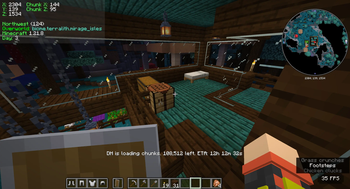


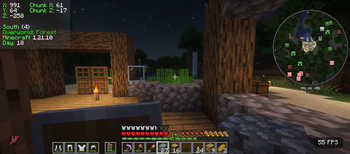
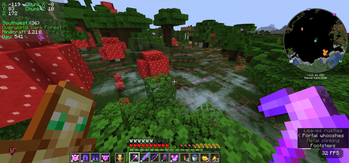
About this Modpack
Daily Driver
This is Daily Driver: An optimization-based client-side modpack, semi-actively maintained on a bi-monthly basis and built for everyday use with carefully chosen quality-of-life mods.
Note: on first load up, go to video settings and change GUI scale if too zoomed in/out.
Main design idea:
This modpack combines a lot of performance mods, providing a smooth experience without bloatware. It’s meant for players who want a reliable base setup (a Daily Driver) that feels clean and efficient, but still flexible enough to expand with other mods.
This modpack also adds a variety of HUD mods that enhance gameplay like coordinates and saturation, alongside other mods like Xaero's minimap and world map. Every HUD mod is toggable using Mod Menu.
The design of the pack is primarily made for Vanilla Multiplayer, and it is optimized so. There won't be any features that make gameplay un-vanilla like, or change the game too much, unless you choose to enable terrain generation mods like terralith or similar.
Note: The only mod that isn't client side is Simple Voice Chat, which is only included since so many multiplayer servers also have it.
Features:
- Optimization: Includes quality tested performance mods and configurations to maximize FPS and reduce lag.
- Client Utilities: Handpicked QoL mods (HUD tools, small tweaks, visual improvements) for convenience and usability.
- It's Lightweight: Avoids bloated mods or mods that change the game too much. Again, this whole modpack was designed to be vanilla-like.
- Customization-ready: Designed as a foundation you can build upon, letting you add whatever extras fit your playstyle.
Version naming convention: x.y.z
x: Edition of Daily driver (ex. Base, 1.8, Bedwars, Etc.)
y: Minecraft: Java Edition Version (ex. 1.21.8, 1.21.9, and the numeric value would be the number of versions it’s been since the creation of the modpack)
z: Modpack version number; within version (ex. v1.2.4 would be the second version of Java since modpack release in 1.21.5; 1.21.7. It would also be the fifth release of this modpack within that version.)
All Custom Keybinds
Shaders
k - shaders toggle
. - reload shaders (this is a period)
o - shaders menu
Maps (World Map and Mini Map)
m - show world map
y or ] - minimap/worldmap settings
z - enlarge minimap (hold)
u - waypoints menu for world map, minimap, and in game display
b - add waypoint shortcut
Voice Chat
v - voice chat settings/setup
h - toggle voice chat icons
n - enable/disable voice chat
Misc
Left Alt - freelook and anti item break bypass
g - full bright toggle (even works with shaders enabled now!)
` - toggle perspective (rebinded F3 since it is easier to reach)
c - zoom in and out, scroll wheel for zoom strength
Full documentation and mod list
https://docs.google.com/document/d/17_PHssK3-H8QaVwTKJySHtgBw6QGHzfHLZ40LZ5NC4k
Available Versions
How to Set Up a Daily Driver Server
Order Server
Choose at least 4 GB RAM (6 GB recommended for Daily Driver). Based on player count: per 8 players.
Install Modpack in Dashboard
Open the modpack browser in the dashboard, search for "Daily Driver" and click "Install". The fabric loader and Minecraft 1.21.11 are configured automatically.
Start Server & Play
Start the server – all mods are loaded automatically. Share the server IP with friends and play together!
Frequently Asked Questions
Daily Driver server crashes or won't start – what to do?
Most common causes: insufficient RAM or wrong fabric loader. Check latest.log for "OutOfMemoryError" → increase RAM to at least 6 GB. For "Mixin" or "ClassNotFoundException" errors: modpack version and loader don't match. With Mado Hosting, loader and Minecraft version are auto-configured on modpack install – preventing most startup issues.
How much RAM does a Daily Driver server really need?
Minimum 4 GB, recommended 6 GB for stable performance. per 8 players. Important: Minecraft modpacks need more RAM than vanilla – plan extra per additional player. With Mado Hosting, you can scale RAM up live at any time without data loss (from €8/month).
Can I add custom mods to Daily Driver without conflicts?
Yes, but check compatibility: only use mods for the same loader (fabric) and same Minecraft version (1.21.11). Common issues: ID conflicts with recipe mods and incompatible coremod versions. The Mado dashboard mod browser only shows compatible mods and warns about known conflicts.
Daily Driver server lagging – performance tips
1) Increase RAM to 6 GB+. 2) Reduce server view-distance to 8 (server.properties). 3) Pre-generate chunks with the "Chunky" plugin. 4) Use /spark profiler to check which mods consume the most tick time. With Mado Hosting, all servers run on NVMe SSDs with dedicated CPU cores – eliminating hardware as a bottleneck.
Similar Modpacks
![Better MC [FABRIC] - BMC2](https://cdn.modrinth.com/data/shFhR8Vx/a19c2bcb51d38f32f138d3607e91cb2b7b8e387f_96.webp)
![Better MC [FORGE] - BMC4](https://cdn.modrinth.com/data/4BV47HRn/7f5ef7cc61b2593609aabef3ed07a866a4f11b73_96.webp)


![Better MC [FABRIC] - BMC3](https://cdn.modrinth.com/data/NHUidpfR/327e0749bb6d160c41799fd77bf6d3d631569dc8_96.webp)

Rent Daily Driver Server
Start your own server with automatic modpack installation.
Details
- License
- Creative Commons Attribution Non Commercial Share Alike 4.0 International
- Server-side
- Optional
- Client-side
- Required
Supported Versions
Start your Daily Driver Server now
From €8.00/month with 6 GB RAM for the best performance.
Configure Server →