
Dangerworks
Dangerworks is a medium-sized 1.20.1 modpack that focuses on adding more to the features that are already in Minecraft as well as adding more challenge as well as a sense of wonder to the game again through wacky magic and simple technology.
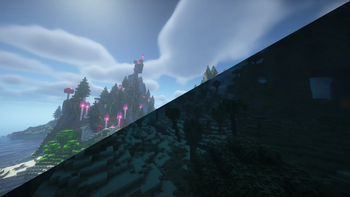
Screenshots
About this Modpack
Journey through danger, construct crazy contraptions with create, travel to distant worlds, tinker with the wackiest enchantments and magic in: Dangerworks! a modpack built from the ground up to make the world a bit more interesting and challenging featuring more diverse terrain with several biome mods, cave mods, dungeons and difficulty that increases as you journey through the nether and the end.
Diverse Simple Biomes
a heavy focus on mods that improve existing biomes as opposed to traditional large scale modpacks. With mods such as cascades that adds the incredibly varied small scale moutains from early beta to william wythers overhauled overworld and geophilic that add tweaks of their own to existing biomes.
Rejuvenated Structures and Dungeons
A heavy focus on mods that improve existing structures such as YUNG's better mineshafts and YUNG's better desert temples as well as Epic dungeons which add incredibly fun and thrilling dungeon adventures that will never be the same each time you explore them.
Adventure And Combat
To compliment the newly added and remastered structures Daedelus's entire RPG series suite has been included which features elemental magic such as Fire, Ice, Thunder and Healing magic through classes that are built to encompany them. Revisited enchanting and alchemy is a focus too with new potion effects that can spice up how you play through Extra Alchemy, Extra Enchantments and Curses and reconfigured enchanting through the Easy Magic mod that fixes many of the issues that Minecraft has had (since forever) with features such as moving enchantments from pre-enchanted items to books and easy rerolls to allow you a more indepth customisable experience with your weapons and equipment.
Tougher Foes
With mods like Majrusz's Progressive Difficulty the game is structured more similarly to games like Terraria through the difficulty increasing as you enter the nether, and as you beat the ender dragon to keep you on your toes at all times. Complimenting this change additionally, several mob mods are included such as Special mobs and Ender Zoology. Which feature challenging mobs that have unique attack patterns that will put your skills to the test, no matter at what point you're at during your adventures.
Available Versions
How to Set Up a Dangerworks Server
Order Server
Choose at least 6 GB RAM (8 GB recommended for Dangerworks). Based on player count: per 5 players.
Install Modpack in Dashboard
Open the modpack browser in the dashboard, search for "Dangerworks" and click "Install". The fabric loader and Minecraft 1.20.1 are configured automatically.
Start Server & Play
Start the server – all mods are loaded automatically. Share the server IP with friends and play together!
Frequently Asked Questions
Dangerworks server crashes or won't start – what to do?
Most common causes: insufficient RAM or wrong fabric loader. Check latest.log for "OutOfMemoryError" → increase RAM to at least 8 GB. For "Mixin" or "ClassNotFoundException" errors: modpack version and loader don't match. With Mado Hosting, loader and Minecraft version are auto-configured on modpack install – preventing most startup issues.
How much RAM does a Dangerworks server really need?
Minimum 6 GB, recommended 8 GB for stable performance. per 5 players. Important: Minecraft modpacks need more RAM than vanilla – plan extra per additional player. With Mado Hosting, you can scale RAM up live at any time without data loss (from €12/month).
Can I add custom mods to Dangerworks without conflicts?
Yes, but check compatibility: only use mods for the same loader (fabric) and same Minecraft version (1.20.1). Common issues: ID conflicts with recipe mods and incompatible coremod versions. The Mado dashboard mod browser only shows compatible mods and warns about known conflicts.
Dangerworks server lagging – performance tips
1) Increase RAM to 8 GB+. 2) Reduce server view-distance to 8 (server.properties). 3) Pre-generate chunks with the "Chunky" plugin. 4) Use /spark profiler to check which mods consume the most tick time. With Mado Hosting, all servers run on NVMe SSDs with dedicated CPU cores – eliminating hardware as a bottleneck.
Similar Modpacks
![Cobblemon Official Modpack [Fabric]](https://cdn.modrinth.com/data/5FFgwNNP/e7f9ee2e9d361623847853fe2ddce42f519ee64f.png)
![COBBLEVERSE - Pokemon Adventure [Cobblemon]](https://cdn.modrinth.com/data/Jkb29YJU/581ecf54530972afb18a04660afd820f2f24f6c7.png)
![Better MC [FABRIC] - BMC2](https://cdn.modrinth.com/data/shFhR8Vx/a19c2bcb51d38f32f138d3607e91cb2b7b8e387f_96.webp)


![Better MC [FORGE] - BMC4](https://cdn.modrinth.com/data/4BV47HRn/7f5ef7cc61b2593609aabef3ed07a866a4f11b73_96.webp)
Rent Dangerworks Server
Start your own server with automatic modpack installation.
Supported Versions
Start your Dangerworks Server now
From €12.00/month with 8 GB RAM for the best performance.
Configure Server →