
Dead Horizon
A visually stunning zombie apocalypse modpack where every shadow hides danger and survival looks terrifyingly beautiful.
Screenshots
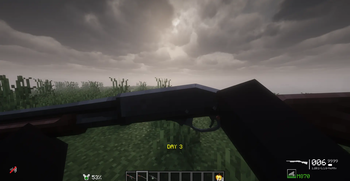
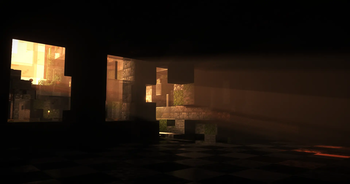
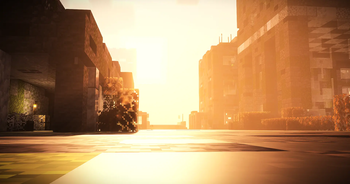
About this Modpack
The world of Minecraft has fallen into chaos — a once-lively land now reduced to ash, ruin, and restless dead. In this immersive modpack, the zombie apocalypse has taken full control, leaving behind crumbling skyscrapers, broken highways, and empty cities where silence is shattered only by the groans of the infected.
Explore the Lost Cities, sprawling urban wastelands swallowed by fog and overgrowth, where every building tells the story of humanity’s last stand. Supplies are scarce, nights are deadly, and the undead never stop hunting. You’ll need more than luck to survive — you’ll need precision.
That’s where TACZ and its addons come in, giving you realistic, tactical firearms and combat mechanics that turn every encounter into a heart-pounding fight for survival. From close-quarters shootouts in dark hallways to rooftop sniper duels at sunset, every moment feels cinematic and raw.
This isn’t the Minecraft you remember — it’s darker, grittier, and beautifully ruined. The apocalypse has arrived… will you outlast it, or join the horde?
Available Versions
How to Set Up a Dead Horizon Server
Order Server
Choose at least 4 GB RAM (6 GB recommended for Dead Horizon). Based on player count: per 5 players.
Install Modpack in Dashboard
Open the modpack browser in the dashboard, search for "Dead Horizon" and click "Install". The forge loader and Minecraft 1.20.1 are configured automatically.
Start Server & Play
Start the server – all mods are loaded automatically. Share the server IP with friends and play together!
Frequently Asked Questions
Dead Horizon server crashes or won't start – what to do?
Most common causes: insufficient RAM or wrong forge loader. Check latest.log for "OutOfMemoryError" → increase RAM to at least 6 GB. For "Mixin" or "ClassNotFoundException" errors: modpack version and loader don't match. With Mado Hosting, loader and Minecraft version are auto-configured on modpack install – preventing most startup issues.
How much RAM does a Dead Horizon server really need?
Minimum 4 GB, recommended 6 GB for stable performance. per 5 players. Important: Minecraft modpacks need more RAM than vanilla – plan extra per additional player. With Mado Hosting, you can scale RAM up live at any time without data loss (from €8/month).
Can I add custom mods to Dead Horizon without conflicts?
Yes, but check compatibility: only use mods for the same loader (forge) and same Minecraft version (1.20.1). Common issues: ID conflicts with recipe mods and incompatible coremod versions. The Mado dashboard mod browser only shows compatible mods and warns about known conflicts.
Dead Horizon server lagging – performance tips
1) Increase RAM to 6 GB+. 2) Reduce server view-distance to 8 (server.properties). 3) Pre-generate chunks with the "Chunky" plugin. 4) Use /spark profiler to check which mods consume the most tick time. With Mado Hosting, all servers run on NVMe SSDs with dedicated CPU cores – eliminating hardware as a bottleneck.
Similar Modpacks

![COBBLEVERSE - Pokemon Adventure [Cobblemon]](https://cdn.modrinth.com/data/Jkb29YJU/581ecf54530972afb18a04660afd820f2f24f6c7.png)




Rent Dead Horizon Server
Start your own server with automatic modpack installation.
Supported Versions
Start your Dead Horizon Server now
From €8.00/month with 6 GB RAM for the best performance.
Configure Server →