
Default Double Plus
A mod package of mods and resourcepacks that enchances the gameplay of Vanilla Minecraft while keeping it feeling the same.
Screenshots
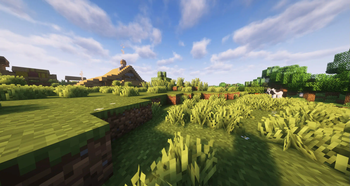
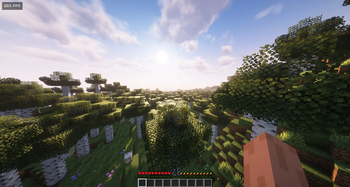
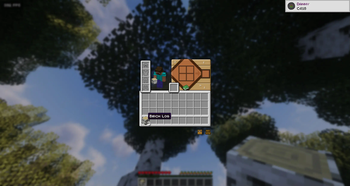
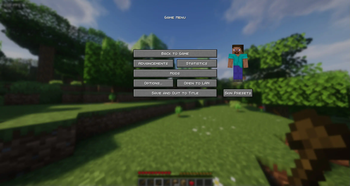
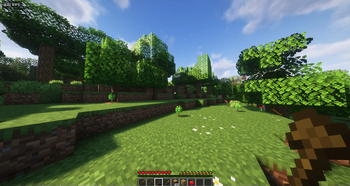
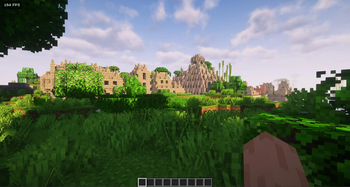
About this Modpack
Ever felt like Vanilla Minecraft needed a little spice up to enhance its experience?

This mod package contains 65 mods, 21 Resource packs and 1 Shader to Enchance your experience to play Vanilla minecraft without changing it drastically to become a overhaul mod.
Examples of what the package contains are:




- 3D Skin Layers made by: tr7zw
- Architectury API made by: Architectury
Organization - AutoSwitch made by: dexman545
- Better Beacon Placement made by: Serilum
- Better Statistics Screen made by: TheCSDev
- BetterF3 made by: TreyRuffy & cominixo
- Better Than Mending made by: legobmw99
- Blur+ made by: Motschen
- Cardinal Components API made by: Ladysnake
Organization - CICADA made by: enjarai
- Cloth Config API made by: shedaniel
- Collective made by: Serilum
- Crops Love Rain made by: ThePoultryMan
- Cull Leaves made by: Motschen
- Customizable Elytra made by: hidoni
- Cycle Paintings made by: Serilum
- Dungeons and Taverns made by: NovaWostra & Konci & Walls
- Easy Anvils made by: Fuzs & LunaPixelStudios
- Easy Magic made by: Fuzs & LunaPixelStudios
- Eating Animation made by: theoness1 & PinkGoosik
- Effect Timer Plus made by: TerminalMC
Organization - EnderPack made by: Lupin & Matt_Hopes & jason13official
- Enhanced Block Entities made by: FoundationGames
- [EMF] Entity Model Features made by: Traben
- [ETF] Entity Texture Features made by: Traben
- Fabric API made by: modmuss50 & sfPlayer1
- Falling Leaves made by: randommcsomethin & BrekiTomasson & Fourmisain
- Fancy Health Bar made by: efekos
- Faster Crouching made by: Serilum
- Forge Config API Port made by: Fuzs
- FPS Overlay made by: iquldev
- Friends & Foes made by: faboslav
- Held Item Info made by: A5b84
- Horse Buff made by: F53 & Ran & GirlInPurple
- Immersive UI made by: SSKirillSS & catboybinary
- Indium made by: comp500
- Music Delay Remover (Infinite Music) made by: PlasticStrawActivist
- Iris Shaders made by: coderbot & IMS
- Item placer made by: Original pidors
Organization - JamLib made by: Jam Core
- Leaves Be Gone made by: Fuzs & SHXRKIE & LunaPixelStudios
- Make Bubbles Pop made by: Tschipcraft
- Missing Wilds made by: UltrusBot
- Mod Menu made by: Terraformers
Organization - Model Gap Fix made by: MehVahdJukaar
- MonoLib made by: jason13official
- More Mob Variants made by: nyuppo
- Mouse Tweaks made by: YaLTeR
- Music Notification made by: KosmoMoustache
- Nether Coords made by: CaelenO42
- No Resource Pack Warnings made by: Space Walker
- Not Enough Animations made by: tr7zw
- Notes made by: Chaosyr
- OctoLib made by: SSKirillSS & catboybinary & laipel
- oωo (owo-lib) made by: Wisp Forest
Organization - Particle Rain made by: PigCart
- Particular made by: Chai
- Pick Up Notifier made by: Fuzs & LunaPixelStudios
Puzzles Lib made by: Fuzs - RightClickHarvest made by: Jam Core
Organization - Ships made by: EMD123
- Show Me Your Skin! made by: enjarai
- Shulker Box Tooltip made by: MisterPeModder
- Skin Shuffle made by: IMB11
- Sodium made by: jellysquid3 & IMS
- Stack to Nearby Chests made by: xiaocihua
- TCDCommons API made by: TheCSDev
- Tiny Item Animations made by: Trivaxy
- TotemCounter made by: uku
- Tree Harvester made by: Serilum
- Ukulib made by: uku
- Visuality made by: PinkGoosik
- YetAnotherConfigLib made by: isxander

- AL's Allay Pack made by: ALtheGatorMC
- AL's Allay Pack x Fresh Animations made by: ALtheGatorMC
- AL's Boss Rush made by: ALtheGatorMC
- AL's Boss Rush x Fresh Animations made by: ALtheGatorMC
- AL's Creepers Revamped made by: ALtheGatorMC
- AL's Zombies Revamped made by: ALtheGatorMC
- AL's Zombies Revamped x Fresh Animations made by: ALtheGatorMC
- Animated Items made by: vrabb-gh
- Animated Ore made by: gitq
- Better Carpets made by: DoomedArtemis
- Better Illagers made by: creepermax123
- Bontiful Crops made by: Bonfire
- Broken Tools made by:
Stereo528 - 3D crops Revamped made by: vexcenot
- Crosshair TXFmade by:
jahirtrap - Cubic Sun & Moon made by: JoeFly
- Fresh Moves made by: TrasTick & IthanMendoza
- Fast Better Grass made by: Fabulously Optimized
Organization - Fresh Animations made by FreshLX
- Glowing made by: 7777777_4547
- Just Expressions made by TrasTick & FreshLX & IthanMendoza
- More Mob Variants x Fresh Animations made by: nyuppo
- qrafty's Capitalized Font made by: qrafty
- Recolourful Containers GUI + HUD made by: Vi_Tul
- XXVI's Shiny Armor Trims made by: ManuelXXVI
- Simple Grass Flowers made by: JamieCubed
- Vanilla Tweaks made by: André & Stridey & Grant & rx
- Vervada's enhanced plants made by: Valdr687
- Glass Bottom Boat [32x] made by: SagXD
- Better Boats made by: PystoyPlayer
- RAY's 3D Ladders made by xR4YM0ND

- Complementary Shaders - Unbound made by: EminGT
Available Versions
How to Set Up a Default Double Plus Server
Order Server
Choose at least 6 GB RAM (8 GB recommended for Default Double Plus). Based on player count: per 5 players.
Install Modpack in Dashboard
Open the modpack browser in the dashboard, search for "Default Double Plus" and click "Install". The fabric loader and Minecraft 1.21.1 are configured automatically.
Start Server & Play
Start the server – all mods are loaded automatically. Share the server IP with friends and play together!
Frequently Asked Questions
Default Double Plus server crashes or won't start – what to do?
Most common causes: insufficient RAM or wrong fabric loader. Check latest.log for "OutOfMemoryError" → increase RAM to at least 8 GB. For "Mixin" or "ClassNotFoundException" errors: modpack version and loader don't match. With Mado Hosting, loader and Minecraft version are auto-configured on modpack install – preventing most startup issues.
How much RAM does a Default Double Plus server really need?
Minimum 6 GB, recommended 8 GB for stable performance. per 5 players. Important: Minecraft modpacks need more RAM than vanilla – plan extra per additional player. With Mado Hosting, you can scale RAM up live at any time without data loss (from €12/month).
Can I add custom mods to Default Double Plus without conflicts?
Yes, but check compatibility: only use mods for the same loader (fabric) and same Minecraft version (1.21.1). Common issues: ID conflicts with recipe mods and incompatible coremod versions. The Mado dashboard mod browser only shows compatible mods and warns about known conflicts.
Default Double Plus server lagging – performance tips
1) Increase RAM to 8 GB+. 2) Reduce server view-distance to 8 (server.properties). 3) Pre-generate chunks with the "Chunky" plugin. 4) Use /spark profiler to check which mods consume the most tick time. With Mado Hosting, all servers run on NVMe SSDs with dedicated CPU cores – eliminating hardware as a bottleneck.
Similar Modpacks
![Cobblemon Official Modpack [Fabric]](https://cdn.modrinth.com/data/5FFgwNNP/e7f9ee2e9d361623847853fe2ddce42f519ee64f.png)
![COBBLEVERSE - Pokemon Adventure [Cobblemon]](https://cdn.modrinth.com/data/Jkb29YJU/581ecf54530972afb18a04660afd820f2f24f6c7.png)
![Better MC [FABRIC] - BMC2](https://cdn.modrinth.com/data/shFhR8Vx/a19c2bcb51d38f32f138d3607e91cb2b7b8e387f_96.webp)


![Better MC [FORGE] - BMC4](https://cdn.modrinth.com/data/4BV47HRn/7f5ef7cc61b2593609aabef3ed07a866a4f11b73_96.webp)
Rent Default Double Plus Server
Start your own server with automatic modpack installation.
Supported Versions
Start your Default Double Plus Server now
From €12.00/month with 8 GB RAM for the best performance.
Configure Server →