
Devcontainer
Official resourcepack for the dev container private server.
Screenshots
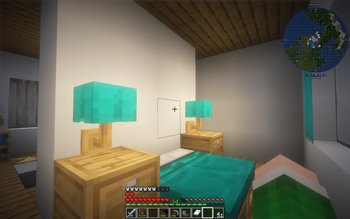
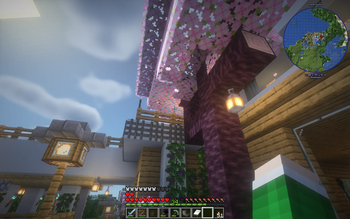
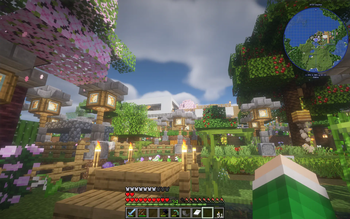
About this Modpack
Main Description
Experience a refined Minecraft gameplay with our carefully curated mod package. This collection enhances the gaming experience without deviating from the core vanilla feel of the game. Introduce variety to your journey with additions like Farmer's Delight, Expanded Delight, and Immersive Aircraft, providing nuanced gameplay. Engage in captivating explorations with Explorify, Underground Bunkers, and YUNG’s additions, while catering to the needs of builders through Macaw’s mods and various furniture mods.
Performance and Eyecandy
Prioritizing performance, the Modpack integrates essential optimizations for both server and client. Notable additions like Sodium and Entity Culling ensure a smoother gaming experience. Immerse yourself in visual enhancements with Iris Shaders and More Mob Variants, subtly elevating the overall immersion.
Quality of Life
the Modpack includes Quality of Life additions, like Mod Menu, EMI, JourneyMap, and Inmis, streamlining server activities and emphasizing the exploratory aspect of the pack.
Modlist
- Macaw's Bridges
- Trinkets
- YUNG's API
- Macaw's Furniture
- Mod Menu
- YetAnotherConfigLib
- EMI Enchanting
- Concurrent Chunk Management Engine (Fabric)
- Starlight (Fabric)
- YUNG's Better Jungle Temples
- Debugify
- More Mob Variants
- LibZ
- Advancement Plaques
- Forge Config API Port
- YUNG's Bridges
- 3D Skin Layers
- Better Combat
- FastAnim
- Enhanced Block Entities
- Fabric API
- Elytra Slot
- YUNG's Better Strongholds
- More Culling
- Iceberg
- M.R.U
- InmisAddon
- YUNG's Better Witch Huts
- Companion
- Better Ladders
- HT's TreeChop
- Beautify: Refabricated
- EMI Addon: Extra Mod Integrations
- Entity Culling
- Bushier Flowers
- Path Under Fence Gates
- Macaw's Paintings
- BSL Shaders
- ModernFix
- Indium
- Grass Overhaul
- Immersive Aircraft
- Traveler's Titles
- Remove Reloading Screen
- Chipped
- Handcrafted
- Iris Shaders
- FerriteCore
- Let's Do: NetherVinery
- Sound Physics Remastered
- Boat Item View
- YUNG's Better Dungeons
- Naturalist
- Macaw's Fences and Walls
- Macaw's Trapdoors
- Memory Leak Fix
- YUNG's Better Nether Fortresses
- Collective
- More Mobs
- Not Enough Animations
- Cloth Config API
- YUNG's Better Mineshafts
- Patchouli
- Subsurface
- Revive
- EMI Loot
- ChoiceTheorem's Overhauled Village
- playerAnimator
- Macaw's Windows
- Sodium
- Farmer's Delight [Fabric]
- Reese's Sodium Options
- Another Furniture
- Continuity
- Comforts
- Exordium
- Pixlli
- LambDynamicLights
- EMIffect
- Spawn Animations
- YUNG's Better Ocean Monuments
- Puzzles Lib
- Sodium Extra
- ThreadTweak
- Let's Do: Vinery
- Towns and Towers
- EMI
- Lithium
- Resourceful Lib
- EMI Trades
- Let's Do: API
- Expanded Delight
- Glowing Ores
- Macaw's Roofs
- Explorify
- Geckolib
- FleshZ
- Enchanted Vertical Slabs
- Krypton
- Dungeons and Taverns
- Cristel Lib
- AutoTag
- TieredZ
- Athena
- Underground Bunkers
- Couplings
- Better Statistics Screen
- Pure Copper Tools
- Diagonal Windows
- Crawl
- Cull Leaves
- Macaw's Lights and Lamps
- Show Me Your Skin!
- Jump Over Fences
- Macaw's Paths and Pavings
- Architectury API
- YUNG's Extras
- Diagonal Fences
- Healing Campfire
- Macaw's Doors
- YUNG's Better Desert Temples
- Let Me Despawn
- Inmis
- ServerCore
- Only Hammers And Excavators
- JourneyMap
Available Versions
How to Set Up a Devcontainer Server
Order Server
Choose at least 6 GB RAM (8 GB recommended for Devcontainer). Based on player count: per 5 players.
Install Modpack in Dashboard
Open the modpack browser in the dashboard, search for "Devcontainer" and click "Install". The fabric loader and Minecraft 1.20.1 are configured automatically.
Start Server & Play
Start the server – all mods are loaded automatically. Share the server IP with friends and play together!
Frequently Asked Questions
Devcontainer server crashes or won't start – what to do?
Most common causes: insufficient RAM or wrong fabric loader. Check latest.log for "OutOfMemoryError" → increase RAM to at least 8 GB. For "Mixin" or "ClassNotFoundException" errors: modpack version and loader don't match. With Mado Hosting, loader and Minecraft version are auto-configured on modpack install – preventing most startup issues.
How much RAM does a Devcontainer server really need?
Minimum 6 GB, recommended 8 GB for stable performance. per 5 players. Important: Minecraft modpacks need more RAM than vanilla – plan extra per additional player. With Mado Hosting, you can scale RAM up live at any time without data loss (from €12/month).
Can I add custom mods to Devcontainer without conflicts?
Yes, but check compatibility: only use mods for the same loader (fabric) and same Minecraft version (1.20.1). Common issues: ID conflicts with recipe mods and incompatible coremod versions. The Mado dashboard mod browser only shows compatible mods and warns about known conflicts.
Devcontainer server lagging – performance tips
1) Increase RAM to 8 GB+. 2) Reduce server view-distance to 8 (server.properties). 3) Pre-generate chunks with the "Chunky" plugin. 4) Use /spark profiler to check which mods consume the most tick time. With Mado Hosting, all servers run on NVMe SSDs with dedicated CPU cores – eliminating hardware as a bottleneck.
Similar Modpacks
![Cobblemon Official Modpack [Fabric]](https://cdn.modrinth.com/data/5FFgwNNP/e7f9ee2e9d361623847853fe2ddce42f519ee64f.png)
![COBBLEVERSE - Pokemon Adventure [Cobblemon]](https://cdn.modrinth.com/data/Jkb29YJU/581ecf54530972afb18a04660afd820f2f24f6c7.png)
![Better MC [FABRIC] - BMC2](https://cdn.modrinth.com/data/shFhR8Vx/a19c2bcb51d38f32f138d3607e91cb2b7b8e387f_96.webp)


![Better MC [FORGE] - BMC4](https://cdn.modrinth.com/data/4BV47HRn/7f5ef7cc61b2593609aabef3ed07a866a4f11b73_96.webp)
Rent Devcontainer Server
Start your own server with automatic modpack installation.
Supported Versions
Start your Devcontainer Server now
From €12.00/month with 8 GB RAM for the best performance.
Configure Server →